To increase CTR in SEO, make your search snippet more clickable than the results around it: front-load the title tag with your target keyword and one power word, rewrite the meta description as click copy with a clear benefit, and earn richer results with schema markup. These changes lift clicks without new rankings or new content. On a page stuck at position 5, moving CTR from 2% to 4% doubles its traffic. This guide shows you how to find low-CTR pages in Google Search Console, fix the snippet, and keep winning clicks even when AI Overviews sit on top of the results, where most pages quietly lose more than half of theirs.
Key takeaways
- CTR (click-through rate) is the share of searchers who click your result after seeing it. A higher CTR turns rankings you already hold into more organic traffic.
- In 2026, position 1 averages roughly 27.6% CTR on a clean SERP, down from 39.8% before AI Overviews, so the snippet you write now matters more than raw position.
- The three levers you fully control are the title tag, the URL slug, and the meta description. Google rewrites about two-thirds of meta descriptions, so intent-matched copy wins the click.
- Google Search Console is the fastest way to spot high-impression, low-CTR pages that rank on page one but leak clicks.
- When an AI Overview appears, the top organic result can lose up to 58% of its clicks, yet pages cited inside the AI Overview earn about 120% more clicks per impression.
- Numbers, brackets, and power words in titles can raise CTR by 14% to 38%, and schema markup (FAQ, review, breadcrumb) makes your listing occupy more space in the results.
What is CTR in SEO, and why does it matter in 2026?
CTR in SEO is the percentage of people who click your page after it appears in search results, calculated as clicks divided by impressions. If 1,000 searchers see your listing and 40 click, your CTR is 4%. It matters because it decides how much of your hard-won ranking actually turns into traffic.
Here is the shift almost nobody priced in: ranking has gotten more crowded. Google now wraps your blue link in AI Overviews, People Also Ask boxes, and rich features that pull attention before anyone reaches you. Two pages at the same position can send wildly different traffic depending on how magnetic their snippet is. That is why CTR, not just rank, is where a lot of 2026 traffic is won or lost.
Improving CTR gives you four compounding wins:
- More traffic from the same rankings. You capture clicks you were already earning impressions for.
- A better user signal. A result people consistently choose tends to hold or improve its position over time.
- Tighter intent match. Writing a sharper snippet forces you to answer the query, which lifts engagement after the click too.
- Cheaper wins. Snippet edits take minutes, not the months a new ranking asset needs.
| Pro tip Before you touch a single title, pull one number from Search Console: your site-wide average CTR. Any page ranking in the top 10 that sits well below that average is a candidate. You are not chasing a universal benchmark, you are beating your own baseline. |
You might be thinking CTR only matters for informational blogs. It is the opposite for local and commercial pages, where a single extra click can be a booked job. Next, let us find the exact pages leaking those clicks.
How to find pages that need CTR improvement in Search Console
Open Google Search Console, go to the Performance report, and look for pages with high impressions but a CTR below your site average, especially those ranking in positions 4 to 15. Those are pages Google already considers relevant. The traffic is sitting right there.
Work through this quick diagnostic in order:
- Sort by impressions. Enable Clicks, Impressions, CTR, and Position, then sort high to low. Big impressions plus weak CTR equals opportunity.
- Flag the top-10 underperformers. A page at position 3 with 5% CTR is underperforming its slot and usually signals a weak title or intent mismatch.
- Compare the query to your snippet. Read the actual search query, then read your title and description as a stranger would. Do they promise what the searcher wants?
- Check for missing SERP features. If competitors show star ratings, FAQs, or sitelinks and you do not, that gap alone can cost you clicks.
- Separate AI Overview queries. Segment queries that trigger an AI Overview from those that do not, because mixing them hides two very different click economies.
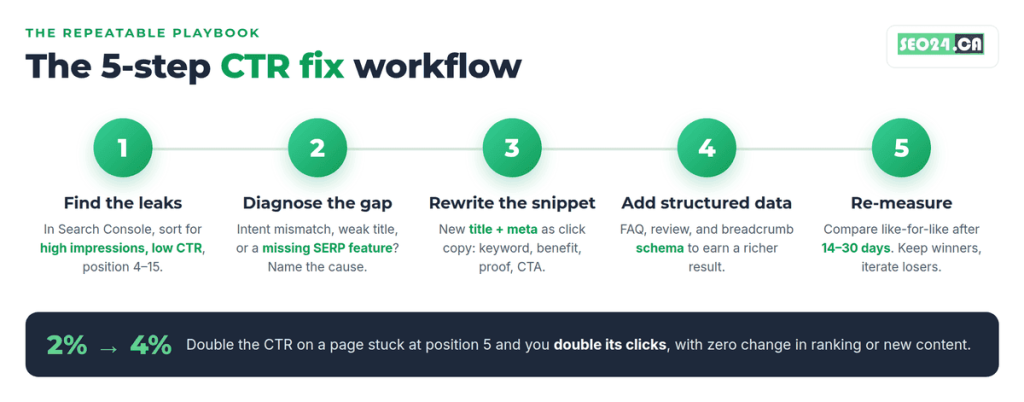
A Toronto dental clinic we audited had a services page stuck at position 6 with a 1.3% CTR and a title that just read the practice name. Rewriting it to lead with the service and neighbourhood lifted CTR to 4.1% over six weeks, with no change in ranking. Same slot, roughly three times the clicks.
| Pro tip Export the Pages and Queries tabs to a sheet, record current title, description, CTR, and position, and rewrite the weakest snippets first. Judge results after two to four weeks using like-for-like date ranges, never after three days. |
Once you know which pages to fix, the next question is what “good” even looks like, because a 4% CTR at position 8 is excellent while the same number at position 1 is a leak.
What is a good organic CTR by position in 2026?
A good organic CTR depends entirely on your position and the SERP around it. On a clean results page in 2026, position 1 averages about 27.6%, position 2 about 15.8%, and the top three together capture roughly 55% to 69% of all clicks. If an AI Overview or local pack is present, cut those numbers sharply.
| Position | Avg CTR (clean SERP) | What it means for you |
| 1 | 27.6% | More clicks than positions 3 to 10 combined |
| 2 | 15.8% | Nearly half of position 1 |
| 3 | 11.0% | Last of the high-traffic slots |
| 4 – 5 | 6% – 8% | Prime snippet-rewrite territory |
| 6 – 10 | 2% – 5% | Small gains still add up on high-impression queries |
| 11+ | Under 1% | Page two is effectively invisible |
Consolidated 2026 data (Backlinko, Sistrix, First Page Sage, Ahrefs). Clean SERP, no AI Overview. Figures vary by device and query type.
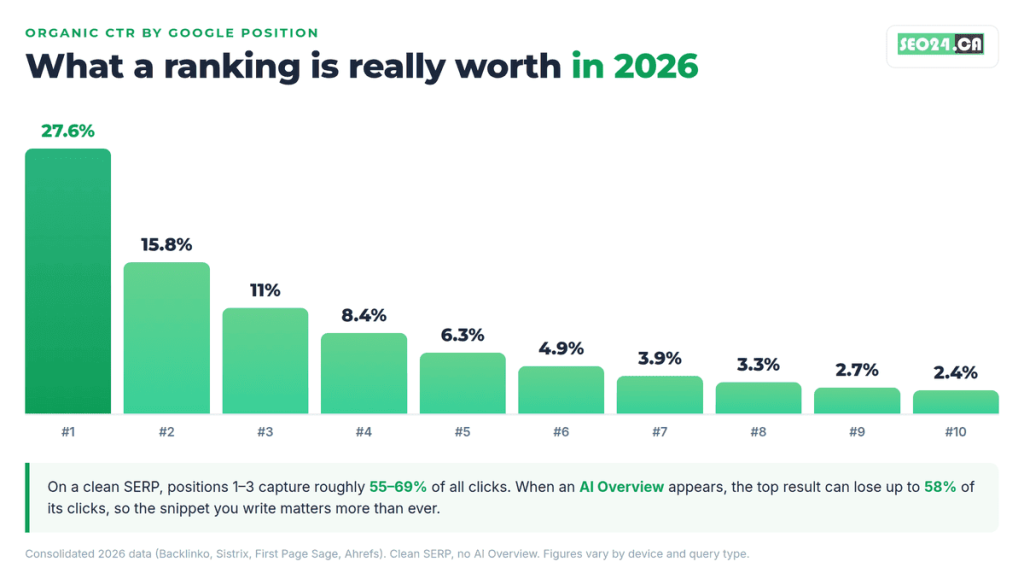
Read the table as a target, not a verdict. If you rank 5th and pull 8% CTR, you are already beating the curve and your effort is better spent climbing. If you rank 2nd and pull 6%, your snippet is quietly costing you thousands of clicks. Benchmark against your position, then against the specific SERP you actually appear in.
| What most people miss Moving up one position raises CTR by around 32% on average, but rewriting a weak snippet can lift it just as much without the months of link building a ranking jump requires. The cheapest traffic is almost always the snippet you already own. |
So how do you actually write a snippet that beats the curve? That is the rest of this guide.
12 proven ways to increase CTR in SEO
Increasing CTR comes down to matching intent, then writing a snippet that is clearer and more compelling than everything around it. Here are 12 tactics, roughly in the order you should apply them.
1. Match search intent before you touch anything
The most compelling title in the world fails if it answers the wrong question. Confirm the intent behind the query (informational, commercial, or transactional), then make sure your page and snippet deliver it. A how-to query wants steps, a “best” query wants a comparison, a “buy” query wants a product. Solid keyword targeting is what keeps intent and snippet aligned.
2. Write title tags that earn the click
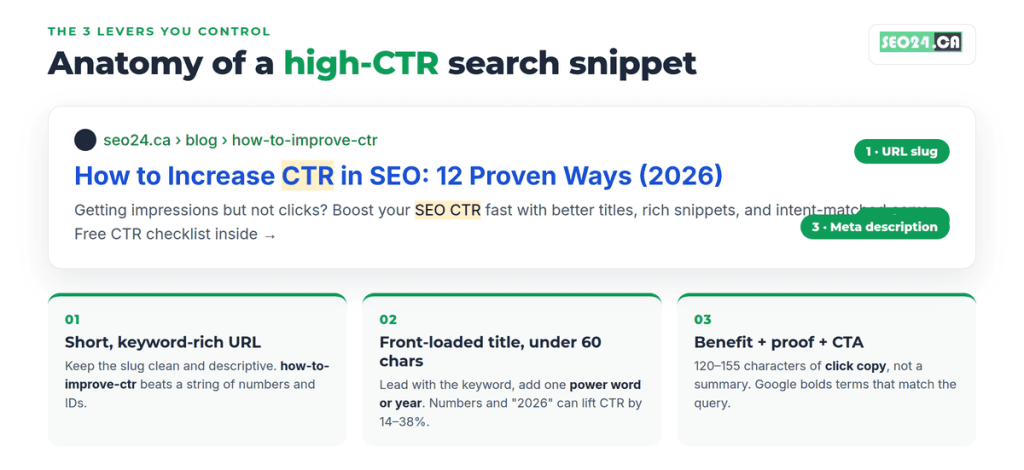
Your title tag is the single biggest CTR lever. Front-load the primary keyword within the first 50 characters, keep the whole thing under 60 so it does not truncate, and make it unique per page. Numbers and a year (“12 Proven Ways,” “2026”) read as specific and current, which is part of why titles with numbers or power words can lift CTR by 14% to 38%.
3. Rewrite meta descriptions as click copy
Treat the meta description as organic ad copy, not a summary. Use the formula benefit + proof + call to action, keep the key message in the first 120 characters for mobile, and include the query naturally because Google bolds matching terms. It is not a ranking factor, but a strong description can lift CTR by 20% to 30% on the same ranking. If you are unsure on length, here is how long a meta description should be.
| Pro tip Google rewrites roughly two-thirds of meta descriptions when yours does not match the query well enough. The fix is not to skip writing them, it is to write query-specific descriptions per page so Google keeps yours. |
4. Win rich results with schema markup
Structured data can add star ratings, FAQs, prices, and sitelinks to your listing, which makes it physically larger and more eye-catching. Add FAQ, review, breadcrumb, and product schema where they genuinely apply. If a competitor owns those rich results and you do not, they are winning clicks before searchers even read the titles.
5. Capture featured snippets (position zero)
Featured snippets sit above the standard results and often pull the highest CTR on the page. Answer the target question in a clean 40 to 60 word block, then support it with a list or table. Our guide to ranking in zero-click searches and featured snippets walks through the exact formatting Google favours.
6. Use numbers, brackets, and power words
Brackets and parentheses around a qualifier (“[2026 Guide]”, “(Step by Step)”) give the eye something to catch, and power words like Proven, Complete, Fast, and Free trigger a click. Use them with restraint. One power word and one specific number per title is plenty; stacking five turns a headline into spam.
7. Clean up the URL slug
A short, readable URL such as /how-to-improve-ctr signals relevance and builds confidence before the click. Skip dates, random IDs, and stop words. This is a one-time fix on new pages and worth a careful redirect on old ones.
8. Match mobile truncation
More than 60% of searches happen on mobile, where titles and descriptions truncate earlier and AI features push blue links further down. Preview your snippet on a phone, put the value proposition first, and assume the second half of your description may never be seen.
9. Target queries AI Overviews do not cannibalize
Purely informational questions increasingly get answered on the page by an AI Overview, so the click never happens. Shift some effort toward commercial, comparison, and local queries where users still need to visit a site to act. It is a quieter tactic, but it protects the clicks that convert.
10. Strengthen internal links to the page
Pages with more relevant internal links tend to rank a little higher and get crawled more often, which keeps your freshly rewritten title in rotation. Smart internal linking also sends readers deeper into your site, improving the engagement signals that sit downstream of CTR.
11. A/B test titles and descriptions
Change one snippet, wait two to four weeks, then compare CTR against the prior period on the same query set. Keep winners, revert losers, and never judge a test during a Google core update or a seasonal spike. This is how you turn CTR from guesswork into a repeatable process.
12. Build brand recognition
As blue-link CTR softens, a name people recognize gets clicked even from lower positions. Consistent branding, being cited in ChatGPT and other AI answers, and steady visibility across channels all feed a halo effect that shows up as higher CTR on branded and semi-branded queries.
Apply even four of these and you will feel it. But there is one 2026 force that overrides all twelve if you ignore it, so let us tackle it head on.
How AI Overviews changed CTR, and how to still win clicks
AI Overviews are the biggest CTR disruptor since featured snippets. When Google places an AI-generated answer at the top of the page, click-through rates fall for every organic position beneath it. In a February 2026 study of 300,000 keywords, Ahrefs measured up to a 58% drop in CTR for the top result when an AI Overview was present.
The effect is uneven. Informational queries lose the most, because the AI often answers them in full. Navigational and branded queries barely move. And there is a genuine upside: Seer Interactive found in April 2026 that pages cited inside an AI Overview earned roughly 120% more clicks per impression than uncited pages on the same queries.
So the 2026 CTR playbook adds three moves:
- Earn the citation. Structure content as clear, self-contained answers with entities and facts stated plainly, which is exactly what Google AI Overviews tend to pull from.
- Report in two buckets. Track AI Overview queries separately from clean-SERP queries so your averages are not misleading.
- Defend the clickable queries. Double down on commercial and local searches where users still need to click through to act.
| What most people miss Rankings stable, impressions up, clicks down is not a contradiction in 2026. It is the signature of an AI Overview eating your clicks. If you see that pattern, the problem is rarely your ranking and almost always the snippet or the SERP feature above you. |
That leads to a question every SEO eventually asks, and the honest answer is not what most blogs tell you.
Does a higher CTR actually improve your Google rankings?
Not directly. Google has repeatedly said CTR is not a direct ranking factor, and it is easy to manipulate, so treating it as a lever to game rank is a mistake. What CTR does is signal relevance in aggregate, and it drives traffic that feeds the engagement signals Google does appear to value.
Here is the “yes, but” that resolves the debate. Yes, a page with consistently strong CTR tends to hold or improve its position over time, but that is correlation working through better content and satisfied users, not a dial Google turns because your CTR ticked up. Chase clicks with clickbait and you will earn a spike, a bounce, and a slow ranking decline as Google reads the dissatisfaction.
The productive way to think about it: CTR turns rankings into traffic, and good content turns that traffic into the signals that protect rankings. If you want the ranking side of the equation, our guide on why an optimized page still won’t rank covers the causes CTR cannot fix.
How to improve CTR for local SEO and the map pack
For local businesses, the map pack runs on its own CTR curve, and it is far flatter than organic. Going from first to third inside the local pack costs only a couple of percentage points, while the same drop in organic can cost nearly 30. That means getting into the pack matters more than ranking exactly first inside it.
To lift CTR on local searches:
- Optimize the profile. A complete, active listing wins the click. Work through Google Business Profile optimization so photos, hours, categories, and services are all filled in.
- Win and answer reviews. Star ratings and review counts are the first thing a local searcher scans, and a strong rating pulls the click before the name is even read.
- Add location to titles. A neighbourhood or city in your title tag (“North York”, “Toronto”) instantly matches local intent and raises relevance.
- Keep NAP consistent. Matching name, address, and phone across the web supports the trust signals that keep you in the pack.
A North York renovation company we worked with was ranking third in the map pack with a thin profile and no review responses. Filling out the profile and replying to every review lifted their listing CTR by about 28% in two months, with no change in map ranking.
Best tools to track and improve CTR in 2026
Google Search Console is the only free, first-party source of your real CTR by query and page, so it is the non-negotiable starting point. Layer other tools on top for benchmarking and testing.
| Tool | Best for | Cost |
| Google Search Console | Your real clicks, impressions, CTR, position | Free |
| Ahrefs / Semrush | Competitor snippets and SERP-feature gaps | Paid |
| Advanced Web Ranking | Industry CTR curves to benchmark against | Paid |
| A SERP preview tool | Checking title and meta truncation before publishing | Free |
You do not need the whole stack to start. Search Console plus a free SERP preview tool covers 80% of the work. If you are building your kit, our roundup of the best SEO tools for beginners is a good next stop.
CTR mistakes that quietly cost you clicks
Most CTR problems are self-inflicted and invisible until you look. These are the ones we see most often when auditing pages that drive organic traffic but underperform on clicks.
- Duplicate titles and descriptions. Templated snippets across similar pages confuse Google and flatten CTR. Every ranking page needs its own.
- Clickbait that oversells. A title that overpromises earns the click and then the bounce, and Google reads that dissatisfaction fast.
- Set and forget. Snippets are not a one-time task. Search intent and competitors shift, so audit your top 20 pages quarterly.
- Ignoring mobile. Writing for a desktop preview when 60% of clicks are mobile means half your description is wasted.
- Optimizing pages that cannot win. Spending hours on a page ranking 30th returns almost nothing. Focus where you already rank on page one.
| Pro tip Run a simple 80/20 pass: list your top 20 pages by impressions, and rewrite the 4 or 5 with the widest gap between impressions and clicks. That handful usually holds most of the recoverable traffic on the whole site. |
Turn impressions into clicks, starting this week
The core principle is simple: CTR is where you convert rankings you already earned into traffic, and in 2026 that conversion is decided as much by your snippet and the SERP features around you as by your position. Win the click by matching intent, writing titles and descriptions as sharp click copy, and earning the rich results and AI citations that make your listing impossible to scroll past.
Keep the balance right. Optimize for the searcher first and the algorithm second, because a snippet that overpromises will always cost you more in bounces than it earns in clicks. Start with the handful of high-impression, low-CTR pages in your Search Console, rewrite their snippets, and measure the lift in two to four weeks. That single habit, run monthly, compounds into real traffic without a single new page.
Frequently asked questions
What is a good CTR for SEO?
It depends on position. On a clean 2026 SERP, roughly 27% at position 1, 15% to 16% at position 2, and 6% to 8% at positions 4 to 5 are healthy. The most useful benchmark is your own site-wide average: any top-10 page below it is a candidate for a snippet rewrite.
How do I increase my CTR in Google?
Front-load your title tag with the keyword and one power word, rewrite the meta description as benefit-driven click copy, add schema for rich results, and match search intent. Then find your high-impression, low-CTR pages in Search Console and fix those snippets first.
Does CTR affect SEO rankings?
Not directly. Google has said CTR is not a direct ranking factor. It signals relevance in aggregate and drives traffic that feeds the engagement signals Google does value, so strong CTR tends to help rankings hold over time, but clickbait that causes bounces hurts them.
Why is my CTR low even though I rank on page one?
Usually a weak or generic title, a meta description that does not match the query, a missing SERP feature that a competitor owns, or an AI Overview absorbing the click above you. Segment AI Overview queries separately to see which cause applies.
How long does it take to see CTR improvements?
Snippet changes can show in the SERP within days of Google recrawling the page, but judge results after two to four weeks using like-for-like date ranges so you are comparing genuine trends rather than daily noise.
Get your CTR leaks found for free
Want to know exactly which of your pages are leaking clicks? Our team will pull your Search Console data, flag the high-impression, low-CTR pages, and hand you rewritten titles and meta descriptions for your top pages as part of a free SEO audit. If you would rather have it handled end to end, SEO24’s SEO services in Toronto turn those snippet fixes into a steady traffic gain. Submit your site and we will show you the clicks you are leaving on the table.