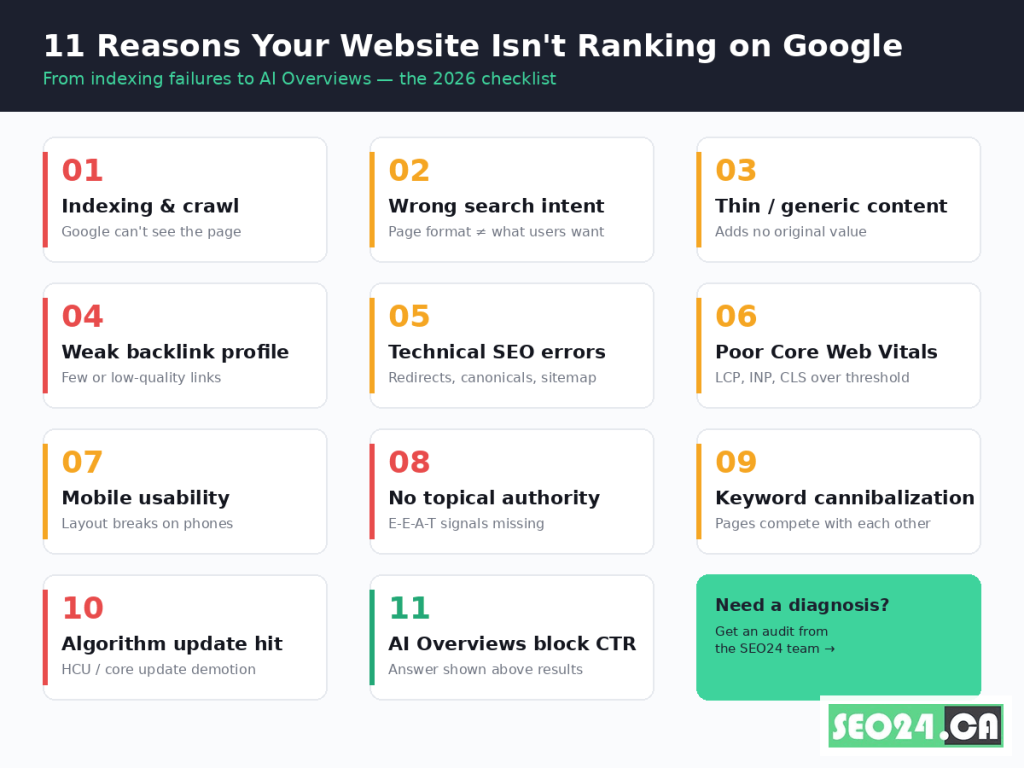
Your website isn’t ranking on Google for one of three reasons: Google can’t index the page, the page doesn’t match what searchers actually want, or the page isn’t authoritative enough to beat competitors. Everything else is a sub-cause of those three. Today, two newer pressures pile on top: Core Web Vitals (with INP replacing FID in March 2024) and AI Overviews, which now sit above results in 100+ countries and quietly suppress clicks even when you rank. This guide walks through all 11 root causes, with a 5-step diagnostic at the end. Most SEOs fix the wrong layer first. We’ll show you how to avoid that.
Key Takeaways
- Roughly 96.55% of indexed pages get zero organic traffic from Google, per Ahrefs’ study of one billion pages, so “not ranking” is the default state, not the exception.
- Three root causes explain nearly every case: indexing failure, intent mismatch, or authority gap. Diagnose in that order before touching content.
- INP replaced FID as a Core Web Vital on March 12, 2024. If your audit still references FID, your page-experience fixes are aimed at the wrong metric.
- Google’s Helpful Content system is now integrated into the core ranking algorithm (rolled in during the March 2024 core update), which means thin or AI-spun content gets demoted continuously, not in discrete penalties.
- AI Overviews appear on a growing share of informational queries and can cut click-through rate by 30–60% even when you rank #1 organically (Pew Research, 2025).
- A new page typically takes 3 to 6 months to reach a stable position for a moderately competitive keyword; aggressive niches can take 12+ months.
- The fastest ranking win for most underperforming pages is matching intent and format to what already ranks in the top 5, not adding more words.
Why your website doesn’t rank on Google (the short answer)
A website doesn’t rank on Google for one of three reasons: it isn’t indexed, it doesn’t match user intent for the target query, or it lacks the authority signals (links, expertise, trust) that beat the current top results. Everything else collapses into one of those three buckets. Fix them in that order. There is no point optimizing meta tags on a page Google has chosen not to index.
The reason most ranking diagnoses fail is sequencing. SEOs reach straight for content edits because that’s the lever they control daily, but a page with a noindex tag or a canonical pointing elsewhere can be the most beautifully optimized article on the web and still earn zero impressions. Open Search Console, filter by the URL, and start at the top: is Google showing impressions for it at all? If yes, you have a ranking problem. If no, you have an indexing or relevance problem. They are not the same thing and they are not fixed the same way.
The 11 reasons below are ordered by frequency in real audits, not by impact. A new site likely has problems 1, 4, and 8. A 5-year-old site that suddenly lost rankings likely has problems 5, 6, or 10. Match your symptoms to the right reason before pulling levers.
Pro Tip. Before reading further, run site:yourdomain.com/your-page-url in Google. If the page returns, it’s indexed. If it doesn’t, you have a Reason 1 problem and nothing else on this list matters until that’s fixed.
Reason 1: Google can’t crawl or index your page
If the page isn’t in Google’s index, it cannot rank. Crawling is the process where Googlebot fetches the page; indexing is the decision to store and serve it. Both must succeed before any other ranking factor matters.
The five most common indexing failures we see at SEO24 are: an accidental noindex meta tag left over from staging, a robots.txt disallow on the URL or its parent directory, a canonical tag pointing to a different URL, an orphan page with zero internal links pointing to it, and a 404 or 5xx status returned to Googlebot specifically (often a firewall or bot-management rule). In Search Console’s URL Inspection tool, a “Discovered, currently not indexed” or “Crawled, currently not indexed” status pinpoints which class of failure you’re dealing with.
| Indexing status in GSC | What it means | First action |
| Submitted and indexed | Page is in the index | Move to Reason 2 |
| Discovered, currently not indexed | Google knows about the URL but hasn’t fetched it | Improve internal links and content quality; do not just resubmit |
| Crawled, currently not indexed | Google fetched the page and decided not to index it | Quality signal problem (thin content, duplicate, low authority) |
| Excluded by noindex tag | A noindex directive is blocking it | Remove the tag, then request indexing |
| Blocked by robots.txt | robots.txt disallows crawling | Edit robots.txt to allow the path |
| Page with redirect | URL 301/302s to another URL | Normal if intentional; otherwise fix the redirect chain |
Example. A Toronto e-commerce client we audited had 1,400 product pages, 1,100 of which were in the “Crawled, currently not indexed” bucket. The cause wasn’t technical. It was that 1,100 product pages used the supplier’s stock description verbatim, and Google’s deduplication systems silently chose not to index them. Indexing rebounded within 6 weeks after the client rewrote the top 200 descriptions in-house.
Yes, but… you might be thinking, “I just published, Google needs time.” Fair point, and that’s often the answer for pages less than 2 weeks old. After 30 days with zero impressions, time is no longer the explanation; one of the failures above is.
Reason 2: Your content doesn’t match search intent
A page that’s indexed but unranked usually fails on intent, not on optimization. Google decides which result format wins a query (a how-to article, a product page, a video, a forum thread, a tool), and pages that show up in the wrong format simply don’t compete.
Open the SERP for your target keyword in an incognito window. If the top 10 results are all 3,000-word how-to guides and you’ve published a 600-word product page targeting the same query, you have an intent mismatch. You cannot out-optimize the wrong format. The fix is either to reformat the page or to retarget it to a query whose intent matches what the page actually is.
Search intent breaks down into four buckets, and matching them changes how the page should be structured:
- Informational (“why is my website not ranking”): long-form explanatory content with headings, examples, and a clear answer at the top
- Commercial investigation (“best SEO agency Toronto”): comparison tables, pros/cons, transparent criteria
- Transactional (“hire SEO consultant”): service page with pricing, scope, social proof, clear CTA
- Navigational (“seo24 ca contact”): simple, fast page that gets the user to the destination
Contrarian take. Most SEO advice says to “write better content.” Often, the page is fine. The intent is wrong. Reformatting a 600-word product blurb into a 1,800-word buyer’s guide can outperform months of link-building because it finally matches what Google has decided the query wants.
Reason 3: Your content is too thin or too generic
Thin content is not really a word-count problem. It’s an originality problem. Google’s Helpful Content system (now baked into the core algorithm after the March 2024 update) demotes pages that summarize what other pages already say without adding original insight, data, examples, or perspective.
Three signals quietly mark a page as thin in Google’s eyes: high similarity to other indexed pages (often a duplicate-content suppression), zero unique information gain over the top-ranking results, and engagement patterns that suggest readers bounce back to Google quickly. None of these are visible in standard SEO tools, but Search Console’s “Crawled, currently not indexed” bucket is a strong proxy.
To fix thin content, write down what your page says that the top 5 results do not. If the answer is “nothing”, that’s the gap to close. Original data, named real examples, a contrarian framing, a downloadable template, or domain expertise the competitors lack. Pick at least one and lead with it.
Pro Tip. Run your draft against the top 3 SERP results before publishing. If you can swap your headline with theirs and the body still makes sense, your content is interchangeable, and interchangeable content does not rank.
Example. A SaaS client targeting “Slack alternatives” had 2,800 words of comparison content but ranked at position 34. The top 5 results all used a feature-comparison table; this client used long prose. We didn’t add a single word. We restructured the same content into a comparison table with pricing, free-tier limits, and a one-line “best for” verdict per tool. The page reached position 7 within 9 weeks.
Reason 4: Your backlink profile is too weak
Backlinks remain a top-3 ranking factor, confirmed repeatedly in Google’s antitrust testimony and engineer interviews through 2024–2025. If your page has zero or low-quality external links and the top 5 results each have dozens of contextually relevant links from authoritative sites, you cannot win on content alone.
What matters is not the raw number of links but their relevance and the trust of the linking site. One link from a respected industry publication often outweighs 50 links from low-quality directories. Two diagnostic questions cut through most of the confusion:
- How many referring domains (not raw links) point to your page? Use Ahrefs, Moz, or Semrush. Compare to the average of the top 5 SERP results. A 10× gap is often the entire story.
- Of those referring domains, how many are topically related? A backlink from a personal-finance blog to your SEO services page passes much less authority than one from a marketing site.
Pro Tip. Don’t waste effort on raw link counts. Earn links from sites that already rank for your target topic. Google’s Link Quality systems weight contextual relevance heavily, and one link from a topically aligned domain often outperforms ten from random-but-high-DA sites.
Example. A B2B agency we audited had 4,200 backlinks but ranked at position 22 for their main service term. Cleanup found that 87% of those links came from a single guest-post network that Google had quietly devalued in 2023. After disavowing and earning 14 new links from genuine industry publications, the page moved into the top 5 within 4 months.
Reason 5: Technical SEO issues are blocking rankings
Technical issues rarely cause a single page to fail in isolation; they degrade entire sections of a site at once. The five technical problems we find most often in audits are: incorrect canonical tags, redirect chains longer than 3 hops, an XML sitemap that omits or misreports the page, conflicting hreflang for international sites, and JavaScript-rendered content that Googlebot can’t see in its first fetch.
To test JavaScript rendering specifically, use the URL Inspection tool in Search Console and click “View tested page” then “Screenshot”. If the visible content there is missing your main copy, Google might not be seeing it either, and you’re effectively serving an empty page.
For canonical issues, view the page source and check the link rel=”canonical” tag. If it points anywhere other than the page’s own URL (and you haven’t intentionally consolidated duplicates), fix it. Self-referencing canonicals are the safe default for unique content pages.
Reason 6: Core Web Vitals and page experience signals
Google made Core Web Vitals a ranking signal in 2021, and updated the metrics in 2024. The current three thresholds (all measured at the 75th percentile of page loads) are:
| Metric | Threshold | What it measures |
| LCP (Largest Contentful Paint) | < 2.5 seconds | How quickly the main content visually loads |
| INP (Interaction to Next Paint) | < 200 milliseconds | Responsiveness to user input (replaced FID in March 2024) |
| CLS (Cumulative Layout Shift) | < 0.1 | Visual stability (no jumping elements) |
INP is the metric most teams underestimate. It tracks every interaction during a page visit, not just the first one. A page can pass LCP and CLS but fail INP because a heavy script blocks the main thread after the user starts interacting. PageSpeed Insights flags this; most SEO audit tools that still report FID do not.
Contrarian take. Core Web Vitals are a ranking signal, not a factor in the same weight class as content or links. A page with excellent content and bad CWV will often still beat a fast page with weak content. But CWV becomes the tiebreaker when content and authority are roughly equal, and that’s where most rank-3-vs-rank-7 fights are decided.
Pro Tip. Don’t optimize CWV based on Lighthouse lab data alone. Lighthouse runs in a controlled environment and almost always over-states performance. Use the “Field Data” section in PageSpeed Insights (CrUX data from real Chrome users) to see what Google actually scores you on.
Reason 7: Mobile usability problems
Google’s index has been mobile-first since 2019, meaning the mobile version of your site is the primary version Google evaluates. If your desktop site is excellent but your mobile version is broken, slow, or content-stripped, mobile is what gets ranked.
The four mobile failures we see most: tap targets less than 48 pixels apart, font sizes below 16px causing the user to pinch-zoom, viewport metadata missing or wrong, and content hidden in mobile accordions that Google can technically see but weights less than fully visible content.
Test in Chrome DevTools’ device mode and read the page on a real phone. If your thumb can’t comfortably tap the menu and you can’t read the body text without zooming, neither can your mobile users, and Google’s mobile usability signals reflect that.
Reason 8: Your site lacks topical authority and E-E-A-T
E-E-A-T (Experience, Expertise, Authoritativeness, Trustworthiness) is not a single score but a cluster of signals Google uses to decide whether a site deserves to rank for high-stakes topics. YMYL queries (Your Money, Your Life: health, finance, legal) carry the strictest E-E-A-T bar, but the framework now influences ranking across many categories after the 2022–2024 Helpful Content updates.
The five practical levers that move E-E-A-T are: a clear author byline with credentials and a real bio page, citations to primary sources (research, official documentation, government data), a transparent About page with team and company information, contact information that proves a real business behind the content, and external mentions of the brand on authoritative sites (unlinked mentions count).
Topical authority sits one layer above E-E-A-T. It’s the cumulative signal that your site is a comprehensive expert on a topic cluster, not just on one article. A site with 40 well-linked pieces on SEO carries more topical authority for “why my website doesn’t rank” than a site with 1 piece on the same query, even if the 1 piece is technically better written. This is why thin sites with isolated “trying to rank” pages rarely break through.
Example. A solo consultant we worked with had a single 4,000-word article on technical SEO that wouldn’t move past position 18. The fix wasn’t editing the article. It was publishing 12 supporting pieces on subtopics (canonicals, crawl budget, structured data, hreflang) and interlinking them into a hub. The main article moved to position 4 within 5 months without a single edit to its body copy.
Reason 9: Keyword cannibalization is splitting your ranking power
Keyword cannibalization happens when two or more pages on your site target the same query. Google has to pick one, and it often picks the wrong one, or worse, oscillates between them, never giving either page enough authority to break into the top results.
The clearest signal is in Search Console. Filter by your target query and look at the Pages tab. If two or more URLs are getting impressions for that query and neither is ranking well, you have cannibalization.
The fix is usually one of three: consolidate the pages into a single stronger one (and 301-redirect the weaker URL), re-target one of the pages to a different but related query, or use internal links to clearly signal to Google which page is the canonical answer for that intent.
Reader objection. “But surely two pages on the same topic give me more chances to rank, not fewer?” In practice, no. Authority signals (links, freshness, internal links) get split between the two URLs, leaving neither strong enough to compete with consolidated competitor pages. One strong page beats two medium ones nearly every time.
Reason 10: A Google algorithm update demoted your page
If your page used to rank and suddenly doesn’t, an algorithm update is the most likely cause. Google now runs core updates roughly every 3–4 months, plus continuous Helpful Content rollouts that don’t get separate announcement names.
The major updates that have reshaped rankings between 2023 and 2026 include the September 2023 Helpful Content Update (devastated thin content sites), the March 2024 core update (folded HCU into the core algorithm), the August 2024 core update, the November 2024 core update, and the March 2025 core update.
Diagnose an algorithm hit with these three checks:
- Cross-reference the drop date in Search Console traffic against published update timelines (Search Engine Land and Google’s Search Status Dashboard maintain accurate lists).
- Check whether the drop affected the whole site or specific URL patterns. Site-wide drops point to a Helpful Content or quality issue; pattern-specific drops often point to a different cause.
- Read Google’s official guidance for that update. Recovery rarely happens by reversing what you were doing. It happens by genuinely improving signals across the issues the update targeted.
Pro Tip. Updates don’t issue “penalties” in the manual-action sense. They re-evaluate the entire web against new signal weights. Recovery is usually gradual (3–6 months) and only after sustained quality improvements, not a single fix.
Reason 11: AI Overviews are eating your clicks (new)
AI Overviews (Google’s generative answer box, formerly SGE) now appear on a growing share of informational queries across 100+ countries. Even when your page ranks #1 organically, an AI Overview that answers the query directly can suppress click-through rate by 30–60%, depending on query type, per Pew Research data published in mid-2025.
This is a new kind of “not ranking” problem. You may technically rank in position 1 and still see traffic collapse. Search Console reports impressions and CTR for the organic listing but does not always make it obvious that an AI Overview is sitting above you.
Three responses that work:
- Get cited in the AI Overview itself. Pages that are concise, fact-dense, and clearly structured around the question being asked tend to be pulled as sources. Use direct answer formats at the top of each H2 (which is exactly what this article does).
- Target queries AI Overviews don’t appear on. Transactional and local queries trigger AI Overviews far less often than broad informational ones.
- Build brand search. AI Overviews can suppress generic-query clicks, but they don’t suppress searches for your brand name. The more your brand becomes the named entity behind your category, the more resilient your traffic is.
Contrarian take. AI Overviews are not universally bad. Citations from AI Overviews drive a different kind of traffic: users who have already self-qualified by reading the summary and choose to click for depth. That traffic converts well. The strategy isn’t to fight AI Overviews; it’s to be the source they cite.
How to diagnose why your website isn’t ranking (step-by-step)
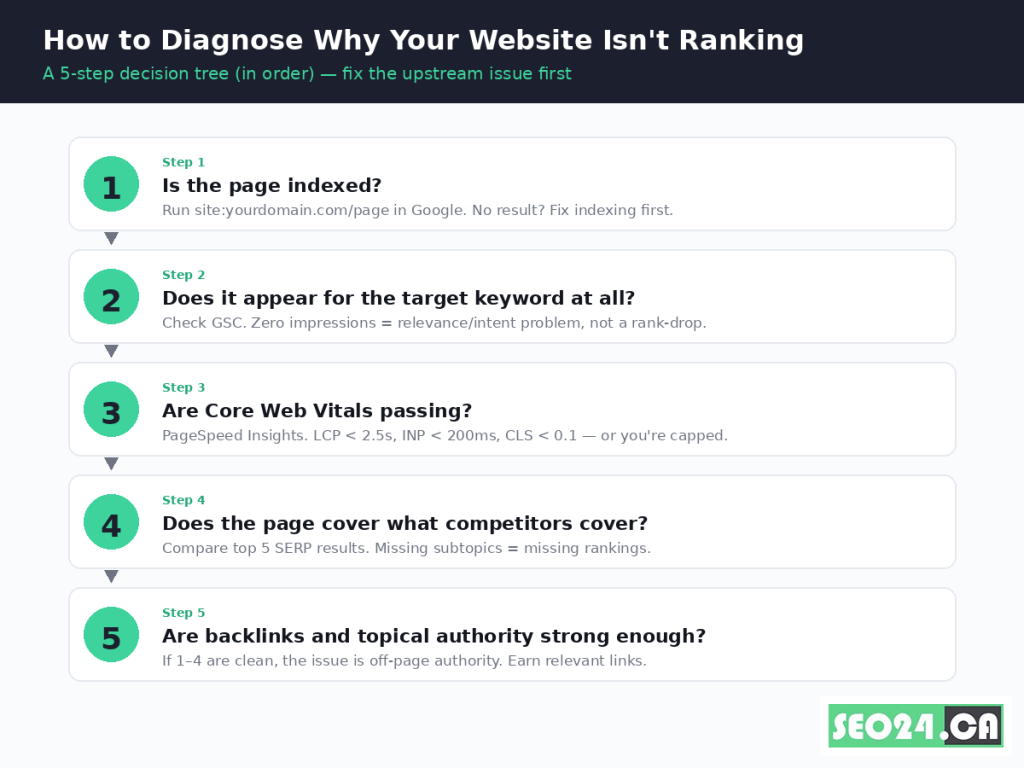
Work through these five steps in order. Do not skip ahead. Almost every diagnostic mistake comes from fixing a downstream symptom before addressing an upstream cause.
- Confirm the page is indexed. Run site:yourdomain.com/your-page-url. If no result appears, open Search Console’s URL Inspection tool and follow the indexing status guidance (Reason 1). Nothing else matters until the page is in the index.
- Check whether Google considers the page relevant to your target query. In Search Console, filter Performance by the URL. If the page gets zero impressions for the target keyword after 30+ days, you have a relevance/intent problem (Reasons 2 and 3), not a ranking-position problem.
- Test page experience. Run the URL through PageSpeed Insights and read the Field Data section. If LCP, INP, or CLS fail, fix those before continuing (Reason 6). On mobile, run the page through Chrome DevTools mobile emulation to catch usability issues (Reason 7).
- Compare against the top 5 SERP results. Look at content depth, format (article vs. tool vs. comparison), subtopics covered, and visual elements. Missing subtopics that all 5 competitors cover means your page is incomplete on the topic (Reasons 2 and 3).
- Audit off-page authority. Compare referring domain counts, anchor-text relevance, and brand mentions against the top 5. If steps 1–4 are clean and you’re still capped, the gap is authority (Reasons 4 and 8).
If a Google algorithm update landed during your traffic drop window, jump to Reason 10 and read Google’s update guidance directly before assuming any of the above.
How long does it take for a new page to rank in Google?
A new page typically takes 3 to 6 months to reach a stable position for a moderately competitive keyword on an established site, and 6 to 12+ months on a new domain. The wide range is real, not a hedge.
Three variables determine where you land in that range. Domain authority compresses the timeline (an established site can rank a new page in days for low-competition queries). Topical authority compresses it further when the new page extends an existing hub on your site. Query competition stretches it: a five-result SERP dominated by Wikipedia, Forbes, and Reuters will take longer to break into than a SERP with smaller publishers.
If a new page has zero impressions after 4 weeks, the issue is indexing or internal linking, not patience. If it has impressions but a position above 50 after 12 weeks, the issue is relevance or authority. The diagnostic in the previous section applies in both cases.
The bottom line
Most websites don’t rank for one of three reasons: Google can’t index the page, the page doesn’t match what users want, or the page lacks the authority to compete. The 11 specific causes covered here all collapse into those three categories, and the diagnostic walks you through them in the order that prevents wasted effort.
What changed recently isn’t the fundamentals. It’s the new layer of pressure on top of them. INP, Helpful Content as a continuous signal, and AI Overviews each reshape how the same fundamentals get rewarded. A page that earned strong rankings in 2022 may need substantive updates today not because it became wrong, but because the bar moved.
Ranking on Google today still rewards the same thing it always has: the genuinely best, most useful, most clearly structured answer to a real question, served by a site Google trusts to keep delivering at that level. Pages that meet that standard rank. Pages that don’t, don’t. The work is in honestly identifying which side of that line your page is on, and then doing the specific upstream fix that moves it.
Frequently Asked Questions
Why am I not ranking on Google even though my page is optimized?
An optimized page that won’t rank usually fails one of three upstream checks: it isn’t actually indexed, it doesn’t match the search intent Google has chosen for that query, or it doesn’t have enough authority signals (backlinks, brand mentions, topical depth) to beat the current top results. Run site:yourdomain.com/page-url first to confirm indexing, then compare your page format to the top 5 results before assuming the issue is on-page optimization.
What are the main reasons a website is not ranking in Google?
The 11 most common reasons are: indexing or crawl failures, search intent mismatch, thin or generic content, weak backlink profile, technical SEO errors (canonicals, redirects, sitemap), poor Core Web Vitals (LCP, INP, CLS), mobile usability problems, missing E-E-A-T signals, keyword cannibalization, algorithm update demotions, and AI Overviews suppressing click-through rate. Diagnose them in the order they affect each other: indexing first, intent next, authority last.
Why is my website not ranking on Google even though it’s indexed?
If the page is indexed but not ranking, the issue is one of relevance or authority. Check Search Console’s Performance report filtered by the URL: zero impressions for the target keyword means Google doesn’t see the page as relevant to that query (a content or intent problem), while impressions with a position above 30 means Google considers it relevant but not authoritative enough yet (a content depth, backlinks, or topical authority problem).
Why is my website not ranking in Google and how do I fix it?
Fix ranking issues by working through a 5-step diagnostic in order: (1) confirm the page is indexed, (2) check if it gets impressions for your target keyword in Search Console, (3) verify Core Web Vitals pass in PageSpeed Insights, (4) compare content depth and format against the top 5 SERP results, (5) audit backlinks and topical authority against those competitors. Fix the first failure you find before moving on. Most ranking problems get misdiagnosed because people skip steps 1-3 and jump straight to content edits.
How long should I wait before deciding my website isn’t going to rank?
Give a new page 4 weeks to register impressions in Search Console and 3 to 6 months to settle into a stable position on an established site. On a new domain, expect 6 to 12+ months. If you see zero impressions after 4 weeks, the problem is indexing or internal linking, not patience. If you see impressions but a position above 50 after 12 weeks, the problem is relevance or authority and won’t fix itself with more waiting.
Does Google still use PageRank?
Yes, internally. Google confirmed that PageRank is still one of many signals, even though the public toolbar score was retired years ago. Links still pass authority, but how much depends heavily on the relevance and trust of the linking page, so a few strong links matter more than many weak ones.
Stop guessing which reason is yours
If your page has been live for 90+ days, has clean indexing, and still won’t rank, the cause is almost always one specific bottleneck, and fixing the wrong one wastes months. The SEO24 team runs a focused ranking diagnostic on a single underperforming URL, identifies the upstream issue in 5 business days, and gives you a prioritized fix list (not a generic 200-point audit). Take a look at our SEO services and tell us the page you want unstuck.