Most advertisers pour time into their ad copy, bidding strategy, and keyword selection. Then they send all that hard-won traffic to a page that was never built to convert. That is where campaigns go wrong.
Your landing page is not a nice-to-have. It is the single most important factor in whether your PPC budget produces results or evaporates. Google knows this too. A well-optimised landing page directly improves your Quality Score, which lowers your cost-per-click and pushes your ad into better positions. A weak one does the opposite: you pay more, rank lower, and still do not get the conversion.
This guide walks you through exactly how to optimise your PPC landing page, step by step. No fluff, no generic advice. Just what actually works.
Why Your PPC Landing Page Is Not Like Any Other Web Page
A PPC landing page has one job. One.
It is not designed to showcase your full product catalogue, introduce your company, or win an award for design. It exists to take a visitor who clicked your ad with a specific intent and move them toward a single action: a call, a form submission, a purchase, a sign-up.
A regular website page tries to serve everyone who might visit. A PPC landing page is built for exactly one audience: the person who just clicked that specific ad. That is a crucial distinction, and it changes every decision you make about the page.
The biggest mistake advertisers make is sending PPC traffic to their homepage. Homepages give visitors too many options, too many navigation paths, and not enough relevance to the specific thing that made someone click. If your Google Ads campaign targets “emergency plumber Toronto,” your landing page should be about emergency plumbing in Toronto. Not about your company history. Not about all your services. That one thing.
This concept is called message matching, and conversions are made or lost on the accuracy of it.
How Your Landing Page Affects Quality Score and CPC
Before getting into the tactics, it is worth understanding why landing page optimisation is also a cost-reduction strategy, not just a conversion strategy.
Google evaluates your landing page experience as one of three components in your Quality Score, alongside expected click-through rate and ad relevance. A higher Quality Score means Google rewards you with better ad positions at a lower cost-per-click. A lower Quality Score means you pay more just to show up, often close to your maximum bid even in low-competition auctions.
The financial impact is significant. Improving your Quality Score from a 5 to an 8 can reduce your CPC by roughly 30%. One case study from a utility company showed that sustained Quality Score improvements over several years generated an estimated saving of over a million dollars in CPC costs alone, while ROAS increased by 55%.
Fixing your landing page is not just about getting more conversions from the same traffic. It actively reduces what you pay for each click.
For a deeper explanation of how Quality Score ties into bidding and what you are actually paying competitors for the same keywords, read our guide on minimum CPC in Google Ads and how competitor CPCs work.
The Elements of a High-Converting PPC Landing Page
Message Match: The Headline Must Echo the Ad
The moment someone lands on your page, they are checking: “Is this what I clicked for?” You have about three seconds to confirm that it is.
Your headline is where this confirmation happens. If your Google Ad says “Custom WordPress Websites for Toronto Businesses,” your landing page headline should reinforce that exact promise. Not something vague about “digital solutions” or “transforming your online presence.” The specific offer, the specific audience, immediately.
This does not mean copying the ad word for word. It means keeping the core promise consistent. If someone clicked because of the offer in your ad, the first thing they see should acknowledge that offer directly.
Every time there is a gap between what the ad said and what the landing page delivers, users leave. They do not give you a second chance.
Remove the Navigation Bar
This is one of the most reliable conversion improvements you can make, and one of the most resisted.
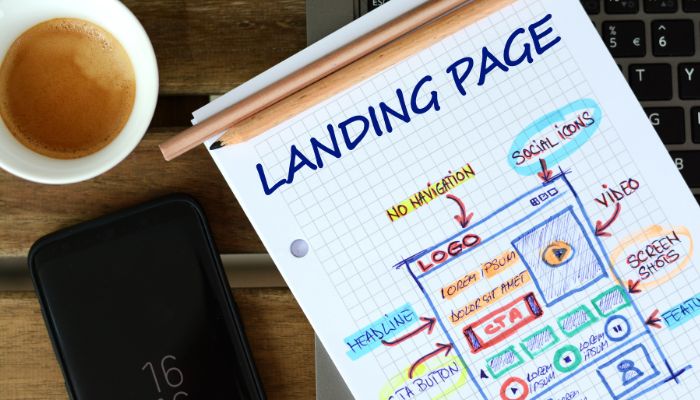
Every link on your landing page is a potential exit. Navigation menus, footer links, sidebar links to other pages: they all give visitors a reason to leave before converting. A PPC landing page is not a website. It does not need a menu. Remove it.
For SaaS companies, e-commerce brands, and service businesses alike, removing navigation from PPC landing pages consistently improves conversion rates because you eliminate the distraction and keep focus entirely on the one action you want users to take.
You can keep a logo that links to your homepage if you need to, but everything else should direct toward your single CTA.
One Call to Action, Not Several
Related to removing navigation: your landing page should have exactly one primary call to action.
“Get a Free Quote,” “Book a Consultation,” “Start Your Free Trial”: pick one and commit to it. You can repeat that same CTA multiple times down the page (above the fold, mid-page, near the bottom), but it should always lead to the same action.
When a page has multiple competing CTAs, visitors stall. They have to decide what to do instead of just doing it. The more choices, the more friction. The more friction, the fewer conversions.
Make your CTA button visually distinct. It should be a contrasting colour from the background, large enough to tap easily on a phone, and use specific language. “Get My Free Quote Today” converts better than “Submit.” “Start Free Trial” converts better than “Learn More.”
Page Speed Is Not Optional
Google and Deloitte’s Milliseconds Make Millions study found that improving mobile load time by just 0.1 seconds lifted retail conversions by 8.4%. On mobile, where most PPC traffic lands, the tolerance is even thinner. Visitors will not wait. They have an entire page of search results to go back to.
Run your landing page through Google’s PageSpeed Insights. Anything below a score of 70 on mobile deserves attention. Common fixes include compressing images without sacrificing quality, minimising third-party scripts and plugins, using browser caching, and ensuring your hosting is not a bottleneck.
Page speed is also a direct input to your landing page experience score, which feeds your Quality Score. Slow pages cost you in conversions and in what you pay per click. Fixing speed issues pays for itself on both ends.
Our WordPress web design builds include performance optimisation as a core requirement, not an afterthought.
Mobile Optimisation Is Non-Negotiable
More than half of PPC clicks happen on mobile. Your landing page must be designed for mobile first, with desktop as secondary.
This means responsive design that adapts cleanly to different screen sizes. It means buttons large enough to tap without zooming in. It means forms short enough to fill out with thumbs. It means text readable without pinching and scrolling horizontally.
Test your landing page on multiple actual devices, not just in a browser resize tool. What looks fine at 768px in Chrome DevTools can feel broken on a real phone. Pay attention to how the page loads on a slower mobile connection too, not just on your office WiFi.
Google evaluates mobile experience as part of landing page quality. A page that works beautifully on desktop but is painful on mobile is still a page with a quality problem.
Above the Fold Content: Make Every Pixel Count
“Above the fold” means what visitors see before they scroll. This is your highest-value real estate on the page.
It should contain: your headline (reinforcing the ad promise), a sub-headline that explains the key benefit in one or two sentences, your primary CTA, and ideally something that builds immediate trust, such as a customer count, a recognisable client logo, a star rating, or a specific result.
If a visitor could only see the above-fold section of your page, they should be able to understand exactly what you offer and what you want them to do next. If they need to scroll to figure that out, you have a problem.
Organise the rest of the page in descending priority. Lead with the most important information, then support it with proof, detail, and reinforcement lower down.
Social Proof: Let Someone Else Do the Convincing
Visitors do not inherently trust you. That is not personal. They just clicked an ad, and ads are inherently promotional. What they do trust is evidence from other people who have used your product or service.
This is why social proof converts. Not because it is a nice addition to the design, but because it removes a fundamental psychological barrier to action.
Effective social proof on a PPC landing page includes specific customer testimonials (the more specific the better: “SEO24 doubled our organic leads in four months” beats “Great service!”), case studies or results data, recognisable client logos, industry certifications, star ratings with a review count, and press mentions if relevant.
The key word is specific. Vague testimonials and round numbers do not move people. Concrete results, real names, and specific industries do.
Position social proof near your CTA. That is the moment of decision, and that is where reassurance matters most.
Forms: Fewer Fields Convert Better
If your goal is lead generation, your form is the finish line. And most forms are too long.
Every additional field you add is another reason for someone to abandon the page. For a first-touch PPC landing page, you typically do not need much more than a name, phone number or email, and possibly one qualifying question. Anything beyond that, such as company size, budget range, or a project description, can be collected in the follow-up conversation.
Ask yourself: what is the absolute minimum information I need to have a useful conversation with this person? Start there. Add fields back only if you have a specific business reason.
Auto-fill compatibility matters too. If a visitor is on mobile and your form does not trigger the right keyboard (number keypad for phone fields, email keyboard for email fields), that is friction you added unnecessarily. Get the technical details right.
Write Copy That Speaks to the Visitor, Not About You
One of the most common landing page problems: the copy is entirely about the company.
“We are a leading provider of…” “Our team of experts…” “We have been in business since…” Visitors do not care about you at this point. They care about what you can do for them.
Reframe every sentence from company-first to visitor-first. Instead of “We offer custom PPC management services,” write “You get a dedicated PPC manager who handles everything from keyword research to bid optimisation.” Instead of “Our team has 10 years of experience,” write “Your campaigns are managed by people who have run accounts across dozens of industries.”
Use short paragraphs. Use bullet points for scannable information. People do not read web pages. They scan them for the information relevant to their decision. Make that information easy to find.
Visual Elements That Support the Message
Images and video on a landing page should do a job, not just fill space.
For service businesses, a photo of a real team member (not a stock photo) builds more trust than a generic handshake photo. For products, multiple high-quality images from different angles, or a short demo video, help visitors feel confident before committing. For software, a screenshot of the actual interface beats a generic graphic.
Research consistently shows that realistic human imagery on landing pages outperforms stock photography. Use your actual team, actual clients (with permission), and actual product images wherever possible.
Video works exceptionally well on PPC landing pages when it is short (under 90 seconds), load-optimised, and directly explains the offer. An autoplay silent video used as a hero background rarely converts better than a static image. A short explainer video with a clear play button often does.
Avoid cluttering the page with too many images. Each visual element should earn its place by supporting the conversion goal, not decorating the page.
How to Structure a PPC Landing Page From Top to Bottom
Here is a practical page structure that works across most industries and offer types:
Hero section (above the fold): Headline matching ad promise, sub-headline with the main benefit, primary CTA button, and one trust signal.
Problem/benefit section: Brief acknowledgment of the visitor’s pain point or goal, followed by how your offer addresses it specifically.
Features and proof: What they get, supported by specific results, testimonials, or case studies. Keep features tied to benefits: “X” so that “Y.”
How it works (optional): For complex products or services, a simple three-to-four step process removes uncertainty about what happens next.
Secondary CTA: Another CTA at the mid-point and near the bottom of the page for visitors who need more time to decide.
Trust and credibility: Logos, certifications, review counts, privacy reassurance near the form.
Final CTA and form: Close the page with a clear, low-friction conversion opportunity.
The structural principles here overlap with conversion design in general. For the fundamentals that apply to any page built to convert, paid or organic, see our guide on how to create a high-converting landing page.
PPC Landing Page Examples: What Good Looks Like by Industry
Principles are easier to apply when you can see them on a page. These three examples show how the same rules play out for different offers. They are composites of patterns we see in the accounts we audit, not specific client pages.
Emergency plumber (local service, call-driven)
- Ad: “24/7 Emergency Plumber in Toronto. On Site in 60 Minutes.”
- Headline above the fold: “Burst Pipe or Flooding? A Licensed Toronto Plumber Can Be There Within the Hour.”
- Primary action: a large tap-to-call button, with a two-field callback form as backup. On mobile, the phone number stays pinned to the screen.
- Trust near the CTA: Google rating and review count, licence number, the neighbourhoods served, and upfront call-out pricing.
- What to cut: the full services menu, blog links and the company history. The visitor has water on the floor.
Dental implants (high-value, considered purchase)
- Ad: “Dental Implants in North York. Free Consultation and Financing.”
- Headline: “Replace Missing Teeth With Implants That Look and Feel Natural.”
- Primary action: “Book a Free Implant Consultation”, repeated after each section.
- Proof: before-and-after photos with consent, the dentist’s name and credentials, a clear outline of the treatment steps, and financing options.
- What to add: an FAQ on cost ranges, pain and recovery time, because considered purchases stall on unanswered questions.
B2B software demo (long sales cycle)
- Ad: “Scheduling Software for Multi-Location Clinics. See a 15-Minute Demo.”
- Headline: “Cut No-Shows and Double Bookings Across Every Location.”
- Primary action: “Book a Demo” with a short form (name, work email, number of locations).
- Proof: customer logos in the same industry, one specific result, a product screenshot rather than an illustration, and security or compliance notes.
- What to watch: send pricing-intent searches to a page that shows pricing; hiding it on a demo page loses the people who searched for it.
Notice what all three share: the headline repeats the ad’s promise, there is one action, and the proof sits right next to that action. The industry changes the details, not the rules.
Testing and Optimisation: The Work That Never Stops
The best PPC landing page is the one that converts best right now. Next month, it might be something slightly different. Markets change, audiences shift, and what resonates evolves.
A/B testing is how you find the improvements you cannot guess. Run one test at a time (one variable per test, not multiple simultaneous changes) so you know what actually caused any difference in results. Test your headline first. Then your CTA copy. Then your hero image. Then your form length. Work through elements systematically.
Give each test enough time and traffic to be statistically meaningful. Making decisions on 50 visitors is guesswork. Waiting for 300 to 500 visitors per variant before drawing conclusions gives you data you can actually act on.
Google Optimize was shut down in 2023, so if a guide still recommends it, that guide is out of date. Today the practical options are dedicated testing platforms like VWO, Optimizely, or Convert for landing page split tests, plus heatmap tools like Hotjar or Microsoft Clarity to see where visitors look, where they click, and where they stop scrolling. Both types of data together tell a far more complete story than conversion rate alone.
Always test a version with a meaningful change, not a trivial one. Changing a button colour from blue to slightly darker blue is unlikely to move results. Changing your headline from a company-focused statement to a customer-benefit statement is likely to move results. Start with the bold changes.
Tracking: You Cannot Optimise What You Cannot Measure
Before you run a single test, make sure your conversion tracking is working correctly.
Google Ads needs to know when someone converts. That means setting up Google Tag Manager, configuring conversion actions (form submissions, phone calls, purchases), and verifying that conversions are firing correctly in your account. Without this, you are flying blind: spending money with no reliable data on what is generating results.
Track multiple conversion points where it makes sense. For a service business, you might track form submissions as primary conversions and phone call clicks from the landing page as secondary. For e-commerce, you track completed purchases but also add-to-cart events as a secondary indicator.
Use Google Analytics 4 alongside Google Ads to monitor landing page behaviour. Engagement rate, average engagement time, and scroll depth all help you understand what visitors are doing before they leave without converting.
For campaigns running on multiple platforms, you will want separate tracking for each. Our PPC management service includes full conversion tracking setup as a foundational step, because accurate data is what everything else depends on.
How AI Campaign Types Change Your Landing Page Strategy
Google’s AI-driven campaign types have changed where your paid traffic actually lands, and most advertisers have not adjusted.
Performance Max campaigns use final URL expansion by default. That means Google can swap your chosen landing page for any other page on your site if it predicts a better conversion outcome. In practice, the carefully built, navigation-free landing page you designed can be bypassed entirely, with paid traffic sent to a blog post or a generic product page that was never meant to close a sale.
You have controls. Inside your Performance Max settings you can turn final URL expansion off, or leave it on and add URL exclusions so Google never sends paid clicks to your blog, careers page, or other non-commercial URLs. Page feeds let you hand Google a curated list of approved landing pages instead of the whole site. If you run Performance Max and have never reviewed its landing page report, do it this week. The results often surprise people.
The same thinking applies to AI Max for Search. Broader query matching means broader intent arriving on the same page, so your landing page has to confirm relevance even faster, and your exclusion lists need regular review.
None of this changes the fundamentals in this guide. It raises the stakes. When Google’s automation decides in real time which page receives the click, every page that could receive paid traffic needs to be conversion-ready, not just the one you originally designed.
PPC Landing Page Compliance: What Google Actually Requires
Google has specific requirements for landing pages connected to ads. Violating them can get your ads disapproved or your account suspended.
Do not make exaggerated or unverifiable claims. If your ad says “Guaranteed first page ranking,” that will get flagged. If your landing page makes promises you cannot substantiate, you are in violation.
Display a clear privacy policy if you collect any personal information through a form. This is not optional. It needs to be linked from the page in an accessible location.
Your landing page content must be directly relevant to the ad. If your ad targets “emergency plumbing services” but your landing page is about general home renovations, Google will see the disconnect and it will hurt both your Quality Score and ad approval.
Avoid deceptive design. Hidden fees, misleading countdown timers, fake “limited availability” claims: these erode user trust and violate platform policies.
Keep your page functional and fast. Broken links, error pages, and slow load times directly impact your Quality Score and can trigger ad disapprovals.
Putting the PPC Puzzle Together
Your landing page does not operate in isolation. It is one piece of a system that includes your ad copy, your keyword targeting, your bidding strategy, and your conversion tracking.
When all of those pieces are aligned and well-optimised, the results compound. Better landing pages improve Quality Score, which lowers CPC, which means your budget goes further, which gives you more data to optimise with.
If you want to understand how this fits into your broader Google Ads strategy, our posts on what PPC management actually involves and how PPC and SEO work together give you that wider picture.
And if you are not sure which platforms you should be running PPC on in the first place, our guide on the best PPC advertising platforms covers exactly that.
PPC Landing Page Checklist: Score Your Page Out of 15
Run your highest-spend landing page through this list. Give it one point for each “yes”. Pages scoring under 10 are usually the fastest way to lower your cost per lead without touching the ad account.
Relevance
- The headline repeats the core promise of the ad that sent the click.
- The page is about one service or product, not the whole business.
- The location or audience in the ad (for example, “Toronto” or “for clinics”) appears above the fold.
Conversion path
- There is one primary call to action, and every button leads to it.
- The CTA is visible without scrolling on a phone.
- The form asks for three fields or fewer, or there is a tap-to-call option.
- Main navigation and unrelated links have been removed or minimised.
Trust
- Specific social proof (reviews with names, results, recognisable logos) sits near the CTA.
- Pricing, guarantees or “what happens next” are explained.
- A privacy policy is linked near the form.
Speed and tracking
- The page loads in under about 2.5 seconds on mobile (Largest Contentful Paint).
- Form submissions and calls are tracked as conversions in Google Ads.
- Conversions have been tested end to end in the last 90 days.
Automation guardrails
- If Performance Max is running, final URL expansion is off or blog and non-commercial pages are excluded.
- There is a written A/B test planned for this page in the next month.
Get Your PPC Landing Pages Professionally Reviewed
Sometimes you need a second set of eyes that has seen hundreds of accounts. Our team at SEO24 reviews landing pages as part of every PPC management engagement. We look at message match, load speed, mobile experience, form friction, and conversion tracking, and we fix what is dragging your campaigns down.
Check our PPC pricing to see what full campaign management looks like, or contact us directly to talk through where your current landing pages are falling short.