
The clearest Google Ads negative keywords example by industry I’ve seen all year happened last month. A Toronto dental clinic showed me their account. They were spending $4,200 a month on Search, and 38% of clicks came from queries like “dental hygienist salary” and “how to become a dentist.” Nobody searching that was ever going to book a cleaning.
That’s the negative keyword problem in every industry. Google Ads accounts leak money the same way whether you run a dental clinic, a law firm, or an e-commerce store. The fix takes about 90 minutes and saves thousands per year. This guide gives you copy-ready negative keyword lists for the most common industries, plus how to add them, how to remove them, and the mistakes that quietly kill accounts.
Key Takeaways
- Negative keywords stop your Google Ads from triggering on irrelevant searches, often saving 30 to 40% of wasted ad spend.
- Well-managed Google Ads accounts run 100 to 500 negative keywords across shared lists, campaign-level, and ad group filters.
- Universal negatives like “free,” “jobs,” “salary,” “DIY,” and “how to” cut waste in almost every industry.
- Industry-specific negatives deliver bigger wins than universal ones because they block queries unique to your service.
- Phrase match is the safest default when adding negatives, since it blocks queries containing the phrase in order without overblocking.
- You can remove negative keywords through the same Negative Keywords tab in Google Ads in under 30 seconds.
- Reviewing the search terms report monthly is the highest-leverage habit in PPC.
What Are Negative Keywords in Google Ads
Negative keywords are the words and phrases you tell Google to ignore. When someone’s search query includes a negative keyword you’ve added, your ad won’t show up. Period.
Think of it like a filter on your inbox. Regular keywords tell Google which searches should trigger your ad. Negative keywords tell Google which searches should never trigger it. The two work together to control where your budget goes.
The reason this matters more in 2026 than it did in 2019: Google’s match types are looser than ever. Exact match now triggers for queries with similar meaning, not identical wording. Broad match, which Smart Bidding actively pushes you toward, will match your ads against searches that are only loosely related to your keywords. Without aggressive negative keyword work, your budget gets shredded.
Pro Tip: If you’ve never reviewed your search terms report, pull it tomorrow morning. Sort by cost descending. You’ll typically find 20 to 40% of your spend going to queries you’d never bid on intentionally. That single audit pays for itself a hundred times over.
You might be thinking, “But Google’s AI should already filter this stuff out.” It doesn’t. The algorithm optimizes for clicks and conversions inside the rails you set. If you don’t tell it what NOT to match, it will keep matching whatever it thinks could convert, including queries that look profitable but never close.
Curious which words drain the most budget regardless of industry? That’s next.
How Negative Keyword Match Types Actually Work
Negative keywords have three match types, and choosing the wrong one is the #1 reason advertisers either overblock traffic or fail to block enough of it.
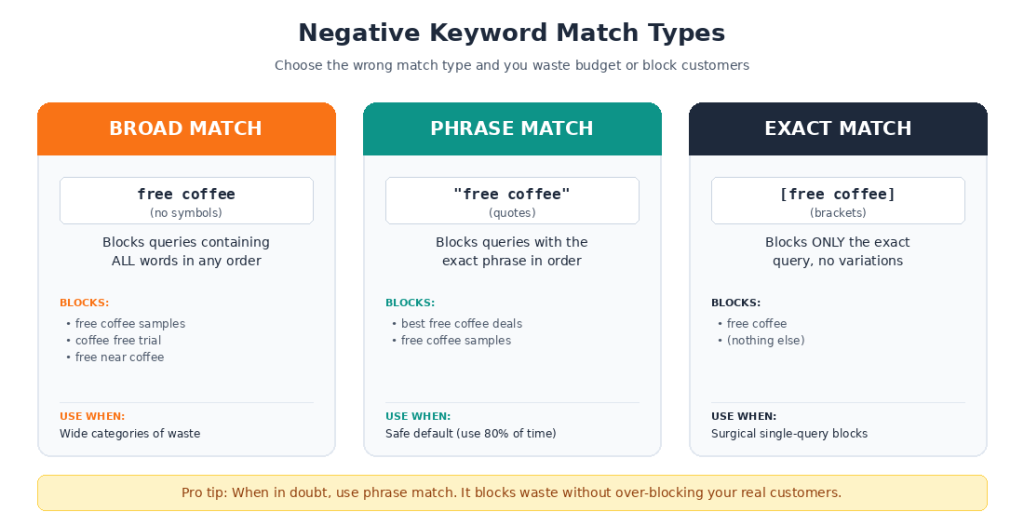
| Match Type | What It Blocks | Example | When to Use |
| Broad Match Negative (no symbols) | Queries containing ALL the words in any order | Negative: free coffee. Blocks “free coffee samples” and “coffee free trial” | Cutting wide categories of waste |
| Phrase Match Negative (“quotes”) | Queries containing the exact phrase in order | Negative: “free coffee.” Blocks “best free coffee deals” but not “coffee free trial” | The safe default for 80% of negatives |
| Exact Match Negative [brackets] | Only queries that match exactly | Negative: [free coffee]. Blocks only “free coffee” exactly | Surgical exclusion of high-traffic exact queries |
Pro Tip: When in doubt, use phrase match. Broad match negatives can accidentally block real customers. A coffee shop that added “free” as a broad negative once blocked their own ad on searches like “wifi free coffee shop near me.” Those were qualified searchers.
Real example: A Toronto law firm we audited had added [lawyer] as an exact match negative trying to block searches for “lawyer salary.” They didn’t realize they were only blocking the single word “lawyer” by itself, while still showing on hundreds of variations. They burned through six months of budget thinking the filter was working.
Match type isn’t a side detail. It’s the difference between negative keywords that save money and negative keywords that quietly sabotage your account.
Once you’ve got match types straight, the next question is what to actually add. Start with the universal list.
Universal Negative Keywords Every Account Needs
These are the negative keywords almost every Google Ads account should run from day one. They block intent that’s never going to convert, no matter what industry you’re in.
Job and Career Negatives
Anyone searching for jobs or career info will never become a customer. These waste the most budget across nearly every industry.
jobs
careers
salary
salaries
hiring
employment
resume
resumes
internship
internships
apprenticeship
Educational Intent Negatives
People learning about your industry aren’t ready to buy. Block them unless you’re selling courses.
how to
tutorial
guide
course
courses
training
certification
school
class
classes
learn
education
degree
university
college
Free, Cheap, and DIY Negatives
These users have explicitly signaled they won’t pay. Save the click cost.
free
cheap
discount
coupon
promo code
DIY
do it yourself
homemade
yourself
Other Universal Negatives
Words that signal browsing or research rather than buying.
wiki
wikipedia
definition
meaning
examples
pictures
images
youtube
reddit
review (sometimes; review your data)
Pro Tip: Build these as a shared negative keyword list called “Universal Negatives.” Then apply it to every Search campaign you run. Updating the list once updates all campaigns. This single move saves agencies hours per week.
Yes, but here’s the catch most marketers miss: some of these can hurt B2B campaigns. If you sell HR software, blocking “salary” and “careers” makes sense for general campaigns but might block your buyer in others. Always check the search terms report before applying universal lists to specialty campaigns.
Now the lists that actually move the needle. Industry-specific.
Google Ads Negative Keywords Example for Legal and Law Firms
Legal CPCs run between $50 and $400 per click in Canada, with personal injury sitting at the top. One wasted click can equal a day’s worth of leads. The cost of bad targeting in legal is brutal.
Common waste sources for law firms
- Job seekers searching legal careers
- Law students researching schools
- People looking for free legal advice
- Government services that compete in SERPs
Negative keyword list for lawyers
pro bono
free consultation (if you charge)
legal aid
public defender
law school
law schools
LSAT
bar exam
bar exam prep
paralegal
paralegal school
legal definition
legal definitions
attorney salary
lawyer salary
attorney jobs
lawyer jobs
court records
court records search
public records
TV show
law and order
suits show
better call saul“A personal injury firm in Toronto we audited had 22% of their search spend going to queries containing “paralegal salary” and “pro bono.” At $87 average CPC, that was over $9,000 a month in wasted budget.“
Twenty minutes of negative keyword work recovered all of it.
The legal space is one of the clearest cases where professional PPC management Service Toronto pays for itself many times over.
What about medical practices? The waste pattern looks similar, but with different culprits.
Google Ads Negative Keywords Example for Dental and Medical Practices
Healthcare CPCs in Canada typically range from $4 to $25, depending on procedure. Cosmetic dentistry and dental implants sit at the high end. The waste patterns here come from students, patients researching insurance, and people looking for free clinics.
Negative keyword list for dental and medical
salary
salaries
hygienist salary
dentist salary
nurse salary
doctor salary
school
schools
dental school
medical school
how to become
training
certification
jobs
careers
free clinic
free dental
free dental clinic
charity dental
sliding scale
insurance covered
covered by insurance
home remedies
DIY
youtube
reddit
symptoms (sometimes; review data)
side effects (sometimes)
Pro Tip: For dental practices specifically, block “Invisalign cost” if you don’t post pricing. Those searchers are price-shopping across providers and convert poorly. Block “free Invisalign consultation” if your consultation has a fee.
Real example: A Toronto orthodontist had blocked “salary” but missed “tech school” and “hygienist program.” Roughly 14% of clicks were coming from students researching career programs. After cleaning the list, their cost per booked consultation dropped 31% in 60 days.
Home services is a different animal. The waste comes from a different direction entirely.
Google Ads Negative Keywords Example for Home Services
Plumbing, HVAC, electrical, roofing, landscaping, and general contracting. CPCs range from $8 to $80 in major Canadian markets. Emergency service keywords sit at the top.
The biggest sources of waste here: DIYers, parts shoppers, and people looking for permits or codes rather than service.
Negative keyword list for home services
DIY
do it yourself
how to
how to fix
how to install
how to repair
tutorial
guide
youtube
video
parts
replacement parts
buy parts
amazon
home depot
lowes
canadian tire
diagram
manual
schematic
permit
permits
code
building code
license
licensing
licence
salary
jobs
careers
apprenticeship
school
training
certification
warranty claim
recall
class action
complaint
better business bureau
yelp review
google review
business for sale
franchise
franchise opportunity
Geographic negatives that drain home services budgets
If you serve Toronto, North York, and Scarborough but not Hamilton or London, every irrelevant location-based click is pure waste.
Hamilton (if not serving)
London Ontario (if not serving)
Ottawa (if not serving)
Buffalo (cross-border)
Detroit (cross-border)
USA
United States
Pro Tip: Stop relying on location targeting alone. Google still matches queries that include other city names even when your campaign is set to Toronto only. Add competing city names as negatives.
A North York HVAC company I worked with was wasting 18% of their budget on people searching variations of “Mississauga AC repair” and “Hamilton furnace.” Adding those as phrase match negatives fixed it overnight.
E-commerce has its own unique waste pattern. The price chasers.
Google Ads Negative Keywords Example for E-commerce and Retail
E-commerce CPCs vary wildly by category, from $0.50 in apparel to $15+ in electronics. The waste pattern: deal hunters, returns researchers, and brand searches for competitors.
Negative keyword list for ecommerce
free
free shipping
cheap
discount
coupon
coupon code
promo
promo code
deal
deals
sale (sometimes; review data)
clearance
liquidation
wholesale
bulk
distributor
manufacturer
amazon
ebay
etsy
walmart
aliexpress
temu
shein
review (sometimes)
reviews (sometimes)
return policy
return
returns
refund
complaint
scam
fake
counterfeit
knockoff
jobs
careers
salary
how to make
DIY
tutorial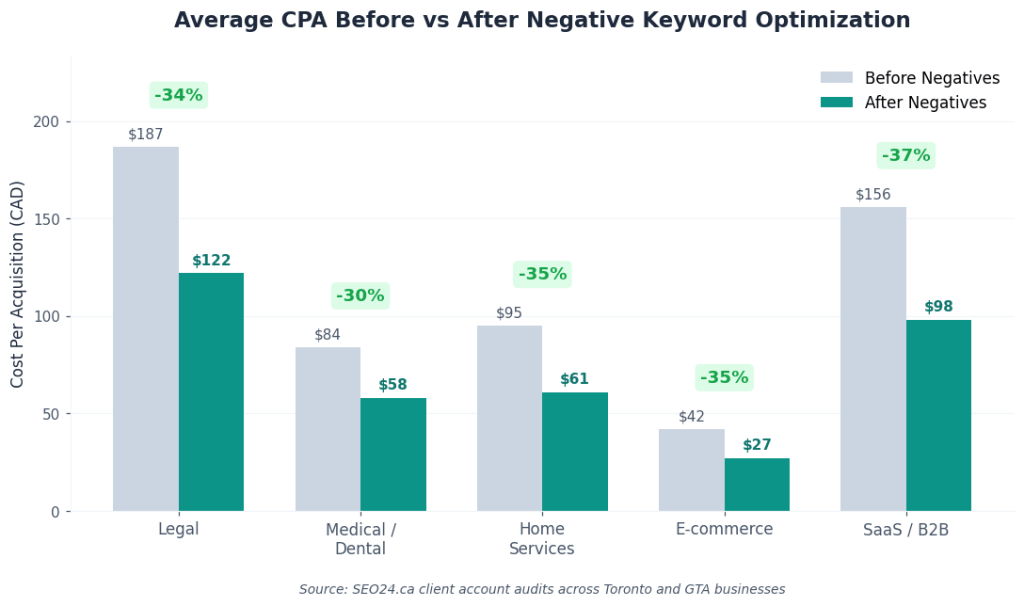
Pro Tip: For e-commerce, run “review” and “reviews” through your search terms report before adding them as negatives. Sometimes review searches convert well; sometimes they drain budget. Data wins arguments, not opinions.
SaaS and software accounts have a very different waste profile.
Google Ads Negative Keywords Example for SaaS and Software
SaaS CPCs in B2B categories typically run $15 to $80 in Canada. The waste comes from free seekers, open-source researchers, and job hunters in tech.
Negative keyword list for SaaS
free
free download
free trial (sometimes; depends on offer)
open source
open-source
github
download
crack
cracked
torrent
pirated
serial number
license key
keygen
chrome extension
plugin
tutorial
how to use
documentation
docs
api docs
jobs
careers
hiring
salary
engineer salary
developer salary
internship
glassdoor
linkedin (sometimes)
indeed
review
reviews (sometimes)
alternative to (sometimes blocks competitor compares; review data)
vs
Pro Tip: SaaS companies should never apply universal negative keyword lists without auditing first. “How to” might block your buyer in HR software if they’re searching “how to manage remote teams.”
Always run a 30-day search terms audit before importing universal lists into SaaS campaigns.
The contrarian take most agencies miss: in SaaS, “free trial” is sometimes worth keeping enabled even though it looks like a free seeker. People who trial often convert to paid at 8 to 15% rates. Pulling it kills your funnel. Trust the data, not the assumption.
Real example: A Toronto SaaS company I consulted with blocked “free” across all campaigns. Within 60 days their qualified trial signups dropped 22%. Free trial users were converting to paid plans. The blanket negative killed the funnel.
Real estate has yet another distinct waste pattern.
Google Ads Negative Keywords Example for Real Estate Agents
Real estate CPCs in Toronto and the GTA run $3 to $25. Wasted spend here comes from renters when you sell, sellers when you list buyers, MLS lookups, and people researching market data.
Negative keyword list for real estate
rent
rental
rentals
for rent
apartments
apartment for rent
craigslist
kijiji
zillow
realtor.ca
foreclosure
foreclosed
auction
bank owned
fsbo
for sale by owner
license
licence
how to become
real estate school
real estate license
real estate course
realtor jobs
realtor salary
agent salary
agent jobs
brokerage jobs
mls login
market report
housing market crash
recession
bubble
news
property tax
property tax calculator
mortgage calculator
mortgage rates
ratehub
free home valuation (if you charge)
Pro Tip: Real estate negatives need geographic precision. If you specialize in North York but your ads keep showing for “Mississauga condos,” add “Mississauga” as a phrase negative. Same for any
neighborhood outside your service area.
Real example: A Toronto realtor specializing in luxury detached homes had been spending 30% of their ad budget on people searching condo and rental queries. After targeted negative work, their cost per qualified lead dropped from $84 to $39 in two months.
B2B and professional services have their own list. The patterns mirror SaaS but with different specifics.
Google Ads Negative Keywords Example for B2B and Professional Services
B2B CPCs in Canada run $10 to $100+ depending on industry. Accountants, consultants, marketing agencies, business coaches, and IT services all share similar waste patterns.
Negative keyword list for B2B
free
free template
free download
free guide
free ebook
template
templates
download
how to
how to do
tutorial
DIY
do it yourself
training
course
courses
certification
school
schools
degree
jobs
careers
salary
hiring
recruiter
freelance
freelancer (sometimes; review)
upwork
fiverr
intern
internship
example (sometimes; review)
examples (sometimes; review)
sample
samples
definition
meaning
what is (sometimes; review)
youtube
reddit
glassdoor
case study (sometimes)
Pro Tip: For B2B agencies and consultants, monitor the search terms report for queries with “DIY” or “how to do it yourself.” Add them as you find them rather than guessing. Some prove valuable as
awareness-stage content keywords; others drain budget instantly.
OK, you have the lists. Now the part most articles skip: actually adding them.
How to Add Negative Keywords in Google Ads
Adding negative keywords takes under five minutes once you know where to click. Here’s the exact path.
Step-by-step process
- Sign in to Google Ads at ads.google.com.
- Click “Campaigns” in the left sidebar.
- Select the campaign you want to add negatives to (or hold Ctrl/Cmd and select multiple).
- Click “Keywords” in the secondary menu.
- Click the “Negative keywords” tab at the top.
- Click the blue plus button to add new negative keywords.
- Choose the level: ad group, campaign, or shared list.
- Paste your list (one keyword per line) and select match type for each line.
- Click “Save.”
Three levels of negative keywords
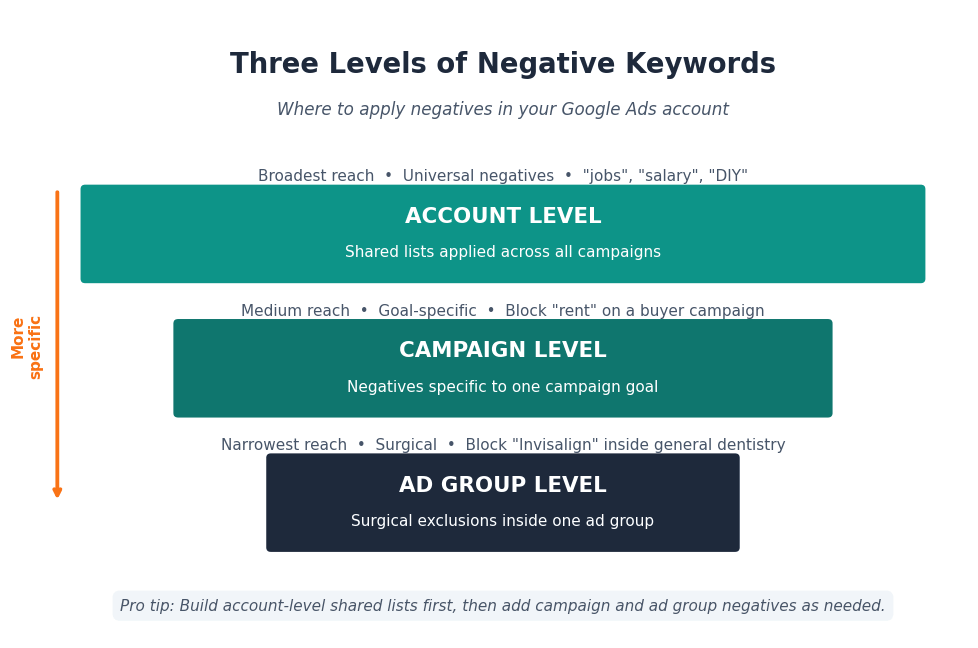
| Level | When to Use | Example |
| Account-level (via shared list applied to all campaigns) | Universal negatives that apply everywhere | “jobs,” “salary,” “DIY” |
| Campaign-level | Negatives specific to one campaign’s goal | Block “rent” on a buyer campaign |
| Ad group-level | Surgical exclusions inside a tight ad group | Block “Invisalign” inside a general dentistry ad group |
Pro Tip: Build a shared negative keyword list for each major industry category in your account. Then apply lists to campaigns rather than adding the same negatives repeatedly. Editing one list updates all campaigns using it.
You might be thinking, “What about Performance Max campaigns?” As of 2026, you can finally add negative keyword lists to Performance Max campaigns at the account level. Use that feature aggressively, since PMax burns budget faster than any other campaign type without proper negatives.
Adding is the easy part. Removing requires the same steps, but most marketers panic when they realize they over-blocked something.
How to Remove Negative Keywords in Google Ads
Removing negative keywords is just as quick. If you accidentally blocked a profitable query, here’s how to fix it without losing your data.
Step-by-step removal
- Open Google Ads and navigate to the campaign.
- Click “Keywords” then the “Negative keywords” tab.
- Find the negative keyword you want to remove. Use the search filter for long lists.
- Check the box next to the keyword.
- Click “Remove” from the action bar at the top.
- Confirm the removal.
For shared lists
- Click “Tools” in the top menu.
- Click “Shared library.”
- Click “Negative keyword lists.”
- Open the list you want to edit.
- Check the boxes next to keywords to remove.
- Click “Remove.”
Pro Tip: Before removing any negative, run the search terms report and confirm the queries it’s been blocking. Sometimes what looks like a bad block is actually a useful filter. Verify before removing.
Real example: A client of ours wanted to remove “free” from their negative list because they were launching a free consultation offer. We checked first. “Free” had been blocking 847 queries the month before, including “free advice,” “free help,” “free template,” and “free download.” None of those people were going to convert into paying customers. We kept “free” as a negative and added a separate, exact-match positive keyword for “free consultation” instead. Surgical, not blunt.
Removing the right keyword unlocks traffic. Removing the wrong one floods you with junk. The five biggest negative keyword mistakes drain more accounts than anything else in PPC.
The 5 Negative Keyword Mistakes That Drain Ad Spend
After auditing hundreds of Google Ads accounts in Toronto, the same mistakes show up over and over. Avoid these and your CPA drops without changing a single bid.
Mistake 1: Setting and forgetting
Most accounts add a list once and never touch it again. Search behavior changes monthly. New irrelevant queries surface constantly. Review the search terms report at least every 30 days.
Mistake 2: Using only broad match negatives
Broad match negatives block more queries than you think. Adding “free” as a broad negative blocks “buy one get one free.” Use phrase match unless you have a specific reason to go broader.
Mistake 3: Forgetting Performance Max
Performance Max accounts can now use negative keyword lists at the account level, but most advertisers don’t apply them. PMax burns budget faster than any campaign type when negatives aren’t applied.
Mistake 4: Blocking branded competitor terms reflexively
Sometimes ranking against competitor brand names converts well. Test before adding competitor names as automatic negatives.
Mistake 5: Not segmenting negatives by campaign goal
What’s a negative for one campaign might be a target keyword for another. A campaign promoting free webinars needs “free” as a positive keyword. A campaign selling enterprise software needs “free” blocked aggressively. Segment by goal, not by habit.
Pro Tip: Set a calendar reminder for the 1st of every month to pull the search terms report. Sort by cost descending. Block the top 10 wasteful queries you find. This 15-minute monthly habit beats 95% of expensive PPC consultants.
If you’ve never seen your search terms report, you’re flying blind. That’s the next move.
How to Build a Negative Keyword Strategy in 2026
A negative keyword strategy isn’t a one-time setup. It’s an ongoing process that compounds over time. Here’s the framework I use with every account.
The 90-day setup
Days 1 to 7: Add universal negatives via shared list applied to all Search and Performance Max campaigns.
Days 8 to 21: Add industry-specific negatives from the lists in this guide.
Days 22 to 60: Pull search terms reports weekly. Add new negatives based on actual wasted queries.
Days 61 to 90: Establish monthly review cadence. Refine match types based on performance.
Ongoing monthly process
| Task | Frequency | Time Required |
| Pull search terms report | Monthly | 5 min |
| Identify top 10 wasteful queries | Monthly | 10 min |
| Add new negatives | Monthly | 5 min |
| Audit existing negatives for over-blocking | Quarterly | 30 min |
| Review match types on heavy negatives | Quarterly | 20 min |
Pro Tip: If you’re running multiple campaigns, build a master spreadsheet of every negative keyword with notes on why each was added and when. Future-you will thank present-you when you need to figure out what’s blocking what six months later.
Real example: A Toronto B2B company we worked with grew their qualified lead volume by 47% in 90 days without raising their budget. The only change was a disciplined negative keyword strategy. No new ads, no bid adjustments, no landing page updates. Just better filters.
For accounts spending over $3,000 per month, professional Google Ads management usually pays for itself in saved spend within the first month. For smaller budgets, doing this work yourself with the lists above gets you 80% of the way there.
If you’re curious what professional PPC services should cost relative to ad spend, check our breakdown of PPC Price Toronto for current market rates.
Final Thought
Negative keywords are the single most underrated lever in Google Ads. Most accounts never touch them after setup. The ones that do regularly outperform the ones that don’t, every time, across every industry.
You now have copy-ready lists for the most common Canadian industries, the exact steps to add and remove them, and a framework to maintain them month after month. The hard part isn’t knowing what to do. It’s actually doing it.
Block 100 wasteful queries this week. Watch what happens to your cost per lead.
Frequency Asked Questions
How many negative keywords should a Google Ads account have?
Most well-managed Google Ads accounts have between 100 and 500 negative keywords across shared lists, campaign-level, and ad group-level filters. The exact number depends on your industry, how aggressively you use broad match, and how much you’ve grown your list over time. Start with universal negatives plus your industry-specific list, then expand based on your search terms report.
What’s the difference between negative keywords and keyword exclusions?
They mean the same thing. Google uses “negative keywords” in their official documentation. Some agencies and tools refer to them as “exclusions” or “keyword exclusions.” Both terms describe the same function: telling Google which searches should not trigger your ads.
Can I add negative keywords to Performance Max campaigns?
Yes. As of 2026, Performance Max campaigns support account-level negative keyword lists. You can apply your universal and industry-specific negative lists directly to PMax campaigns. This was a major Google Ads update that made PMax significantly more controllable for advertisers. Use this feature aggressively, since PMax tends to burn budget faster than other campaign types without negatives.
How often should I update my negative keyword list?
Pull the search terms report at least once per month. Sort by cost descending and add new negatives based on what you find. For larger accounts spending over $5,000 a month, weekly reviews work better. Quarterly, audit your existing negative list to make sure you haven’t over-blocked any profitable queries.
Do negative keywords work for Google Shopping campaigns?
Yes. Shopping campaigns fully support negative keywords. Add them through the same Keywords tab in your Shopping campaign settings. For Shopping, focus especially on negative keywords related to competitor brands, free or cheap modifiers, and irrelevant product categories. Negative keywords are one of the few control levers Google leaves available in Shopping campaigns, so use them.
Will adding too many negative keywords hurt my campaign performance?
Only if you add the wrong ones. Adding 500 well-researched negative keywords improves performance by filtering waste. Adding 500 random or over-broad negatives can choke off real customer traffic. The risk isn’t volume, it’s accuracy. Always check what each negative is blocking by reviewing the search terms report before and after major additions.
Ready to Stop Wasting Ad Budget?
If your Google Ads account is burning budget on irrelevant clicks and you’d rather spend an hour with an expert than 30 hours doing this audit yourself, get a free Google Ads audit from our Toronto team. We’ll pull your search terms report, identify your top 20 wasteful queries, and show you exactly where the savings sit. Book your free audit!