
Internal linking in SEO means linking one page on your site to another page on the same site. It sounds basic, but the payoff is not. Those links do three things at once: they help visitors get around, they give Google a clear path to crawl and index your pages, and they pass authority (PageRank) from your strong pages to the ones you want ranking. Get it right and the whole site benefits, not one post at a time. Below we cover the link types that matter, how to structure them, which tools to audit with, and the mistakes that quietly cost rankings.
Key Takeaways
- Internal links connect pages on the same domain and pass authority, context, and crawl signals between them.
- Contextual, in-body links carry the most SEO weight. Navigation, breadcrumb, and related-post links matter less.
- A pillar and cluster structure is the strongest internal linking structure: clusters link to a pillar, the pillar links back.
- Orphaned pages (pages with zero internal links) rarely rank. Fixing them is one of the fastest SEO wins.
- Descriptive, varied anchor text beats generic “click here” every time and is safer for internal links than external ones.
- Free tools like Google Search Console plus a crawler such as Screaming Frog, Semrush, or Ahrefs handle a full internal linking analysis.
- Keep priority pages within three clicks of the homepage so Google crawls them often.
What Is Internal Linking in SEO?
An internal link is a hyperlink from one page on your site to another page on the same site. Some people call it interlinking. Same thing. The definition is simple, but in SEO an internal link does a lot more than connect two pages.
Internal links do three things at once. They help users find related content and move through your site. They help Google’s crawler discover, crawl, and index pages it might otherwise miss. And they pass link authority (often called link equity or PageRank) from one page to another, which directly influences which of your pages rank.
Think of your site as a city. Pages are buildings, internal links are the roads, and Google’s crawler is a traveller. A building with no road connecting it may never be found.
That is what happens to pages with no internal links pointing at them. They get crawled less, indexed slower, and rarely rank. If you have pages that are crawled but currently not indexed, weak internal linking is one of the most common causes.
The 5 Types of Internal Links
Not all internal links carry the same weight. Once you know the five types, you can use each one on purpose instead of by accident.
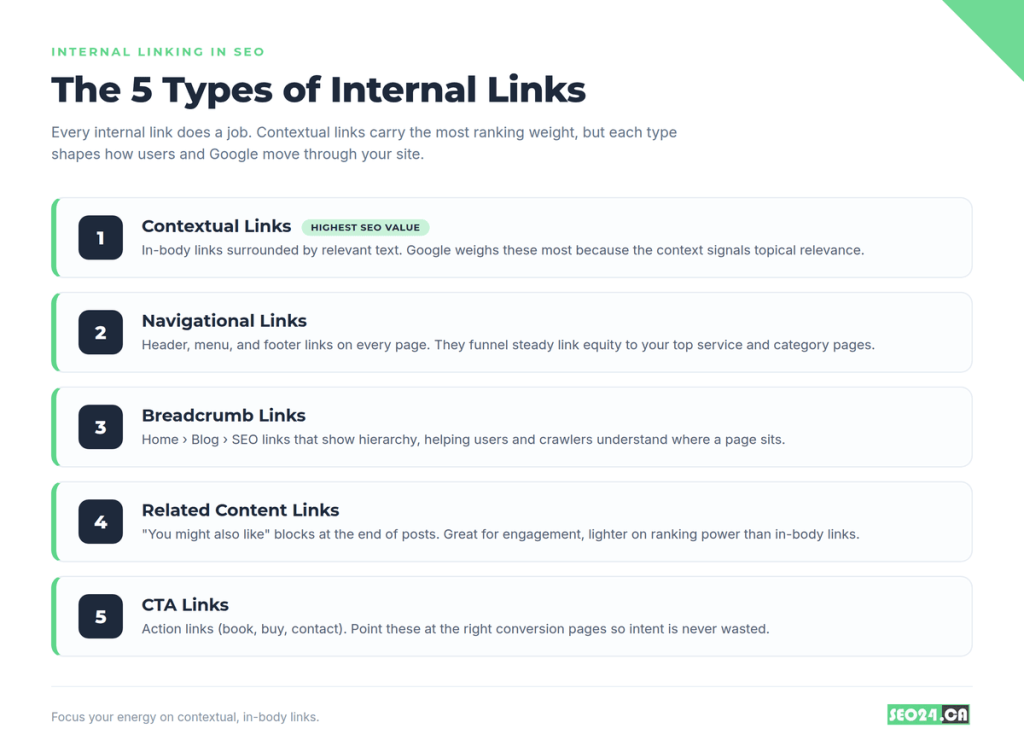
Contextual links are the most valuable. These sit inside the body text, surrounded by relevant words. When an article about technical SEO links the phrase “crawl budget” to a dedicated page, the surrounding text tells Google what the destination is about, so the link carries more weight.
Navigational links live in your menu, header, and footer and repeat on every page. Your top service and category pages collect the most equity simply because the whole site links to them.
Breadcrumb links (Home › Blog › SEO Strategies) show hierarchy and help both users and search engines understand where a page sits.
Related content links appear in “you might also like” blocks. They help engagement but pass less weight than in-body links.
CTA links push a specific action such as book, buy, or contact. Make sure they point at the right conversion page so intent is never wasted.
Pro Tip: Spend most of your effort on contextual links inside your best content. They are the most influential for rankings and the easiest to add naturally while you write.
Why Internal Linking Matters for SEO
Internal linking for SEO matters because it drives three things Google cares about: discovery, authority flow, and topical depth.
Google Uses Internal Links to Discover and Index Content
Googlebot crawls by following links. Publish a new post that nothing links to, and Google has to find it through your XML sitemap or an external link, which slows indexing. Strong internal links give Google direct paths to every page that matters, so new content shows up in search faster. A Toronto e-commerce client of ours cut average indexing time from 9 days to under 48 hours simply by linking each new product page from three existing category pages on publish day.
Internal Links Pass Link Equity Between Pages
Every page has some authority, and pages with more backlinks have more. Google spreads that authority across your site partly through internal links. When a high-authority page links to a newer page with no backlinks yet, some of that authority flows across and can help the new page rank faster.
So your most authoritative pages are your best internal link sources. For how authority gets built in the first place, our guide on how Google evaluates high-quality backlinks covers the mechanics, and if you want more of it, here is how to build high-quality backlinks to feed that equity in.
Internal Linking Builds Topical Authority
Google reads your site as a whole, not page by page. A cluster of tightly linked content on one topic tells Google you cover it in depth, and that depth is a real ranking factor in competitive niches. It is also why content strategy and internal linking go together. The best well-structured SEO content is both well written and well connected.
It Keeps Users Engaged Longer
Drop a relevant link into the middle of an article and a good share of readers click it. That keeps the session going, lifts pages per visit, and pulls bounce rate down. Google reads those signals as a sign the content is doing its job.
You might be thinking these signals are minor. In practice, a law firm we audited saw average session duration climb from 1m 12s to 2m 40s after we added contextual links across 24 blog posts, and three of those posts moved onto page one within six weeks.
What Does a Good Internal Linking Structure Look Like?
A good internal linking structure is shallow and hub-based: a pillar page connects to supporting cluster pages, and every cluster links back to the pillar. This is the pillar and cluster model, and for content-heavy sites it is the structure that works best.
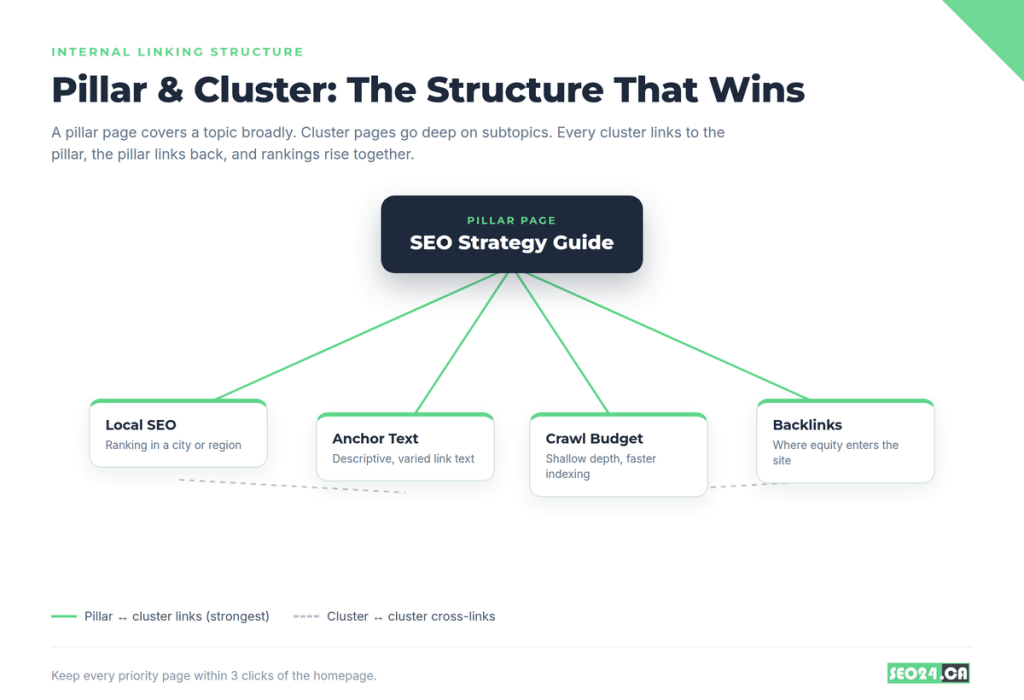
A pillar page covers a broad topic, say a full guide to SEO strategy. Cluster pages go deep on subtopics: local SEO, keyword research, anchor text, crawl budget. Each cluster links to the pillar, the pillar links to every cluster, and related clusters link to each other where it makes sense. Google reads this web as one authoritative resource, so rankings across the cluster tend to rise together.
Two structural rules keep it healthy. First, keep crawl depth shallow: every important page should be reachable within three clicks of the homepage, because pages buried five or six clicks deep get crawled less often. Second, point the most links at your most important pages, since the number of internal links to a page is a direct signal of its importance.
Pro Tip: Before you build a single link, sketch your hierarchy on paper. List the pages that generate leads or revenue first, then design the structure so those pages receive the most internal links.
How to Build an Internal Linking Strategy That Works
With the structure clear, here is the process we actually run on client sites.
- Map your hierarchy first. List your top priority pages (the ones that earn money), then make sure your linking supports them. If you want your technical SEO service page to rank, it needs links from several relevant posts and your homepage.
- Build topic clusters around pillar pages. Follow the pillar and cluster model above so rankings lift together instead of one page at a time.
- Use descriptive, varied anchor text. For internal links you can safely use keyword-rich anchors, which is riskier for external links. A keyword targeting strategy helps you pick the right phrases, but vary them so every link is not identical.
- Link from your strongest pages. Find your highest-authority pages in Ahrefs or Semrush, then add links from them to the pages you most want to push up. A brand new post ranks far faster if a few strong pages link to it in week one.
- Fix orphaned pages immediately. An orphaned page has no internal links pointing to it, so it earns no equity and struggles to rank. Run a crawl, find pages with zero inlinks, and add relevant links. If a well-optimized page refuses to rank, orphan status is often why, one of the reasons your optimized page won’t rank.
- Link old content to new content. Every time you publish, spend 20 minutes adding links from older related posts to the new one. This is also a natural moment to update old blog posts that could perform better with a refresh.
- Keep crawl depth shallow. Add a direct link from a prominent page to any valuable page buried deep in your architecture. It shortens the crawl path and signals importance.
Internal Linking Example: A Before and After
Here is a concrete internal linking example so the theory clicks. Imagine a small SEO blog with three posts and no internal links between them.
Before: “How Long Does SEO Take”, “Local SEO Basics”, and “Keyword Research 101” each sit alone. Google crawls each once, sees no relationship, and treats them as three unrelated pages. None ranks past position 30.
After: You create a pillar page, “SEO Strategy for Small Businesses”, and link it to all three posts using descriptive anchors. Each post links back to the pillar and to one sibling post. Now Google sees a connected cluster with a clear center.
Within eight weeks the pillar moved from unranked to position 6, and two cluster posts jumped roughly 12 positions each. Nothing changed except the links.
Same content, better results. The only thing that changed was the connections telling Google how the pieces fit together.
Anchor Text: A Practical Guide
Anchor text is the clickable text of a link, and it tells users and Google what the destination is about. It is where most people either leave value on the table or make mistakes.
- Exact match links to your “technical SEO” page with the anchor “technical SEO”. Fine for internal links and helpful for context.
- Partial match adds context, like “our approach to technical SEO”. Natural and slightly richer.
- Branded uses your company name, useful for navigation and brand signals.
- Generic like “read more” or “click here” gives Google nothing. Avoid it.
Aim for mostly descriptive partial-match anchors, some exact match, and natural variation. One rule matters most: the anchor must match what the reader actually finds on the destination page. A mismatch is a broken promise to both the reader and Google.
Common Internal Linking Mistakes That Hurt Rankings
Plenty of sites link internally and still lose ground to these six mistakes.
- Too many links per page. Dozens of links dilute the value passed to each and feel spammy. If a real person would not follow them all, cut some.
- Linking to low-value pages from strong pages. If your best pages point mostly at contact and privacy pages, you waste authority. Be intentional.
- Identical anchor text every time. Repeating the exact same anchor to one page looks mechanical and wastes context.
- Nofollow on internal links. Nofollow tells Google not to pass authority. Most internal links should be followed. If you are unsure how to check, learn to tell if a link is nofollow or dofollow and remove the attribute where it does not belong.
- Broken internal links. Deleted or moved pages leave broken links that waste crawl budget and lose equity. Audit and redirect regularly.
- Linking to non-canonical duplicates. Always link to the canonical version. Our guide on canonical URLs explains why linking to the duplicate sends mixed signals.
Pro Tip: Yes, more links can help, but past a point they hurt. A page with 5 highly relevant internal links usually outperforms one with 30 stuffed in wherever they fit.
Internal Linking Analysis: Tools to Audit Your Links
An internal linking analysis finds orphaned pages, broken links, and pages starved of equity. Most of the time you are not building links from scratch, you are finding the gaps in what you already have. These tools do that job well.
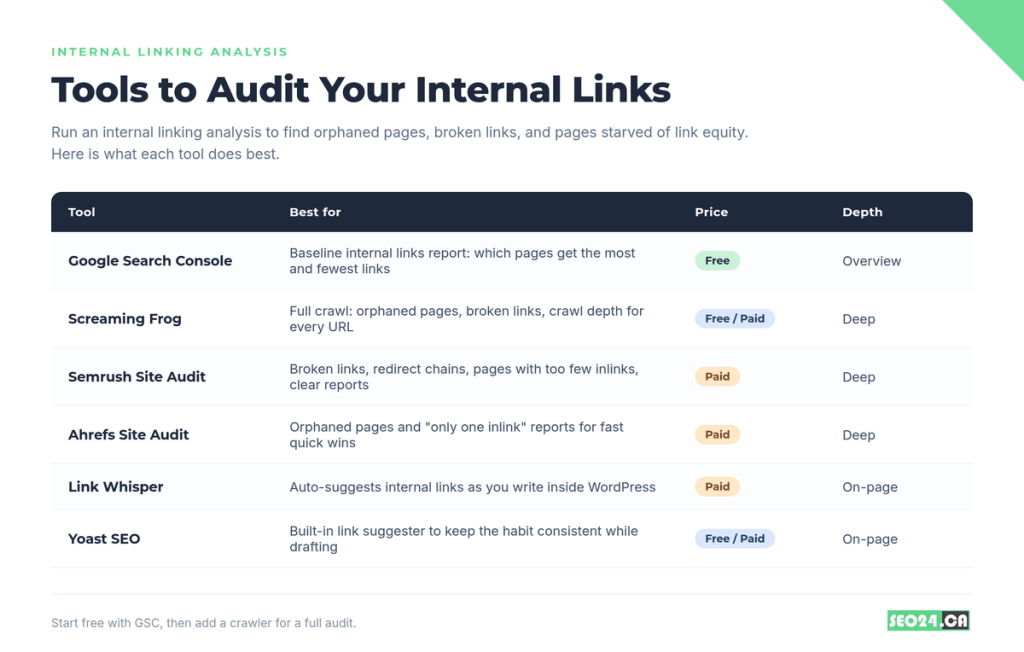
| Tool | Best for | Price |
| Google Search Console | Internal links report: most and least linked pages | Free |
| Screaming Frog | Orphaned pages, broken links, crawl depth per URL | Free / Paid |
| Semrush Site Audit | Broken links, redirect chains, too-few-inlink pages | Paid |
| Ahrefs Site Audit | Orphaned and single-inlink page reports | Paid |
| Link Whisper | Auto-suggests links as you write in WordPress | Paid |
| Yoast SEO | Built-in link suggester while drafting | Free / Paid |
A simple workflow: start in Google Search Console’s internal links report to see where equity sits. Run a crawl in Screaming Frog, Semrush, or Ahrefs to flag orphaned pages and broken links. If you compare on-page helpers, Link Whisper and Internal Link Juicer both suggest links inside WordPress. Then use Google’s site:yoursite.com “topic keyword” search to find existing pages that mention a topic you could link from.
If you want a full technical review of crawlability and site architecture, our technical SEO service covers it, and a free SEO audit will show your current internal linking picture and the biggest opportunities.
Internal Linking Strategies for Toronto SEO Success
For local businesses, internal linking pulls double duty: it concentrates authority on the city and service pages that win local customers. Effective internal linking strategies for Toronto SEO success start by treating your location and service pages as pillars.
Point contextual links from your blog posts to the service and neighbourhood pages you want ranking in local search. A North York dental clinic we worked with linked eight blog posts to a single “Invisalign in North York” page, and it moved from position 14 to position 4 in the Toronto map area over ten weeks. The content on that page barely changed.
- Link blogs to local service pages using city-specific anchors like “SEO for a small business in Toronto”.
- Cross-link neighbourhood pages so North York, Scarborough, and Etobicoke pages support each other.
- Feed local landing pages from your strongest, most-linked blog posts to speed up local ranking.
If you run a local business, our guide on how to improve SEO for a small business in Toronto pairs perfectly with a tight internal linking structure. And if you are wondering how long SEO takes to work, strong internal links are one of the levers that shortens the timeline.
Your Internal Linking Checklist
Run this every time you publish new content or audit existing pages.
- Every new page gets internal links from two to three relevant existing pages on publish day.
- Every important page receives links from multiple relevant supporting pages.
- Anchor text is descriptive, varied, and matches the destination.
- No orphaned pages: every page has at least one internal link pointing to it.
- No internal links point to 404s, redirects, or non-canonical URLs.
- High-authority pages link to the pages you most want to rank.
- Crawl depth for every priority page is three clicks or fewer from the homepage.
- You run an internal linking analysis at least twice a year with a crawl tool.
The Bottom Line on Internal Linking
Internal links tie your whole site together. If you take one idea from this guide, take this: authority and relevance follow the links you build, so the pages that get the most links from your best content are the ones Google treats as most important. A few well-placed links do more than a pile of random ones.
Start small and keep at it. Fix the orphaned pages first, build one clean pillar and cluster, use descriptive anchors, and get in the habit of linking old posts to new ones. Aim for enough relevant links to guide readers and crawlers, and no more than that, because past a point each extra link means less. Do it consistently and the gains stack up across the whole site instead of one page at a time.
Frequently Asked Questions About Internal Linking
What is internal linking in SEO?
Internal linking in SEO is linking one page on your site to another page on the same site. Those links help search engines discover and crawl your content, pass link authority (PageRank) between pages, build topical authority through connected clusters, and keep users engaged by guiding them to related content.
What is interlinking in SEO?
Interlinking is another word for internal linking: connecting the pages within your own website to each other. The terms are interchangeable. It is different from external linking, which points to or from other websites.
Can you give an example of internal linking?
Yes. If a blog post about keyword research includes the phrase “technical SEO” and links it to your technical SEO page, that is an internal link. The anchor text “technical SEO” tells Google what the destination page covers, and the link passes a little authority to it.
How many internal links should a page have?
There is no perfect number. Most well-structured blog posts carry between 3 and 10 contextual internal links, plus navigation links in the header and footer. Google’s guidance is that if it looks like too many, it probably is. Focus on relevance, not a quota.
Does internal linking help with rankings?
Yes, directly. Internal links pass equity between pages, tell Google which pages matter most, signal topical authority, and get new pages indexed faster. A solid internal linking strategy tends to lift rankings across the whole site, not just one page.
What is the difference between internal links and backlinks?
Internal links connect pages within your own site. Backlinks come from other websites. Backlinks build domain authority; internal links distribute that authority across your site toward the pages you most want to rank.
What is an orphaned page and why does it matter?
An orphaned page has no internal links pointing to it. It earns no internal equity and is harder for Google to crawl, even if it is in your sitemap. Adding links from relevant pages is one of the fastest ways to help it rank.
See Your Internal Linking Structure in Action
Not sure which pages are orphaned or where your link equity is leaking? Get a free SEO audit from SEO24 and we will map your internal linking structure and show you the three highest-impact links to add first.