A nofollow link checker is any tool or method that tells you whether a link carries the rel=“nofollow” attribute, which decides if it passes SEO value or not. The fastest one is already in your browser: right-click the link, choose Inspect, and look for rel=“nofollow” in the code. For a whole page or a full backlink profile, a free extension or a platform like Ahrefs or Moz does the same job in bulk.
This guide covers every way to check a link, from a ten-second inspect to a full backlink audit, and how to turn what you find into better links. First, the bit most guides get slightly wrong.
Key Takeaways
- A nofollow link checker reveals whether a link has rel=“nofollow”, rel=“sponsored”, or rel=“ugc”. Any of the three means it will not pass full link equity.
- The quickest manual check: right-click the link, select Inspect, and read the anchor tag. No rel attribute means the link is dofollow by default.
- For a page at a glance, use a browser extension like NoFollow or the Ahrefs SEO Toolbar. For a whole backlink profile, use Ahrefs, Semrush, or Moz.
- Google has treated nofollow as a hint rather than a strict rule since 2020, so a nofollow link from a strong site can still carry some weight.
- Google Search Console shows who links to you but not the rel attribute, so you still need a dedicated checker for follow versus nofollow.
- Checking link type protects your link building: a guest post you expected to be dofollow can quietly publish as nofollow.
What Is a Dofollow Link?
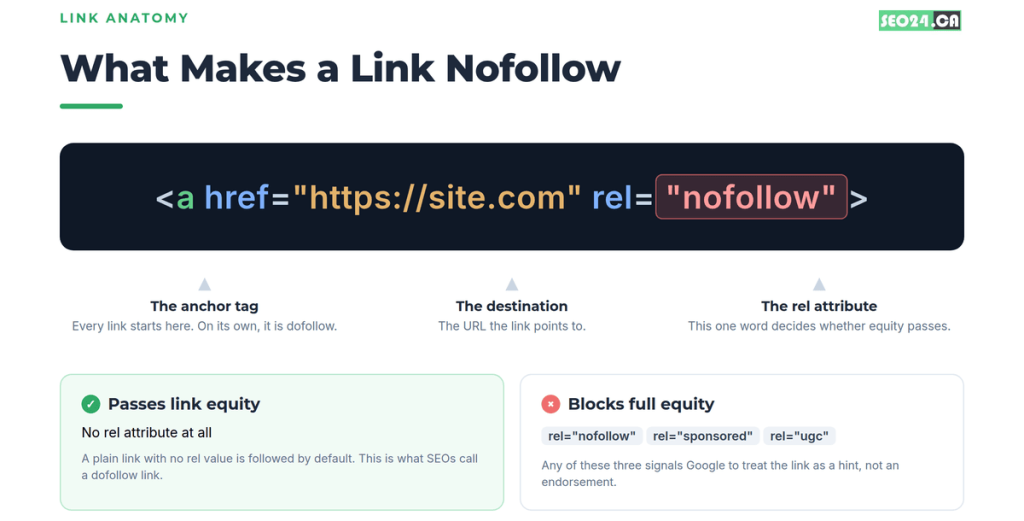
A dofollow link is the default state of any hyperlink. If a link has no attribute restricting it, it is dofollow, and Google follows it, credits the destination page, and passes link equity (often called PageRank or link juice) from one page to the other.
That equity flow is why backlinks remain one of the strongest ranking signals in SEO. Each quality dofollow link is a vote of confidence that Google counts toward your rankings. In plain HTML, a dofollow link looks like this:
| <a href=”https://seo24.ca/”>anchor text</a> |
How much authority a dofollow link actually passes depends on the linking page’s own authority, its topical relevance, and how many other links share the page. A followed link from a trusted, relevant site is worth far more than one from a brand-new domain with no traffic. Our guide on how Google evaluates high-quality backlinks breaks down what makes one link outweigh another.
What Is a Nofollow Link?
A nofollow link carries the rel=“nofollow” attribute on its anchor tag. That attribute tells crawlers not to follow the link and not to pass authority to the destination. Here is what it looks like:
<a href="https://seo24.ca/" rel="nofollow">anchor text</a>Google launched the nofollow attribute in 2005 to fight comment spam. The idea was simple: let site owners publish links in comments and other user areas without vouching for them. Today you will find nofollow links across comment sections, forums, social profiles, press releases, many directories, and Wikipedia. Any site that lets strangers add links tends to nofollow them by default.
Here is the update most older guides skip. In 2019 Google announced it would treat nofollow as a hint rather than a strict directive, and that change took effect for crawling and indexing in March 2020. So Google may now choose to follow a nofollow link and factor it in, especially from a high-authority domain. Nofollow links are still worth less than dofollow ones in most cases, but the old rule that they pass zero value is no longer quite true.
Dofollow vs Nofollow: What Actually Changes for SEO
The practical difference comes down to one thing: a dofollow link passes ranking equity, and a nofollow link mostly does not. Both can send you real visitors. Only one directly moves rankings. This table sums up where they split:
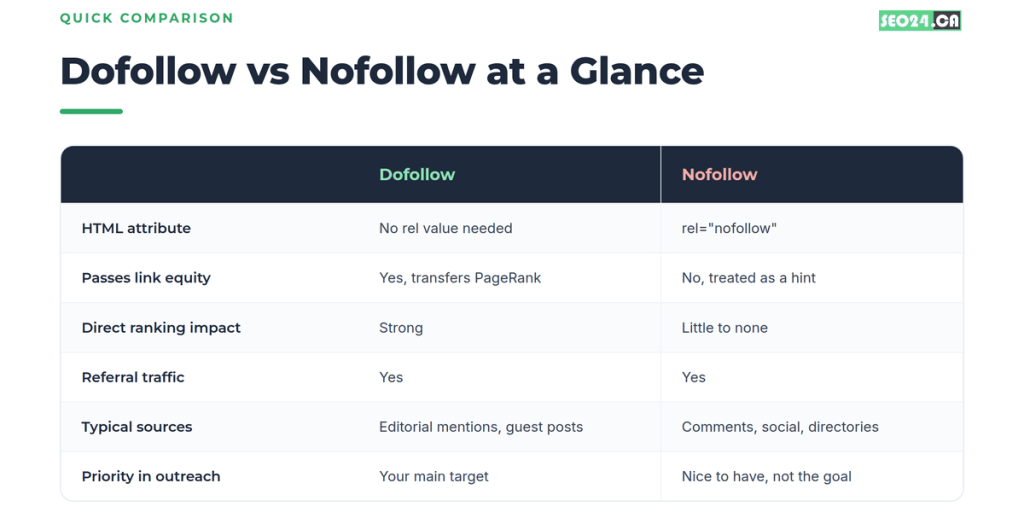
| Factor | Dofollow | Nofollow |
| HTML | No rel value needed | rel=“nofollow” |
| Passes link equity | Yes | No, treated as a hint |
| Ranking impact | Strong | Little to none |
| Referral traffic | Yes | Yes |
| Common sources | Editorial mentions, guest posts | Comments, social, directories |
| Outreach priority | Your main target | Nice to have |
Yes, but: there is no real “dofollow” attribute. This trips people up. HTML has rel=“nofollow”, but there is no rel=“dofollow”. “Dofollow” is just SEO shorthand for a normal link with nothing holding it back. When a checker labels a link dofollow, it means it scanned the tag and found no nofollow, sponsored, or ugc value. So the real question is never “is this dofollow,” it is “is anything blocking it.”
Sponsored and UGC: The Other rel Attributes
Beyond nofollow, two more attributes turn up when you check links. rel=“sponsored” marks paid links, affiliate links, and ads. rel=“ugc” marks user-generated content like comments and forum replies. Google introduced both in 2019 to give site owners cleaner labels than a blanket nofollow.
For your purposes the effect is the same across all three. If a link carries nofollow, sponsored, or ugc, treat it as one that will not hand over full link equity. A link can even carry two at once, such as rel=“sponsored nofollow”, so read the whole attribute, not just the first word.
How to Check If a Link Is Nofollow or Dofollow Manually
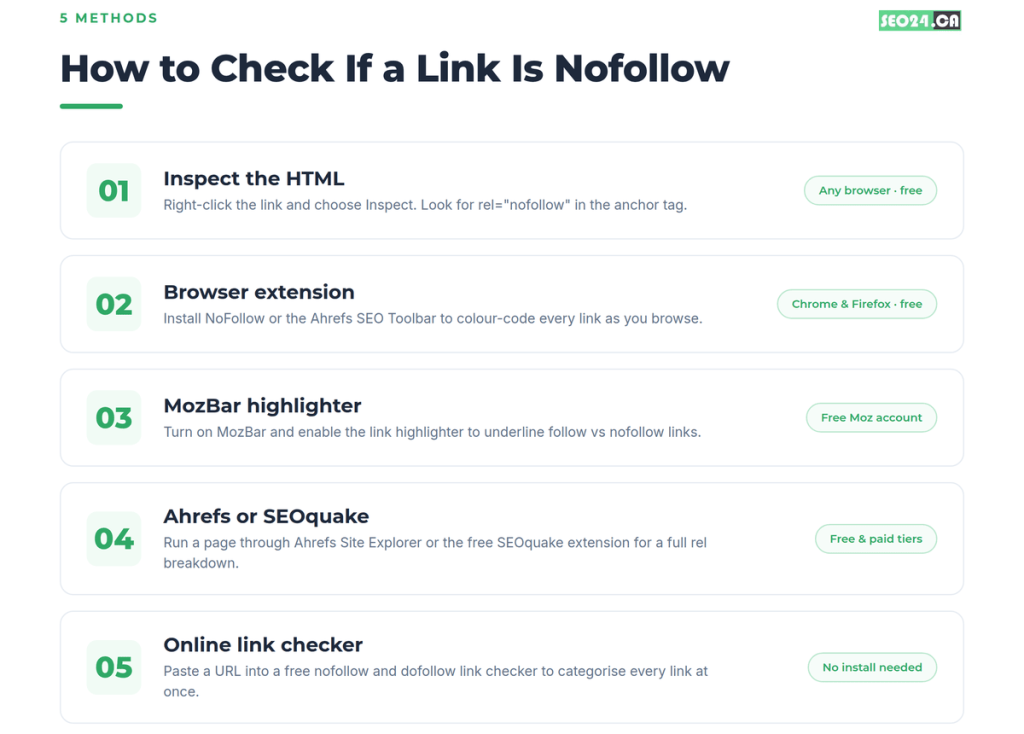
The fastest way to check a single link needs no tools at all. Right-click it, inspect the HTML, and look for a rel value. Here is the exact sequence:
- Open the page where the link sits, in any modern browser (Chrome, Firefox, Edge, and Safari all work).
- Right-click directly on the link text.
- Choose Inspect (Chrome and Edge) or Inspect Element (Firefox). The developer tools panel opens.
- Read the highlighted anchor tag in the Elements panel.
If the tag has no rel value, the link is dofollow:
| <a href=”https://seo24.ca/”>link text</a> |
If you see rel=“nofollow” (or sponsored, or ugc), it will not pass full equity:
| <a href=”https://seo24.ca/” rel=”nofollow”>link text</a> |
Check a Whole Page with View Source
Want every nofollow link on a page at once instead of one at a time? Press Ctrl+U on Windows or Cmd+Option+U on Mac to open the raw HTML, then Ctrl+F and search for “nofollow.” Every instance jumps out. It is less tidy than Inspect, but it scans the full page in seconds.
| Pro Tip Before you inspect a single link, glance at the page’s <head> for a robots meta tag. If it reads noindex, nofollow, every link on that page is nofollow no matter what the individual tags say. A page-level directive quietly overrides the lot, and it is a common reason a link “looks” dofollow in the source but behaves like nofollow. Our robots.txt guide covers how these directives interact. |
Best Nofollow Link Checker Browser Extensions
If you check links often, a browser extension beats inspecting one at a time. These add-ons colour-code dofollow and nofollow links right on the page, so you read a site’s link profile at a glance while you browse. The main ones for Chrome and Firefox:
- NoFollow (by Mangools). Outlines nofollow links in red as you browse. Free from the Chrome Web Store and one of the most-installed options.
- Ahrefs SEO Toolbar. Free for Chrome and Firefox. Highlights link types and shows on-page SEO data. The highlighting works without a paid Ahrefs plan.
- MozBar. A full SEO toolbar that also underlines follow and nofollow links. More on its setup in the next section.
- Link Redirect Trace. Handy when a link bounces through several redirects. It shows the full chain and the rel attribute at each hop, which a normal inspect misses.
Installing one highlighter takes about five minutes and pays for itself the first time you prospect. You stop guessing and start seeing link types as you read.
How to Check Nofollow Links with MozBar and Moz Link Explorer
MozBar is the tool a lot of SEOs reach for to spot nofollow links, because it shows link type alongside Domain Authority in one view. The current MozBar V5 (rebuilt) added a dedicated highlighter for followed and nofollow links. Setting it up takes a minute:
- Install MozBar from the Chrome Web Store and sign in with a free Moz account.
- Open the page you want to check and click the MozBar icon to load the toolbar.
- Turn on the link highlighter. Nofollow links get one outline colour and followed links another.
- Hover any link to confirm its rel attribute, with the page and domain authority shown right beside it.
That last part is the reason to use MozBar over a plain highlighter. When you are prospecting, you see link type and authority together, so you can tell in one glance whether a site gives followed editorial links and whether it is strong enough to matter.
A Note on Moz Open Site Explorer
If you searched for nofollow checking in Moz’s Open Site Explorer and could not find it, that is because the tool was retired years ago. Moz replaced Open Site Explorer with Moz Link Explorer, which is where backlink data now lives. Link Explorer shows the followed or nofollow status of each backlink next to its Domain Authority, so you can filter for links that pass equity versus links that pass none. If an older tutorial points you at Open Site Explorer for “no internal equity passing links,” use Link Explorer instead.
| Pro Tip A client we audited kept a spreadsheet of “won” links from a directory push, all logged as valuable. Ten minutes in MozBar showed every one was nofollow. The lesson: log the rel attribute at the moment you record a link, not months later when you are trying to explain flat rankings. |
How to Check Nofollow Links in Ahrefs
Ahrefs gives you two ways to check nofollow links, one free and one paid. For a quick page check, the free Ahrefs SEO Toolbar highlights every link type on screen. For backlinks pointing at a domain, the free Ahrefs Backlink Checker returns the top links with their follow or nofollow status, no account required. Here is the workflow most people want:
- Open Ahrefs Site Explorer and enter your domain or a competitor’s.
- Go to the Backlinks report, which lists every backlink Ahrefs has found.
- Use the Type filter to show only followed links, only nofollow links, or a mix.
- Sort by Domain Rating to see which followed links carry the most weight.
This is the most thorough way to slice a backlink profile by link type, and you can run the same report on any competitor. One useful Ahrefs habit worth borrowing: they avoid the word “dofollow” entirely and call these “followed” links, precisely because there is no dofollow attribute to point at. It is a small distinction that keeps your thinking accurate.
Free Online Nofollow and Dofollow Link Checker Tools
When you want every link on a page sorted at once, a free online nofollow and dofollow link checker is the easiest route. You paste a URL, the tool fetches the page, and it returns a categorized list of every link: internal, external, followed, and nofollow. No install, no login for most of them.
Search for “nofollow dofollow link checker” and you will find several. Most accept a URL and hand back a breakdown of outbound links with their rel attributes. They earn their keep in a few spots:
- Scanning a competitor’s page to see which outbound links they leave followed, which tells you who they trust enough to pass equity to.
- Checking your own pages so you are not accidentally nofollowing internal links that should pass authority. That mistake is more common than people think, and we cover it in what internal linking is and why it matters.
- Vetting a prospective link partner before you pitch, to confirm they give followed links on editorial placements.
SEOquake: A Free Checker Inside Your Browser
SEOquake, the free extension from Semrush, deserves its own mention. Open its basic panel on any page and it flags nofollow links along with a stack of on-page metrics. It sits between a simple highlighter and a full platform, and it costs nothing. If you already lean on paste-a-URL tools, pairing them with SEOquake covers both the quick scan and the on-page detail. For a wider look at free options, our roundup of the best SEO tools for beginners and our list of duplicate content checkers point to tools worth keeping.
Check Nofollow Backlinks at Scale with Professional Tools
Free checkers handle one page. To check nofollow backlinks across your entire profile, run competitive audits, or monitor link type over time, you need a professional platform. These pull thousands of backlinks and label each one:
- Ahrefs Site Explorer. Filter your full backlink profile to show only followed, only nofollow, or any mix, and run the same on competitors.
- Semrush Backlink Analytics. Its Backlink Audit tags each link followed or nofollow and flags spammy links you might want to disavow. The free Backlink Checker shows follow and nofollow status without an account.
- Moz Link Explorer. Shows nofollow status next to Domain Authority, useful if Moz is already your authority metric.
- Google Search Console. Lists who links to you but does not split followed from nofollow, so pair it with one of the tools above for attribute-level detail.
How to Check Nofollow Backlinks to Your Own Site
To audit the links pointing at your own site, the workflow is short:
- Export your backlink list from Google Search Console, Ahrefs, Semrush, or Moz.
- Open the report and find the Link type or rel attribute column.
- Filter to nofollow links. That is your list of backlinks passing no equity.
- Scan for mismatches: any link you built and expected to be followed (guest posts, editorial placements, partnerships) that came back nofollow.
- Confirm each mismatch on the live page with the Inspect method, in case a tool mislabeled it.
- Check your followed-to-nofollow ratio. A natural profile mixes both. Almost all followed can look manipulated; heavily nofollow suggests your outreach is not landing the links you thought.
You might be thinking a few nofollow surprises are not worth chasing. Often they are. A single followed editorial link from a strong site can outweigh dozens of nofollow mentions, so fixing one mislabeled placement can matter more than a whole outreach round. If your links look fine but rankings still lag, our guide on why an optimized page won’t rank is worth reading alongside this.
Why Link Type Checking Matters (and the Mistakes to Avoid)
Not all link building effort pays off equally. Spend hours landing a guest post, then find the live link is nofollow, and the direct SEO value of that placement drops hard. You did not get what you worked for, and you will not know unless you check.
This happens more than people expect. Some sites nofollow all external links. Some nofollow only certain sections. Some switch a followed link to nofollow months later without a word. Checking regularly lets you verify placements, audit your ratio, vet prospects before outreach, and catch competitors’ followed links you could earn too.
That competitor angle is one of the most useful. Pull a rival’s profile in Ahrefs or Semrush, filter for followed links, and sort by authority. What you get is a ranked list of sites already willing to give editorial followed links in your niche. That is a prospecting list, not just research, and it feeds straight into building high-quality backlinks instead of collecting placements at random.
Common Mistakes When Checking Links
- Checking outbound links when you meant inbound. A page can link out followed while receiving mostly nofollow. Confirm you are checking the direction that matters for your goal.
- Assuming a whole guest post is followed. Some publishers follow one link and nofollow another on the same page. Verify the specific link, not the site’s reputation.
- Not checking after the post goes live. A link agreed as followed can publish nofollow because of a CMS default or plugin. Check when it goes live, not when it is agreed.
- Reading only the first rel value. A link can carry rel=“nofollow sponsored.” One nofollow-equivalent value anywhere in the list blocks full equity.
- Forgetting internal links. If your own site nofollows internal links, you block equity from flowing between your pages. Recheck key internal links after CMS or plugin updates.
Do Nofollow Links Still Have Value?
Yes, and writing them off is a mistake. Dofollow links move rankings directly, but nofollow links pull real weight in other ways:
- Referral traffic. A nofollow link on a busy article can send hundreds of real visitors. If a mention on a popular blog sends 500 relevant readers, that traffic counts regardless of the attribute.
- Brand and topical visibility. Being named by trusted sites in your niche builds recognition and relevance even without full PageRank.
- A natural profile. Real editorial coverage never comes back 100% followed. Nofollow links from social, directories, and communities are expected and healthy.
- Indirect ranking effects. Traffic from a nofollow link that engages well sends its own positive signals, and since 2020 Google may still weigh some nofollow links as hints.
So prioritize followed links in active outreach, but do not turn down a nofollow placement from a relevant, high-authority source. It still earns its keep.
Quick Reference: How to Check Any Link
| Your goal | Fastest method |
| One link on a page | Right-click, Inspect, look for rel=“nofollow” |
| Every link on a page at a glance | A highlighter extension (NoFollow, Ahrefs Toolbar) |
| All outbound links categorized | A free online nofollow/dofollow checker |
| Your full backlink profile | Ahrefs, Semrush, or Moz Link Explorer |
| A competitor’s followed backlinks | Ahrefs or Semrush, filter for followed links |
| Monitoring link changes over time | Backlink alerts in Ahrefs or Semrush |
Conclusion
Checking whether a link is nofollow or dofollow is one of the fastest, most useful habits in SEO. The core idea rarely changes: no rel value means the link passes equity, and nofollow, sponsored, or ugc means it mostly does not. Everything else is just choosing the right tool for the scale you are working at.
Match the method to the job. Inspect for a single link, an extension for a full page, and Ahrefs, Semrush, or Moz for a whole profile. Build the check into your routine, verify every placement when it goes live, and keep your followed links pointed at the sites that actually move rankings. Do that, and you will never guess at your backlink quality again.
Frequently Asked Questions
What is a nofollow link checker?
A nofollow link checker is any tool or method that shows whether a link carries the rel=“nofollow” attribute (or sponsored or ugc). That can mean right-clicking a link and inspecting the HTML, a browser extension that colour-codes links, an online tool that scans a URL, or a platform like Ahrefs, Semrush, or Moz for a full backlink profile.
What is the fastest way to check if a link is nofollow or dofollow?
Right-click the link, choose Inspect (Chrome and Edge) or Inspect Element (Firefox), and read the anchor tag. If it contains rel=“nofollow”, rel=“sponsored”, or rel=“ugc”, the link is not passing full equity. No rel attribute means it is dofollow by default.
How do I check nofollow backlinks to my own site?
Export your backlink list from Google Search Console, Ahrefs, Semrush, or Moz, then filter for the nofollow rel attribute. Review any link you expected to be followed, such as a guest post or editorial placement, and follow up with those publishers to fix mismatches.
How do I check dofollow and nofollow links in Ahrefs?
For a single page, the free Ahrefs SEO Toolbar highlights link types on screen. For a domain, open Site Explorer, go to the Backlinks report, and use the Type filter to show only followed or only nofollow links. The free Ahrefs Backlink Checker also shows follow status without an account.
Does Google ignore nofollow links completely?
No. Since the change took effect in 2020, Google treats nofollow as a hint rather than a strict rule, so it may still follow and weigh a nofollow link, especially from a high-authority domain. Dofollow links remain far more valuable for rankings, but the idea that nofollow links have zero impact is outdated.
What does rel=“sponsored” mean on a link?
rel=“sponsored” marks paid placements, affiliate links, and ads. For SEO, treat it like nofollow: it does not pass full equity as an organic endorsement. Seeing it on a paid link is correct. Seeing it on an unpaid editorial mention is worth raising with the publisher.
How do I make a link nofollow in WordPress?
In the block editor, select the link, open the link settings and switch on the option to mark it nofollow if your SEO plugin adds one (Rank Math and Yoast both do). Without a plugin, edit the block as HTML and add rel=”nofollow” to the link. Use rel=”sponsored” for paid links and rel=”ugc” for user-generated links.
Are nofollow links good for SEO?
They pass little or no ranking credit directly, because Google treats nofollow as a hint, but they are still useful. They can send real referral traffic, make your link profile look natural, and help Google discover pages. A healthy backlink profile always includes a mix of followed and nofollowed links.
See Which of Your Backlinks Actually Pass Value
Checking links one by one tells you the status. It does not tell you which links are worth chasing next. Our free SEO audit reviews your full backlink profile, flags the placements passing no equity, and shows where your best link opportunities sit. If you want that handled month to month, our SEO services include backlink monitoring and strategic link building as standard.