A meta description is the short block of text Google shows under your page title in search results. It is an HTML tag that summarizes what a page is about, usually in one or two sentences. It is not a ranking factor, so it will not push you up the results on its own. What it does control is whether someone clicks your result or the one below it. This guide walks through what a meta description looks like in the code, the length that survives in 2026, why Google rewrites most of them anyway, and how to write one people actually click. The last part surprises almost everyone.
Key Takeaways
- A meta description is an HTML meta tag that summarizes a page and shows up as the grey snippet under your title in Google.
- It is not a Google ranking factor, but it drives click-through rate, which Google does watch as an engagement signal.
- Target 150 to 160 characters on desktop and put your key message in the first 120 characters for mobile, because Google truncates by pixel width, not by character count.
- Google rewrites roughly 60 to 70 percent of meta descriptions, swapping in its own snippet when that fits the query better.
- For branded and exact-match searches, Google almost always keeps the description you wrote, so those pages are worth the effort.
- Meta descriptions still feed AI search. ChatGPT, Gemini, Perplexity, and Google AI Overviews read them to understand your page.
- Keyword stuffing, duplicate descriptions, and vague copy are the fastest ways to get your description thrown out.
What Is a Meta Description, Exactly?
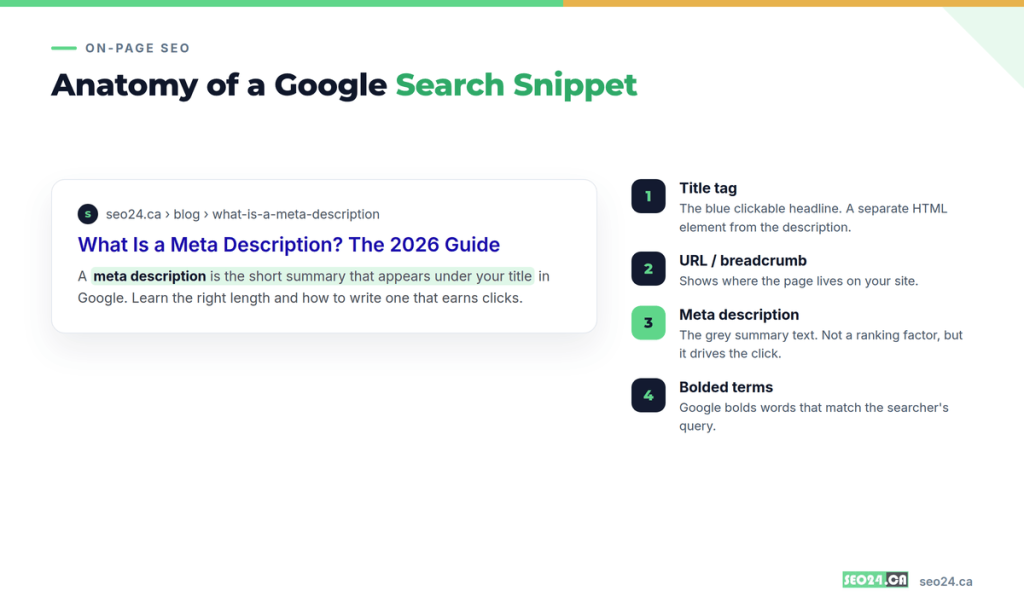
A meta description is an HTML tag that lives in the head of a page and hands search engines a summary of what that page covers. In the results, Google displays that summary as the grey text under the blue title and the URL.
In code, the tag is one line: a meta element with a name of “description” and a content attribute holding your summary sentence. Readers never see the tag itself. They only see the snippet Google chooses to show. Every page on your site can carry its own description, and each one should.
Think of it as the back-cover blurb of a book. The title tag is the cover that catches the eye. The description is the blurb that convinces someone to open it. One earns the glance, the other earns the click.
A Toronto dental clinic we audited had no description on its booking page. Google stitched a sentence together from the footer, so the snippet read like a floating address block. After the clinic added “Book a same-day dental appointment in North York, with emergency slots, direct billing, and evening hours,” the same page started pulling clicks it had been leaving on the table for months.
Pro Tip: The title tag and the meta description are two separate elements that do two separate jobs. If you want to sharpen the headline half of your snippet, our guide on the title tag breaks down length limits and formulas.
So the description shapes clicks, not rankings. That splits people into two camps, and one of them keeps making the same expensive mistake.
Do Meta Descriptions Affect Your Google Rankings?
No. Meta descriptions are not a Google ranking factor, and Google’s John Mueller has confirmed this more than once. A longer description, a keyword-packed one, a perfectly polished one: none of it moves your position in the results.
Here is where people trip. “Not a ranking factor” gets read as “does not matter,” and those are very different claims. The description sets your click-through rate, and click-through rate is one of the engagement signals Google uses to judge whether your result actually satisfies searchers. Picture two pages sitting in positions three and four. The one with the sharper snippet wins more of the clicks, and that behavior can compound over time.
You might be thinking this means you should spend an afternoon tuning descriptions for SEO. Do not. The text carries zero ranking weight. Spend that afternoon making the sentence impossible to scroll past instead.
Here is the part most people miss. Mueller made a second point that rarely gets quoted. Writing your own description is a focus test for the page. If you cannot sum the page up in two sentences, the page is probably trying to do too many things at once, and that is a content problem worth fixing before it becomes a ranking problem. A page that will not fit into one clean description usually will not rank cleanly either.
If length has no effect on rankings, why does everyone obsess over character counts? Because of what happens the moment you get it wrong.
Meta Description vs Title Tag: How They Work Together
The title tag is the clickable blue headline; the meta description is the summary underneath it. Both live in the page head, both shape your snippet, and neither works as well alone as the two do together.
The title makes the promise. The description backs it up with a reason to act. When a searcher scans a page of ten results, the title stops the eye and the description closes the deal. Get them working as a pair and your result reads like a two-line pitch instead of two disconnected fragments.
| Attribute | Title Tag | Meta Description |
| Role in the snippet | The clickable blue headline | The grey summary beneath it |
| Ideal length (2026) | 50 to 60 characters | 150 to 160 characters |
| Ranking factor? | A light, direct signal | Not a ranking factor |
| Main job | Stop the eye and set the promise | Back the promise and earn the click |
| If left blank | Google builds one from the page | Google builds one from the page |
A common trap is repeating the title inside the description. If your title already says “WordPress SEO Services in Toronto,” the description should add something new, like a proof point or an offer, not echo the same four words back.
Pro Tip: Write the title and description together, in the same sitting, as one message. That is the fastest way to stop them from contradicting each other or saying the same thing twice.
Sizing them correctly is half the battle, and the description half has a rule that changed how it works.
How Long Should a Meta Description Be in 2026?
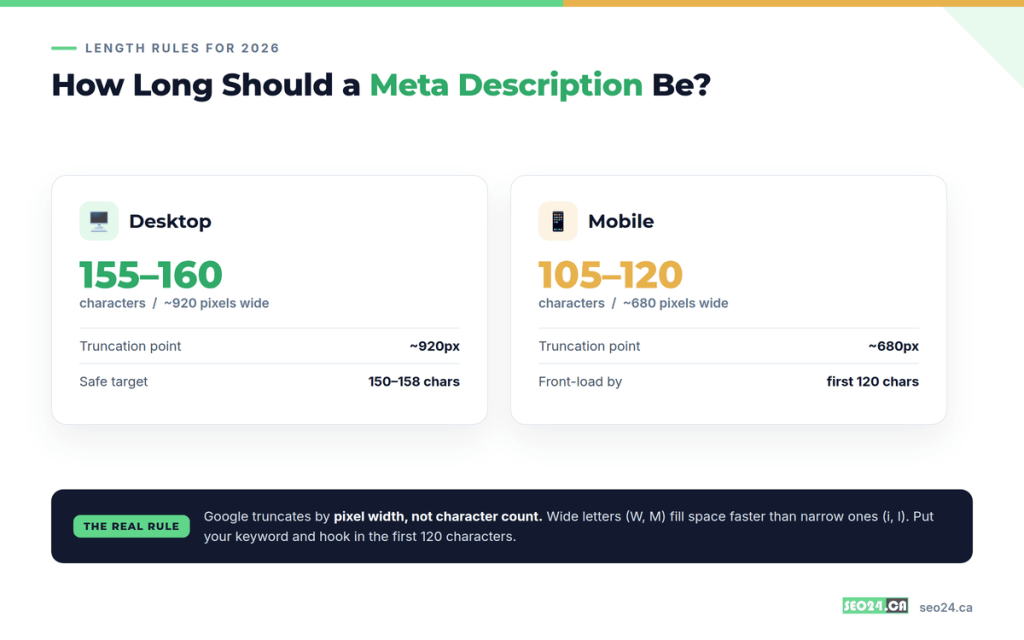
Aim for 150 to 160 characters on desktop, and keep your core message inside the first 120 characters so it survives on mobile. That range gives you room to state a benefit, use your keyword once, and add a call to action without getting cut off.
Here is the detail most beginners never hear: Google does not measure descriptions in characters. It measures in pixels. The desktop snippet truncates at roughly 920 pixels and the mobile snippet at about 680 pixels. Because a capital W is far wider than a lowercase i, two descriptions with the exact same character count can truncate at completely different points. Character count is a useful proxy, not a hard rule.
That distinction matters more than it sounds, because over half of Google searches happen on mobile. If you write to the full 160-character desktop limit and bury your call to action at the end, mobile users see the first 120 characters and an ellipsis where your best line used to be.
For a full breakdown of the exact cutoffs and how to preview them, our guide on how long a meta description should be goes deeper than we can here.
Pro Tip: Front-load ruthlessly. Put your keyword, your main benefit, and any urgency in the first sentence. Treat everything after character 120 as a bonus that desktop users might see and mobile users might not.
Nail the length and you still run into the plot twist that frustrates every SEO who has ever checked their work. Google might replace your description entirely.
How to Write a Meta Description That Earns Clicks
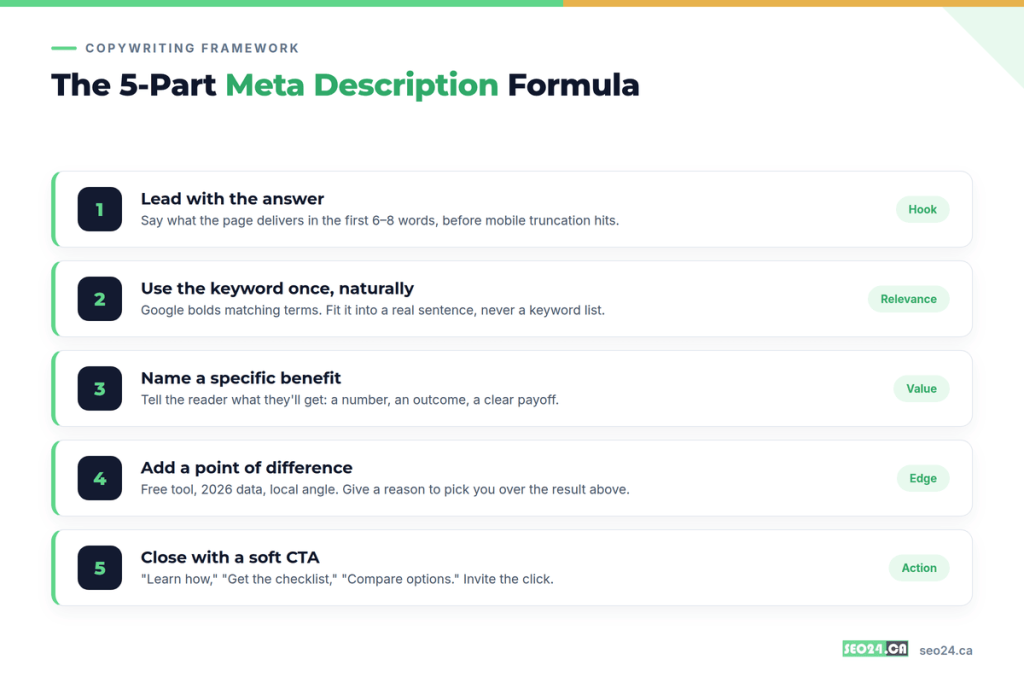
Lead with the answer, use the keyword once, name a specific benefit, add a point of difference, and close with a soft call to action, all inside about 155 characters. That is the whole formula.
Walk through it one step at a time:
- Lead with the answer. Say what the page delivers in the first six to eight words, before the mobile cutoff hits.
- Use the keyword once, naturally. Google bolds terms that match the search query, so a well-placed keyword stands out visually. One mention inside a real sentence is plenty.
- Name a specific benefit. A number, an outcome, a clear payoff. “Recover lost traffic” beats “improve your website.”
- Add a point of difference. Free tool, 2026 data, a local angle, a guarantee. Give a reason to pick you over the result sitting right above you.
- Close with a soft call to action. “Learn how,” “compare your options,” “get the checklist.” Invite the click without shouting.
Compare these two:
Weak: “We offer SEO services for businesses of all sizes and industries.”
Strong: “Get a free SEO audit for your Toronto site. See the exact pages losing traffic and the fixes that recover it, often within 48 hours.”
The first describes the company. The second describes what the reader walks away with, which is the only thing a searcher cares about at the moment of choosing. Keyword placement is its own small craft, and our guide on keyword targeting covers where these terms earn their keep across a page.
Pro Tip: Read your finished description on an actual phone. If the benefit is not visible before the text cuts off, the description is not done yet.
The formula works the same whether you write in raw HTML or a content management system. If you run WordPress, the plugin does most of the counting for you.
How to Add a Meta Description in WordPress with Rank Math
In WordPress with Rank Math, open the post, scroll to the Rank Math SEO box under the editor, click Edit Snippet, and type your description into the Description field.
The steps in order:
- Open the post or page you want to edit.
- Scroll below the content to the Rank Math SEO box.
- Click Edit Snippet to open the title and description fields.
- Type your description and watch the character counter. Green means you are inside the safe range.
- Set your Focus Keyword so Rank Math can check that the keyword appears in the description.
- Update or publish the page.
If your site runs Yoast instead, the process is nearly identical: the SEO panel sits in the same place, with a Meta description field and a length bar that shifts from orange to green as you hit the right range. Either plugin writes the same underlying HTML tag, so the choice comes down to preference. Solid on-page work like this is the backbone of any WordPress SEO effort.
Pro Tip: Rank Math and Yoast both show a live snippet preview. Toggle it to mobile view before you save, since that is where truncation bites hardest.
The field is easy to fill. The frustrating part is what Google does next.
Why Google Rewrites Meta Descriptions and What to Do About It
Google rewrites roughly 60 to 70 percent of meta descriptions, replacing yours with a snippet pulled straight from the page body when it decides that answers the query better. Studies from Portent and others have tracked this rate climbing over the years as Google’s snippet generation improved.
One analysis found that 70 percent of tracked queries surfaced a Google-written description rather than the one on the page, and single pages showed anywhere from two to eleven different snippets in a single month. Google usually rewrites for one of three reasons: your description does not match the specific query, it simply repeats the opening paragraph, or a sentence buried in your page answers the search more directly than your summary does.
You might be thinking this makes the whole exercise pointless. It is not, for one reason that matters. For branded searches and exact-match queries, Google almost always shows the description you wrote. When someone types your company name or the precise phrase your page targets, your words are what appear.
So spend your description-writing time where it pays off:
- Write real descriptions for the queries where they show: brand names, product names, and the exact-match head terms each page is built to win.
- Match search intent closely, which gives Google less reason to override you in the first place.
- Skip hand-crafting descriptions for thin, long-tail pages Google will rewrite regardless.
- Check Search Console to see which snippet is actually displaying before you rewrite anything.
Some teams have taken this data and stopped hand-writing descriptions for the bulk of their pages, reserving the effort for launches, money pages, and anything with compliance stakes. That is a defensible call when 70 percent of your work gets swapped out. The nuance is that a strong description still helps on the pages where it shows, and those pages are often your most valuable ones. If a page keeps getting rewritten and losing clicks, that can be a symptom of a bigger issue, which our guide on why your optimized page is not ranking digs into.
There is one more reason to keep writing descriptions, and it has nothing to do with Google’s ten blue links.
Do Meta Descriptions Matter for AI Overviews and ChatGPT?
Yes. Meta descriptions are core metadata that AI search tools read to understand and summarize your page, so leaving the field blank hands the machines less to work with. ChatGPT, Gemini, Perplexity, Claude, and Google AI Overviews all lean on clear metadata when they decide what a page is about and whether to cite it.
There is a gate worth knowing about. A page is only eligible to appear in Google’s AI features if it is eligible to appear as a normal search snippet in the first place. The old fundamentals still decide whether the fancy new surfaces ever see you. Your meta description, your title, and your structured content are part of how both Google AI Overviews and large language models build a picture of your page.
A SaaS company we worked with left descriptions blank across its help center, trusting the machines to figure it out. After writing a plain one-sentence summary at the top of each article and mirroring it in the meta description, their pages started turning up as cited sources in AI answers for their product name. The summary gave the models something clean to quote.
Pro Tip: Write the first sentence of your description as a self-contained answer that makes sense with no other context. That is exactly the kind of line an AI Overview or a featured snippet can lift word for word, and getting cited in ChatGPT rewards the same clarity.
The mechanics are simple once you can see them. The failures are simple too, and they repeat on site after site.
Meta Description Mistakes That Quietly Kill Your CTR
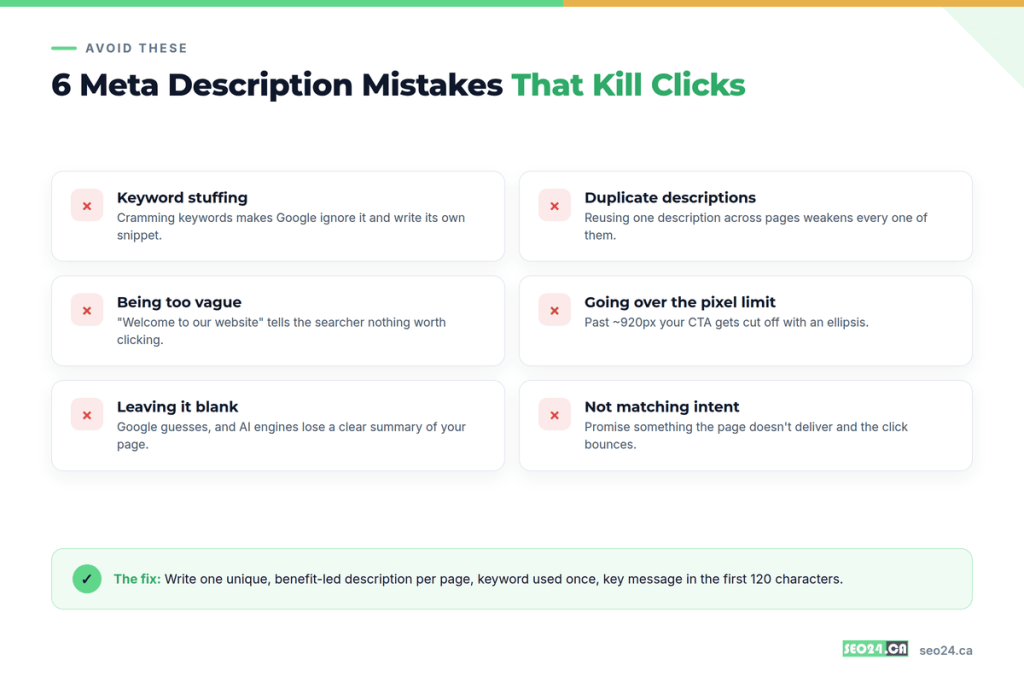
The most common meta description mistakes are keyword stuffing, duplicate descriptions across pages, vague copy, overshooting the pixel limit, and leaving the field blank. Each one costs you clicks in a slightly different way.
Run down the list and check your own pages against it:
- Keyword stuffing. Cramming the same keyword in three times reads like a robot and signals low quality, so Google often ignores the description and writes its own.
- Duplicate descriptions. Reusing one description across dozens of product or category pages weakens all of them and confuses which page should rank.
- Being too vague. “Welcome to our website” or “We are a full-service agency” tells a searcher nothing worth clicking on.
- Overshooting the pixel limit. Run long and your call to action gets chopped off with an ellipsis, right where you needed it most.
- Leaving it blank. Google guesses, the AI engines get less to work with, and you lose control of your own first impression.
- Missing the intent. Promise something the page does not deliver and the click bounces straight back, which teaches Google the result was a poor match.
An ecommerce client of ours ran the same twelve-word description across 300 product pages. Rewriting them into unique, benefit-led lines took a week of work, and the category pages that had been buried started earning clicks they had never seen. If low click-through rate is your real symptom, our guide on how to improve your click-through rate covers the fixes beyond the description itself.
Conclusion
A meta description will never rank your page, and chasing it as a ranking tactic wastes time you could spend elsewhere. Its job is narrower and more valuable than that: it wins the click once you have already earned the ranking. Treat it as the two-line sales pitch it is. Lead with a real benefit, use your keyword once, respect the mobile cutoff, and match what the page actually delivers.
The teams that get the most from meta descriptions are the ones who stop writing them for every page and start writing great ones for the pages that count. Focus your effort on branded terms, money pages, and the content you most want cited by both Google and AI search. Write each description as if it will always be shown, because on the queries that matter, it will be.
Frequently Asked Questions
What is a meta description in simple terms?
A meta description is a short HTML tag that summarizes a web page. Google shows it as the grey text under your title in search results, and it helps searchers decide whether to click your page or a competitor’s.
Is a meta description a ranking factor?
No. Google has confirmed meta descriptions are not a direct ranking factor. They influence click-through rate, and a higher click-through rate can indirectly help your rankings over time as an engagement signal, but the description text itself carries no ranking weight.
How long should a meta description be?
Around 150 to 160 characters on desktop, with your most important message in the first 120 characters so it is not cut off on mobile. Google truncates by pixel width, roughly 920 pixels on desktop and 680 on mobile, so character count is a guide rather than a hard limit.
Why does Google rewrite my meta description?
Google rewrites 60 to 70 percent of descriptions when it thinks a sentence from your page matches the searcher’s query better than your summary. It also rewrites when your description is too short, duplicates your first paragraph, or does not match the query. For branded and exact-match searches, Google usually keeps your version.
Do meta descriptions matter for AI search?
Yes. Tools like ChatGPT, Gemini, Perplexity, and Google AI Overviews read meta descriptions to understand and summarize your page. A clear, unique description gives AI engines a clean summary to work with, which helps your page get understood and cited.
Get Your Free Meta Description Audit
Not sure which of your pages have missing, duplicate, or truncated meta descriptions? Get a free SEO audit from SEO24 and we will show you the exact pages leaking clicks, plus the title and description fixes that recover them.