
A 204 status code (“No Content”) is the server’s way of saying “your request worked, but I have nothing to send back.” It is a success response in the 2xx family, defined in RFC 9110, and it carries no response body at all. Browsers and API clients stay exactly where they are. Developers and webmasters reach for it after a DELETE, a PUT, or a background action where returning data would be pointless. Below you will see what 204 No Content really means, when to use it, how it differs from 200, and the one situation where it quietly wrecks your search rankings.
Key takeaways
- A 204 No Content means the request succeeded and there is intentionally no response body to return.
- It is most common after DELETE, PUT, PATCH, CORS preflight (OPTIONS), and analytics beacons.
- A 204 response must not include a body; it is cacheable by default and often carries an ETag on PUT.
- On an API or utility endpoint, a 204 is perfectly healthy. On a page meant to rank, it is a problem.
- Google cannot index a URL that returns 204, so a content page returning one will not appear in search results.
- The most common bug is calling response.json() on an empty 204 body, which throws an error.
What does a 204 status code mean?
A 204 status code means the server successfully processed the request and is deliberately returning no content in the response body. The status line carries the full message: the work is done, and there is nothing left to show.
The leading “2” places it in the success category alongside 200 OK and 201 Created. The difference is the body. A 200 hands back a payload (a web page, a JSON object, a file). A 204 hands back headers and a status line, then stops. The current specification, RFC 9110, Section 15.3.5, defines this behaviour and replaces the older RFC 7231 that many older articles still quote.
Think of it like asking a colleague to file a document. You do not need the document read back to you. A nod that says “done” is enough. That nod is your 204.
| Worth knowing: If you are still citing RFC 7231 in your API docs, update the reference. RFC 9110 (published June 2022) is the consolidated HTTP semantics spec, and reviewers in 2026 expect to see it. |
Here is the part that trips people up: an empty 204 is not the same as a 200 with an empty body. That distinction decides how clients, caches, and crawlers treat your response, which is exactly where we go next.
204 vs 200: why “no content” is not the same as “empty content”
A 200 OK with an empty body still says “here is your content, and it happens to be empty.” A 204 says “there is no content by design.” Clients treat these two very differently, and so do caches and search engines.
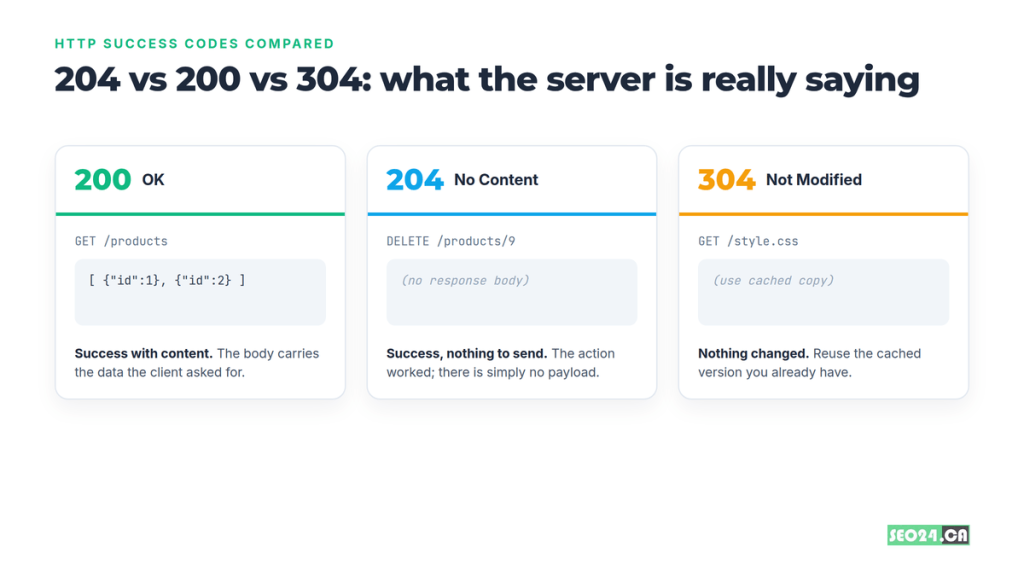
Returning a 200 with {} or [] forces the client to parse a payload that means nothing. A 204 removes that step entirely. One contrarian point worth making: a lot of teams treat 200 as the safe default for everything, but “safe” 200s with empty bodies are how you end up with clients that hang waiting for data that never had a reason to exist.
204 vs 304 vs 202: the three that get confused
| Code | Meaning | Has a body? | Typical trigger |
| 200 | Success, with data | Yes | GET that returns a resource |
| 204 | Success, no content | No | DELETE, PUT, PATCH, beacons |
| 304 | Not Modified, use cache | No | Conditional GET with ETag match |
| 202 | Accepted, still processing | Usually | Async job queued, not finished |
The quick rule: 204 means “done, nothing to send.” 304 means “nothing changed, reuse your copy.” 202 means “I took the job, but it is not finished yet.” Mixing these up is the difference between a clean API and one that confuses every consumer.
So when is the empty response actually the right move? More often than most developers think.
When should you return a 204 No Content?
Return a 204 when the operation succeeded and the client gains nothing from a response body. That covers a surprising number of everyday endpoints.
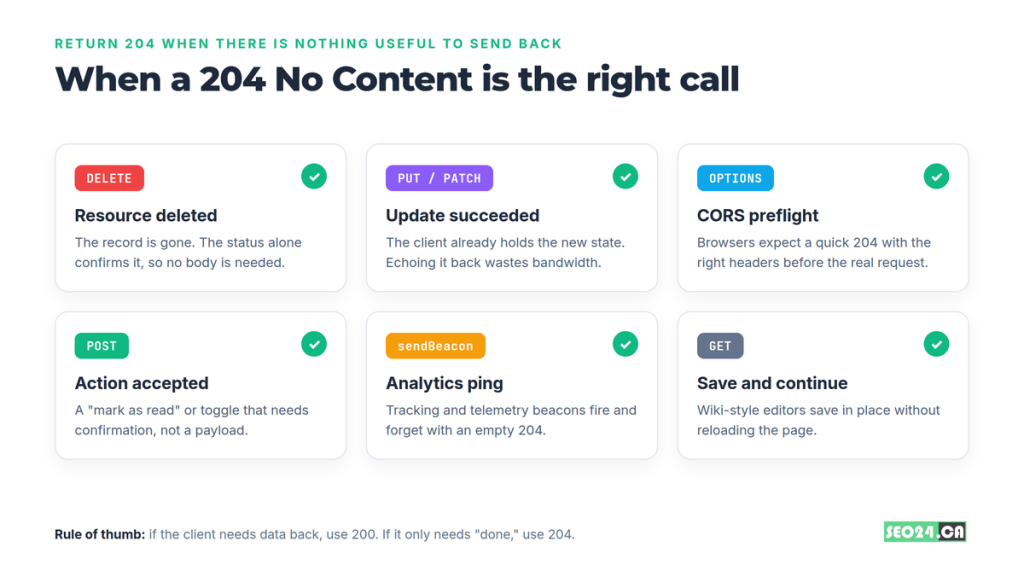
The most common cases:
- DELETE requests. The resource is gone. The status confirms it, so echoing the deleted object back adds nothing.
- PUT and PATCH updates. When the client already holds the new state, returning it again wastes bandwidth. On PUT, include an ETag for the new representation.
- CORS preflight (OPTIONS). Browsers fire an OPTIONS request before the real one and expect a fast, bodyless 204 with the right CORS headers.
- Fire-and-forget POSTs. A “mark as read,” a toggle, or a vote that needs confirmation, not a payload.
- Analytics beacons. navigator.sendBeacon() and tracking pixels return 204 so the browser never waits on a body.
A real example: a Toronto SaaS team we audited was returning the full updated user object on every PATCH /settings call. Their settings screen fired roughly 12,000 saves a day, each shipping a 4 KB payload nobody read. Switching to 204 cut about 48 MB of daily egress and shaved perceptible lag off the save button. Nothing broke, because the client already had the values it just sent.
| Quick win: For CORS preflight specifically, a 204 is usually better than a 200. Some browsers and proxies treat an OPTIONS 200 with an unexpected body as suspicious, and a 204 sidesteps the issue while keeping the preflight fast. |
There is a catch, though. “No body” is not a loose suggestion. It is a rule with teeth, and breaking it causes real bugs.
The rules a valid 204 response must follow
A 204 response must not contain a message body, and well-behaved clients will not try to read one. A handful of header and behaviour rules come with that.
- No response body. Anything you write after the headers violates the spec. Some HTTP libraries will hang, truncate, or throw when they hit unexpected bytes.
- Content-Length is 0 (or omitted). There is nothing to measure, so do not advertise a length you will not send.
- Cacheable by default. Per RFC 9110, a 204 is cacheable, and an ETag is included when relevant. Set cache headers intentionally rather than by accident.
- It does not change the page. If a browser navigates to a top-level URL that returns 204, it stays on the current page instead of loading a blank one.
That last rule is a famous gotcha. Years ago, some sites pointed a link or form at a 204 endpoint specifically so the browser would fire the request and not navigate anywhere. It works, but it is a hack. A real example: a webmaster we helped had a “close tab” button wired to a 204 URL, then could not understand why analytics showed the request but users reported “nothing happened.” Nothing was supposed to happen visually. That is the whole point of the code.
Understanding the rules also explains why the SEO question has a two-part answer, which is the thing most webmasters actually came here to settle.
Is a 204 status code harmful? It depends on the URL
A 204 is not inherently harmful. It is harmful only when it appears on a URL that is supposed to serve content and rank in search. On API and utility endpoints, it is healthy and expected.
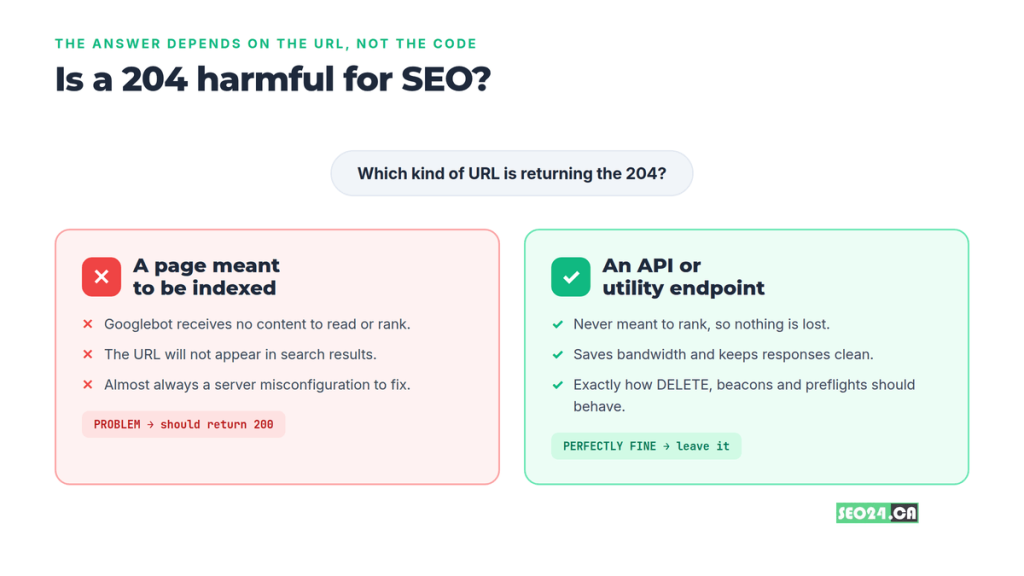
You might be thinking, “isn’t any non-200 code a red flag?” Not at all. Your robots.txt file, a CORS preflight, and a delete endpoint all do their jobs without ever needing to rank. The trouble starts when a 204 lands somewhere a reader (or Googlebot) expected real content.
When a 204 is a problem
- A blog post, product page, or category page returns 204 because of a server or CDN misconfiguration.
- A page that used to return 200 now serves an empty 204 after a deployment, and traffic quietly drops.
- A bot-detection or geo rule returns 204 to crawlers while serving 200 to humans, which can look like cloaking.
When a 204 is completely fine
- REST endpoints for DELETE, PUT, and PATCH.
- OPTIONS preflight responses.
- Tracking beacons and other background calls that were never meant to be indexed.
| What most people miss: A single broken page returning 204 rarely tanks a whole site. The real damage comes from pattern problems: a template, a CDN rule, or a plugin that returns 204 across a whole section. We watched a content hub lose roughly 60% of its organic clicks in three weeks because a caching layer served 204 to Googlebot on every paginated archive page. |
Once you accept that the code itself is neutral, the next question is mechanical: what does a 204 actually do to crawling and indexing?
How a 204 affects crawling, indexing, and rankings
When Googlebot requests a URL and receives a 204, it gets no content to read, score, or index. With nothing to evaluate, the URL has no path into the index and cannot appear in search results.
This is different from a “crawled, currently not indexed” status, where Google did see content and chose to hold it back. A 204 gives the crawler nothing in the first place. It also differs from 301 redirects, which pass signals to a new URL. A 204 passes nothing and points nowhere.
If your page is meant to rank, it has to return a 200 with real HTML that sits among the file types Google can actually index. There is one upside worth noting: because 204 beacons are tiny and bodyless, using them for analytics instead of heavier requests can trim a little load off your pages, which quietly helps your Core Web Vitals.
| Make it a habit: Run your key landing pages through Google Search Console’s URL Inspection tool monthly. If it reports a status other than 200 on a page you expect to rank, treat it as a fire drill, not a someday task. |
Knowing the impact is half the battle. The other half is catching the mistakes before they ship.
Common 204 mistakes developers make (and how to avoid them)
Most 204 bugs come from treating it like a normal response with an empty body. A few patterns cause the majority of incidents.
Calling .json() on an empty 204
This is the number one 204 bug. A fetch() call followed by await res.json() throws a parse error on a 204 because there is no JSON to parse. Check the status first:
| Fix: if (res.status === 204) return null; else return res.json(); |
Sending a body with a 204
Frameworks sometimes let you set a 204 status and still write a body. The header says zero content, the body says otherwise, and clients behave unpredictably. A real example: a fintech team returned a 204 with a JSON error message attached. Their mobile app showed success while the backend had actually rejected the payment. Pick 200 with a body or 204 with none, never both.
Using 204 for failures
A 204 is a success code. If validation failed, the input was missing, or the server errored, return a 4xx or 5xx. A silent 204 on failure hides the problem from clients and from your own logs.
Letting a content page return 204
Caching layers, edge rules, and aggressive bot filters are the usual suspects. Audit any rule that can short-circuit a response before it reaches your application, and confirm it never returns 204 for human-facing pages.
All of these are easy to catch once you know how to look, so let us cover the quickest ways to check.
How to check which URLs return a 204
You can confirm a status code in seconds from the command line, the browser, or a crawler. Use whichever fits your workflow.
- Command line. Run curl -I https://yoursite.ca/path to see the status line in the headers without downloading a body.
- Browser DevTools. Open the Network tab, trigger the request, and read the Status column. A 204 shows up with a blank size.
- Screaming Frog or Sitebulb. Crawl the site and filter by status code to surface every URL returning 204 at scale.
- Google Search Console. Use URL Inspection for individual pages and the Pages report to spot indexing problems across the site.
| Automate it: Add a status-code check to your deployment pipeline. A simple post-deploy script that curls your top 20 URLs and fails the build on any non-200 catches a rogue 204 before your users (or Google) ever see it. |
The bottom line on 204 No Content
A 204 status code is a precise, useful tool: it confirms success while sending nothing back, which keeps APIs lean and background actions quiet. The code is never the problem on its own. Context is everything.
Use 204 freely on DELETE, PUT, PATCH, preflight, and beacon endpoints where a body would only add noise. Keep it far away from any URL that is supposed to serve content and earn rankings, because Google cannot index what it cannot read. Get that one distinction right, and the 204 becomes a sign of a well-designed system rather than a hidden leak in your search traffic.
Frequently asked questions
Is a 204 status code an error?
No. A 204 is a success response in the 2xx family. It tells the client the request worked and there is simply no content to return.
What is the difference between 200 and 204?
A 200 OK returns a response body with the requested data. A 204 No Content returns no body at all. Use 200 when the client needs data back and 204 when it only needs confirmation that the action succeeded.
Can a 204 response have a body?
No. By specification a 204 must not include a message body. If you need to send data, use 200 instead. Sending a body with a 204 causes unpredictable client behaviour.
Is a 204 bad for SEO?
Only on pages meant to rank. Google cannot index a URL that returns 204, so a content page serving one will not appear in search. On API and utility endpoints, a 204 has no SEO impact because those URLs were never meant to be indexed.
When should I use 204 instead of 200?
Use 204 when an operation succeeds but the client gains nothing from a response body, such as a DELETE, an idempotent PUT or PATCH, a CORS preflight, or an analytics beacon. Use 200 whenever you need to return data.
Next step: Not sure whether a 204 (or any status code) is quietly costing you rankings? Run your top landing pages through Google Search Console’s URL Inspection tool this week, and if you spot anything other than a 200 on a page that should rank, get a technical SEO audit from the SEO24.ca team to find and fix the root cause before it spreads.