
A meta description should be 150 to 160 characters long, which is about 920 pixels wide on desktop. That length lets Google show your full summary and call to action without cutting it off. Here is the part most guides skip: Google measures meta description length in pixels, not characters, and mobile snippets usually stop near 120. This guide gives you the exact limits for desktop and mobile, what Google actually says, how to write a description that fits, the mistakes that get yours truncated, and the tools that show the cutoff before you hit publish. First, the number that actually matters.
Key Takeaways
- The ideal meta description length is 150 to 160 characters for desktop and 110 to 120 characters for mobile.
- Google truncates by pixel width (about 920 pixels on desktop, 680 pixels on mobile), not by a fixed character count.
- There is no official character limit from Google. The 150 to 160 range is a community best practice for avoiding truncation.
- Meta description length is not a direct ranking factor, but the right length lifts click-through rate, which can support rankings indirectly.
- Google rewrites roughly 62 to 70 percent of meta descriptions when they do not match the search query.
- Front-load your key message and call to action in the first 120 characters so it survives on mobile.
- Use a pixel-based SERP preview tool to check length before publishing.
How Long Should a Meta Description Be?
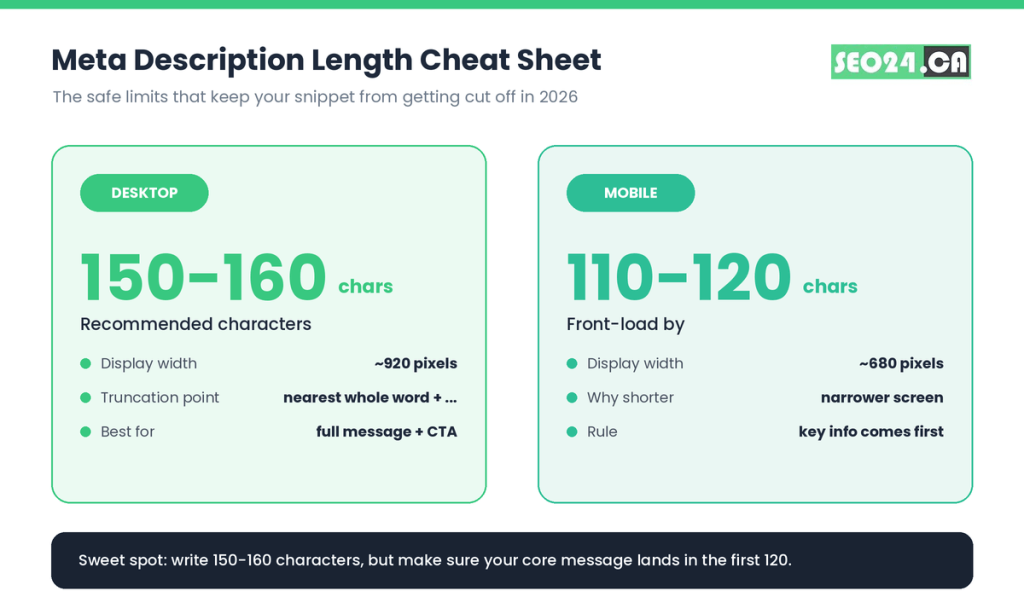
For 2026, a meta description should be 150 to 160 characters on desktop and 110 to 120 characters on mobile. That keeps it inside the space Google gives a snippet, so your full message shows instead of trailing off into an ellipsis.
The 150 to 160 range is a guideline, not a law. It exists because that many average characters fits the roughly 920 pixels Google allows on a desktop result. Write a clear, specific summary in that window and you rarely get cut off.
Treat the upper end as a ceiling, not a target. A sharp 140-character description that answers the query beats a padded 160-character one stuffed with filler to reach a number.
| Device | Safe character range | Approx. pixel width |
| Desktop | 150 to 160 characters | ~920 pixels |
| Mobile | 110 to 120 characters | ~680 pixels |
| Safest for both | Front-load the first 110 to 120 | Core message first |
Pro Tip Aim your most important words and your call to action at the front of the description. If Google trims the tail on a small screen, the part that earns the click is still visible.
That covers the headline number. But here is the catch: characters are only half the story. Google does not actually count them.
Why Google Measures Meta Descriptions in Pixels, Not Characters
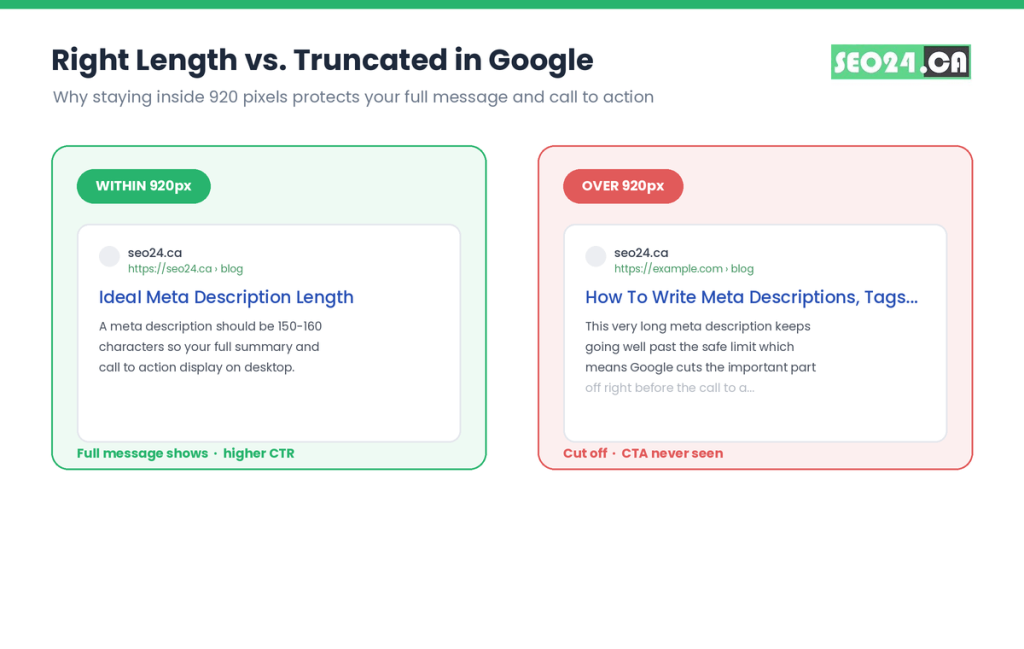
Google decides how much of your meta description to show based on pixel width, not character count. The desktop limit is about 920 pixels and the mobile limit is about 680 pixels. When your text passes that width, Google trims it to the nearest whole word and adds an ellipsis.
This matters because letters are not the same width. A capital W or M takes far more horizontal space than an i or an l. So two descriptions with the same 158-character count can display very differently: one fits cleanly, the other gets clipped.
Think of it like a bookshelf measured in inches, not in number of books. Ten thin paperbacks and ten thick hardcovers are the same count, but only one set fits the shelf. Your snippet works the same way.
What most people miss A description packed with wide characters (capital letters, the @ symbol, em-style punctuation) can truncate well before 160 characters. A line full of narrow letters can survive past it. Counting characters gets you close. Checking pixels gets you certain.
Leading SEO tools like Moz, Ahrefs, and Semrush all land on the same 150 to 160 character guidance for this reason. So if pixels decide the cutoff, which screen should you write for?
Meta Description Length on Mobile vs Desktop
Desktop shows roughly 150 to 160 characters; mobile shows roughly 110 to 120 before truncating. Since Google uses mobile-first indexing and most searches now happen on phones, you should write for the smaller screen and let desktop enjoy the extra room.
The practical move is front-loading. Put the answer, the benefit, and the keyword in the first 110 to 120 characters. Anything after that is a bonus that desktop users see and mobile users may not.
Picture a Toronto dental clinic whose description opened with a slogan and only mentioned “book online today” at the very end. On mobile, the booking line was cut off. Moving the call to action to the front recovered the part that actually drove clicks.
- Lead with the search answer or main benefit in the first sentence.
- Place your primary keyword early so it can show in bold on the result.
- Keep the call to action inside the first 120 characters.
- Save secondary detail for the tail, where only desktop may show it.
Pro Tip You do not need two separate descriptions for mobile and desktop. Write one that works on mobile first; it will read just fine on desktop, where you simply get more visible text.
Front-loading also feeds your click-through rate, because the most persuasive words are never the ones that get cut. Next question: how far can you push the length before it backfires?
What Is the Maximum (and Minimum) Meta Description Length?
There is no hard maximum set by Google. In practice, anything past about 160 characters (920 pixels) risks being truncated on desktop, and Google may rewrite long descriptions entirely. The working maximum to stay fully visible is 920 pixels, or roughly 155 to 160 characters.
Google has occasionally displayed longer snippets, and it once briefly showed descriptions around 300 characters in 2017 before reverting. Do not build a strategy around exceptions. Write for the limit that holds today.
Is there a minimum meta description length?
There is no official minimum either, but a description under about 70 characters usually wastes the space. It often fails to summarize the page, gives Google less reason to use it, and looks thin next to competitors. Aim for at least 70 to 120 characters so the snippet earns its spot.
| Length | What it means | Risk |
| Under 70 chars | Too short | Thin, often rewritten by Google |
| 70 to 120 chars | Mobile-safe | Low, may leave desktop space unused |
| 120 to 160 chars | Sweet spot | Low if front-loaded |
| Over 160 chars | Too long | Truncated on desktop, may be rewritten |
So the range has a floor and a ceiling. What actually happens when you cross either line?
What Happens If Your Meta Description Is Too Long or Too Short
A description outside the safe range performs worse in search results, either by getting cut off or by failing to sell the click. Both outcomes cost you traffic even though length itself is not a ranking factor.
If it is too long
Google truncates past about 920 pixels and adds an ellipsis. Whatever sat at the end (often the call to action) vanishes from the snippet. A 178-character description that ends in “…request your free quote” loses the exact phrase that would have driven the click.
If it is too short
A description under roughly 70 characters reads as thin. It leaves persuasive space empty, skips keywords that could appear in bold, and gives Google more reason to ignore your text and generate its own snippet from the page.
For example, the description “Learn about meta description length.” (36 characters) technically works, but it says nothing a searcher cares about. Compare it with a fuller version (151 characters) that answers the query and adds a reason to click.
What most people miss Both extremes raise the odds that Google rewrites your description. The fix is rarely “write more” or “write less.” It is “match the query and fit the space,” which protects your click-through rate far more than hitting an exact count.
Length is in your control. Whether Google honors it is not entirely. So what does Google itself say you should do?
What Google Officially Says About Meta Description Length
Google publishes no character or pixel limit for meta descriptions. Its official guidance in Google Search Central asks you to write a unique, accurate, and compelling summary of the page, and to make it long enough to be useful but not artificially padded.
Google describes a good meta description as a pitch that convinces the searcher your page is what they want. It also states plainly that meta description content is not used as a ranking signal. The value is in the click, not the rank.
Google can and does rewrite your description when a different snippet from your page better matches a query. Recent data puts that rewrite rate around 62 to 70 percent across the web, which is normal and not a penalty.
Yes, Google says length does not matter for ranking. But the 150 to 160 guideline still helps, because it keeps your chosen words visible instead of letting Google pick a snippet for you. You optimize length to control the message, not to climb the rankings.
Pro Tip If Google keeps rewriting a key page, the usual cause is a mismatch between your description and the query. Rewrite the description to answer the actual search, and check related pages with our guide on ranking in featured snippets, which rewards the same clear, answer-first phrasing.
With the rules clear, here is how to write one that fits every time.
How to Write a Meta Description That Fits (Step by Step)
Write your meta description in this order and it will land inside the limit while reading naturally. The goal is a clear summary that earns a click, sized to survive on mobile.
- Open with the answer or main benefit, using your primary keyword early so it can appear in bold.
- Add one specific reason to click: a number, an outcome, or a differentiator.
- End with a clear call to action (learn how, compare options, get a quote).
- Count your work, then check the pixel width with a SERP preview tool, not just the character count.
- Confirm the first 110 to 120 characters carry the message in case mobile trims the rest.
- Make it unique. No two pages on your site should share the same description.
Keep keywords natural rather than crammed. One primary keyword placed well does more than three forced ones; the same restraint that governs how many keywords to use per page applies inside the description.
For example, a Toronto bakery page could use: “Order fresh sourdough and custom cakes in Toronto with same-day pickup. See this week’s menu and reserve your loaf online.” It leads with the offer, includes the location keyword, and ends on an action, all inside the safe range.
Pro Tip Templates speed this up. Try: “[Benefit/answer] for [audience/location]. [Specific proof or number]. [Action].” The same answer-first habit that powers strong SEO-friendly blog posts makes meta descriptions write themselves.
Even with a clean process, a few recurring habits quietly sabotage descriptions. Here are the ones to avoid.
Common Meta Description Mistakes That Get Yours Cut Off or Rewritten
Most truncation and rewrite problems trace back to the same short list of mistakes. Fix these and your descriptions show the way you wrote them far more often.
- Duplicate descriptions: reusing one description across many pages confuses Google and weakens every snippet.
- Keyword stuffing: repeating the keyword reads as spam and pushes Google to write its own version.
- Heavy special characters: stars, trademark and copyright symbols, and stacked pipes or dashes can trigger Google to drop your description entirely.
- Ignoring mobile: a great desktop line that hides the call to action past 120 characters fails on phones.
- Writing for the plugin score: chasing a green “good” light instead of writing for the searcher.
- Leaving key pages blank: letting Google auto-generate descriptions for pages you actually want to rank and convert.
What most people miss Chasing the green “good length” light in an SEO plugin can backfire. The plugin counts characters; Google counts pixels and, more importantly, relevance. A description that fits the bar but ignores the query still gets rewritten. Write for the search first, the score second.
Pro Tip Auditing an older site? Pair this with our guide on updating old blog posts, and rewrite thin or duplicated descriptions in the same pass.
Knowing the mistakes is one thing. Catching them before you publish is another, and that is what the right tool does.
Tools to Check Your Meta Description Length and Pixel Width
Use a SERP preview tool that measures pixels, not just characters, so you can see exactly where Google will cut your snippet on desktop and mobile before you publish. Character counters alone miss the truncation point.
| Tool | Best for | Shows pixel width? |
| Yoast / Rank Math (WordPress) | Editing inside your CMS | Yes, live preview |
| Mangools SERP Simulator | Quick desktop and mobile preview | Yes |
| Portent SERP Preview | Side-by-side device view | Yes |
| Ahrefs / Semrush site audit | Finding truncated or missing descriptions at scale | Flags length issues |
If you are choosing your stack, our roundup of the best SEO tools for beginners covers preview tools and audits that catch length problems across a whole site, not one page at a time.
Pro Tip Previewing also helps you show up well in. Clear, answer-first descriptions are easier for AI search to read and cite, the same way they are easier for searchers to scan.
The bottom line on meta description length
Meta description length comes down to one principle: write for the searcher and size it for the screen. Keep desktop descriptions around 150 to 160 characters, front-load the first 120 for mobile, and remember that Google measures the cutoff in pixels, not characters.
Length will not lift your ranking on its own, and Google may still rewrite your text. What length controls is whether your own words, your best pitch and your call to action, reach the searcher intact. That is where clicks come from, and clicks are what move pages over time.
Write a clear, unique summary that answers the query, check it in a pixel-based preview, and you have done the part that actually matters.
Frequently Asked Questions
How long can a meta description be?
There is no hard maximum, but to stay fully visible keep it under about 920 pixels, which is roughly 155 to 160 characters on desktop. Past that, Google truncates the snippet with an ellipsis and may rewrite it. On mobile the visible limit is shorter, around 110 to 120 characters.
How long does a meta description take to update in Google?
It updates the next time Google recrawls and reindexes the page, which can take anywhere from a few hours to a few weeks depending on how often the page is crawled. You can speed it up by requesting indexing in Google Search Console. Remember that even after updating, Google may choose to display its own snippet.
Does meta description length affect SEO rankings?
Not directly. Google has confirmed meta descriptions are not a ranking factor. The indirect effect is real, though: a well-sized description (150 to 160 characters) that avoids truncation lifts your click-through rate, and stronger engagement can support rankings over time. A weak or cut-off description that earns fewer clicks can hold you back.
Will Google always show the meta description I write?
No. Google rewrites descriptions roughly 62 to 70 percent of the time, usually when a different snippet from your page better matches the query. You reduce rewrites by writing a description that genuinely answers the search, sized to fit, and matched to the page content.
How long should a product description be for SEO?
That is a separate thing from the meta description. On-page product copy can run several hundred words to cover features, benefits, and keywords. The product page’s meta description still follows the same rule as any other page: 150 to 160 characters on desktop, front-loaded for mobile, summarizing the product and inviting the click.
Want every snippet on your site working this hard?
Most sites have dozens of pages with truncated, duplicated, or missing meta descriptions quietly leaking clicks. Get a free SEO audit and we will flag the pages whose descriptions are costing you traffic, then show you exactly how to fix them. Claim your free SEO audit → SEO services in Toronto