
A title tag is the HTML element that sets the clickable headline for your page in Google and labels the browser tab. It lives in your page’s head section as a single line of code, and search engines read it to work out what your page is about. Get it right and you win the click. Get it wrong and Google may rewrite it, or push you below a competitor who wrote a better one. This guide covers what a title tag is, how long it should be, how to write one that ranks, and why Google sometimes swaps yours out. Let’s start with the part most beginners get backwards.
KEY TAKEAWAYS
- A title tag is an HTML element (the <title> code) that becomes your clickable headline in search results and the label on your browser tab.
- Aim for about 50 to 60 characters, or under roughly 600 pixels wide, so the full title shows on desktop without being cut off.
- Put your main keyword in the first 30 to 35 characters, where it survives truncation on mobile screens.
- Google rewrites around 76% of titles. Matching your title to your H1 drops that risk to roughly 21%.
Every page needs its own unique title. Duplicate or ‘Home’-style titles waste your strongest on-page ranking signal.- Title tags still count for ranking even when Google shows a different version, so a strong one always pays off.
What Is a Title Tag?
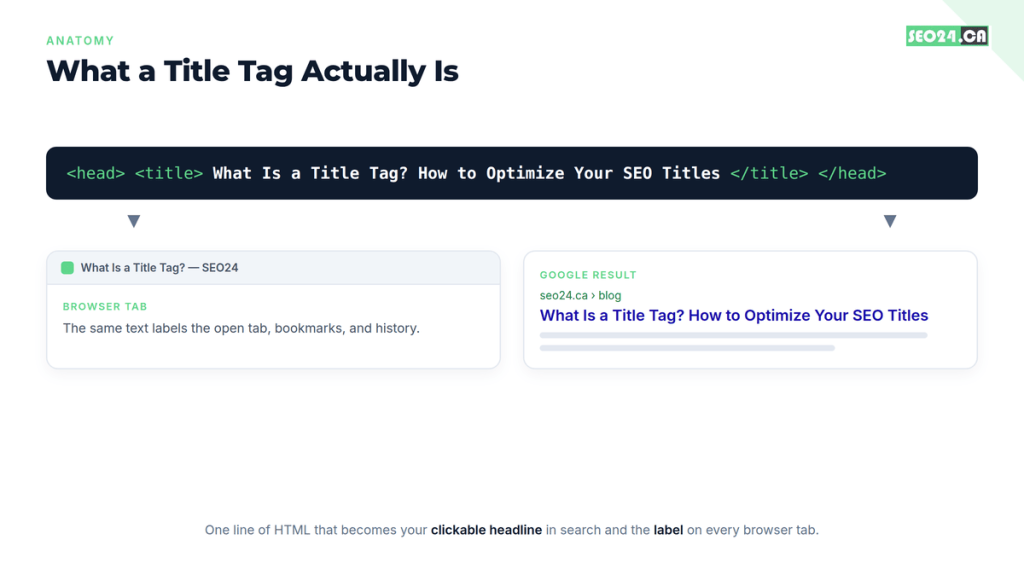
A title tag is an HTML element that specifies the title of a web page. It shows up as the blue clickable headline in Google search results and as the text on your browser tab, and it sits inside the <head> section of your page as one short line of code.
Search engines treat that line as one of the first clues about your page’s topic. Users treat it as a promise: it tells them, in a few words, whether your page answers what they just typed. That is a lot of weight for one sentence to carry, which is exactly why it deserves more than a rushed afterthought.
Here is the distinction beginners miss most often. The title tag is not the same as the big headline printed at the top of your page. That visible headline is usually the H1. The two can match, and often should, but they are separate elements doing separate jobs. The title tag talks to the search result. The H1 talks to the reader already on your page.
| PRO TIP A Toronto bakery we audited had every blog post set to the same title: ‘Blog | Sweet Co.’ Google had nothing specific to display, so it built its own titles from stray sentences in the body. Give every page a real, descriptive title and you take that decision back from the algorithm. |
So the title tag is simple to define but easy to waste. Before you can write a good one, you need to know how it differs from the two elements people constantly confuse it with.
Title Tag vs. H1 vs. Meta Description
The title tag, the H1, and the meta description are three different elements that often get lumped together. The title tag is your search headline, the H1 is your on-page headline, and the meta description is the short summary under the search headline. Each has its own length rules and its own purpose.
| Element | Where it appears | Ideal length | Main job |
| Title tag | Search result headline and browser tab | ~50 to 60 characters | Earn the click and signal the topic |
| H1 | Top of the page itself | No strict limit | Confirm the topic for the reader |
| Meta description | Snippet text under the title | ~140 to 160 characters | Support the title and add detail |
The title and the meta description work as a pair in the search result. The title makes the promise; the description backs it up. If you are unsure how to size the second half of that pair, our guide on how long a meta description should be walks through the pixel limits in detail.
You might be thinking the H1 and the title should just be identical to save time. Not quite, and the reason turns out to matter for a problem we will hit later: how much Google trusts your title in the first place.
Why Title Tags Matter for SEO and AI Search
Title tags matter because they influence three things at once: how Google ranks your page, whether people click it, and whether AI answer engines cite it. Few on-page elements touch all three.
For ranking, Google uses the words in your title as a topic signal. A title that clearly states its subject helps the page compete for the right queries. For clicks, the title is your storefront window in a crowded results page. Two pages can rank side by side, and the one with the sharper title takes more of the traffic. If your rankings are fine but clicks are thin, the fix usually starts with the title, and our guide to improving your click-through rate goes deeper on that.
WHAT MOST PEOPLE MISS Titles now do double duty. Google’s AI Overviews appear on roughly 48% of tracked US searches, and a 2025 Seer Interactive study measured organic click-through dropping from 1.76% to 0.61% when an AI Overview showed up. When clicks get scarce, a clear, specific title is also the anchor AI engines lean on to decide whether your page is worth quoting. A vague title does not just lose clicks; it loses citations.
That same clarity helps you compete for featured snippets and other position-zero spots, where the wording of your title and headings decides what Google pulls. So the title earns clicks, guides rankings, and shapes how machines summarize you. The next question is the one every beginner asks: how long can it actually be?
How Long Should a Title Tag Be?
Keep your title tag to roughly 50 to 60 characters, which is about 580 to 600 pixels wide on desktop. Stay in that range and Google displays your full title in around 90% of desktop results, with no ellipsis cutting off the end.
Here is the twist: Google does not actually count characters. It measures pixel width, because letters are different widths. A row of narrow letters like ‘i’ and ‘l’ takes far less space than wide ones like ‘W’ and ‘M’. That is why two titles with the same character count can behave differently, and why a pixel checker beats a character counter for anything close to the limit.
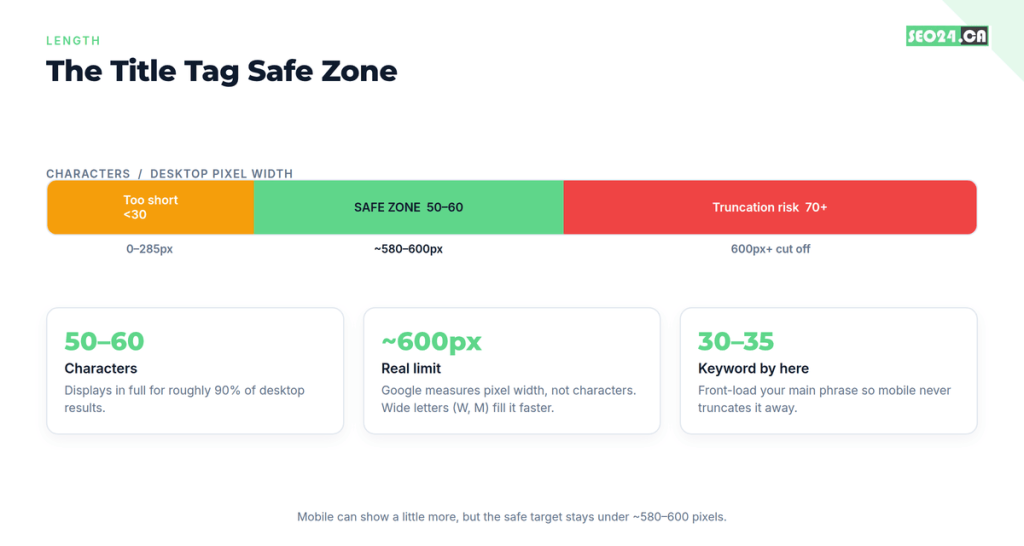
Mobile complicates things, since over 60% of Google traffic is mobile and phones can show slightly longer titles. The safe move is to front-load. Put your primary keyword and your hook inside the first 30 to 35 characters, so the important words survive no matter where the display cuts off.
| PRO TIP Very short titles get rewritten too. Titles under about 30 characters, and one-word placeholders like ‘Home’ or ‘Services’, are changed more than 95% of the time because they give Google too little to work with. Aim for descriptive, not minimal. |
Length keeps your title visible. Wording is what makes someone click it. Let’s turn the rules into a repeatable way to write one.
How to Write an SEO Title Tag, Step by Step
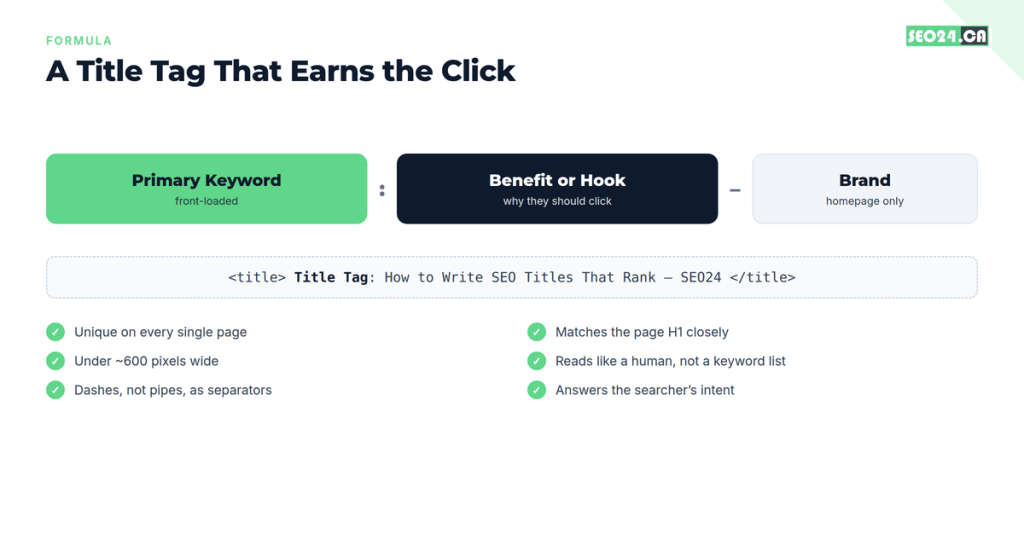
Writing a strong title tag comes down to a simple pattern: lead with the keyword, follow with a reason to click, and keep it human. Here is the process we use on client pages.
- Lead with the primary keyword. Place your main phrase near the front, ideally in the first 30 to 35 characters. Solid keyword targeting here tells both Google and the reader what the page covers before anything gets truncated.
- Add a hook or benefit. After the keyword, give a specific reason to click: a number, a year, an outcome, or a promise. ‘How to Write SEO Titles That Rank’ beats a flat ‘SEO Titles’ every time.
- Add the brand only where it helps. Put your brand name at the end, and mainly on the homepage or key service pages. On blog posts it often just eats space Google would rather use for your topic.
- Use a dash, not a pipe. When you need a separator, a dash reads more naturally and gets swapped out far less than a pipe. More on why in the next section.
- Make it unique and match intent. Give every page its own title, and make sure it answers what the searcher actually wants. The same discipline you apply when writing SEO-friendly blog posts applies to the title that sits on top of them.
| PRO TIP Read your finished title out loud. If it sounds like a human recommending a page to a friend, keep it. If it sounds like a list of keywords stapled together, rewrite it. Google has gotten good at spotting the second kind, and so have readers. |
You now have a title you are proud of. Then you check Google and see something you never wrote. That happens constantly, and it is worth understanding why.
Why Google Rewrites Title Tags (and How to Stop It)
Google rewrites title tags when it decides your version is a poor fit for the query or the page. This is not rare. A large Zyppy study of more than 80,000 titles found Google rewrote about 61% of them, and a 2025 analysis by John McAlpin put the figure at roughly 76%. When Google does step in, it is not gentle: on average it removes about 2.71 words and keeps only around 35% of your original.
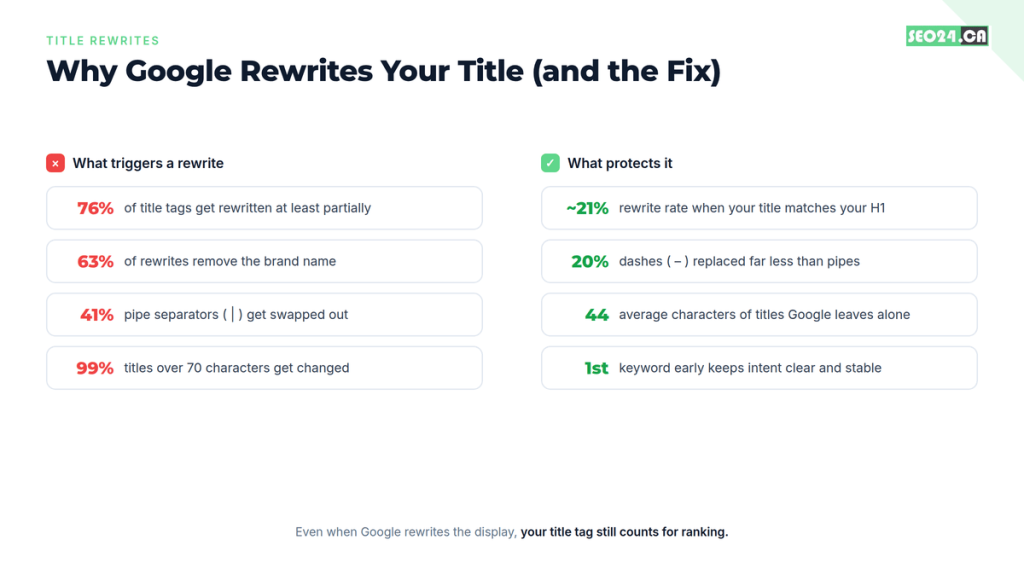
The single biggest lever you control is H1 alignment. When your title tag and your H1 say substantially the same thing, the rewrite rate drops from the mid-70s to around 21%. Google reaches for your H1 when it distrusts your title, so give it less reason to. A few other patterns matter too:
- Separators: dashes get replaced about 20% of the time, pipes about 41%. Use dashes.
- Brand names: removing the brand is the most common single edit, happening in roughly 63% of rewrites, especially on non-branded queries.
- Length: titles over 70 characters are changed close to 99% of the time. Titles Google leaves alone average about 44 characters.
You might be thinking this makes the whole exercise pointless. Yes, Google may rewrite the display, but your title tag still counts for ranking, and a clean, well-sized title is what steers Google’s edits in your favor instead of against you. There is a newer wrinkle worth watching: in March 2026 Google confirmed it is testing AI-generated headline rewrites in Search that create brand new phrasing, not just borrow your H1. Strong, clear titles remain your best defense. If your pages are technically fine yet still invisible, title trouble is one of several reasons an optimized page still won’t rank.
Rewrites are one way titles fail. The quieter failures are the ones you cause yourself.
Title Tag Mistakes That Quietly Kill Your Clicks
Most title tag damage comes from a handful of repeat mistakes. None of them throw an error. They just quietly cost you rankings and clicks while everything looks fine in your editor. Watch for these:
- Keyword stuffing. ‘Title Tag, SEO Title Tag, Best Title Tag Guide’ looks spammy and invites a rewrite. Use your phrase once, naturally.
- Duplicate titles. Reusing one title across many pages makes them compete against each other. Every page needs its own.
- Vague placeholders. ‘Home’, ‘Services’, or ‘Untitled’ tell Google and readers nothing. They get rewritten and rarely rank.
- Brand first. Leading with your company name pushes your keyword past the point where mobile truncates. Save the brand for the end.
- Ignoring intent. A clever title that does not match what the searcher wants loses to a plain one that does.
| REAL EXAMPLE A law firm we worked with ranked on page one for a service term but got almost no clicks. Their title read ‘Home | [Firm Name] Barristers & Solicitors’. We changed it to lead with the service and the city. Same ranking, and their clicks on that page roughly doubled within a few weeks. Nothing changed except the sentence Google showed. |
Spotting these on one page is easy. Spotting them across a whole site is the real work, and it needs a system.
Good vs. Bad Title Tag Examples
The fastest way to internalize the rules is to see them applied. Below are weak titles beginners write all the time, paired with a stronger version that leads with the keyword, adds a reason to click, and stays inside the length limit.
| Weak title | Stronger rewrite | Why it wins |
| Home | Sweet Co Bakery | Custom Cakes in Toronto – Sweet Co Bakery | Leads with what people search, keeps the brand at the end |
| Services | PPC Management Services for Toronto Businesses | Says what the service is and who it is for |
| Blog Post About Title Tags SEO Title Tags Guide | Title Tag SEO: How to Write Titles That Rank | Drops the stuffing, reads like a human wrote it |
| Everything You Ever Wanted to Know About Meta Tags and On-Page SEO for 2026 | Meta Tags Explained: A Beginner’s On-Page SEO Guide | Trims to under 60 characters so nothing gets cut off |
Notice the pattern in every rewrite: the keyword moves to the front, the wording gets specific, and the length comes down. None of them use a trick. They just respect how people search and how Google displays results. Now let’s make sure you can apply this at scale.
How to Check and Fix Title Tags Across Your Site
To audit your titles, start where the money is: pages with lots of impressions but few clicks. Those are ranking already, so a better title is often the fastest win you can get.
- Open Google Search Console. In the Performance report, sort by impressions and look for pages with high impressions and a low click-through rate. Those titles are underperforming their ranking.
- Crawl your site. A crawler like Screaming Frog lists every title at once, so you can spot duplicates, missing titles, and anything over the length limit in one view.
- Compare written vs. displayed. Check what you wrote against what Google actually shows. A gap usually means a rewrite you can influence by tightening the title and matching your H1.
- Rewrite, then re-measure. Fix the worst offenders first, then watch click-through in Search Console over the following weeks.
You do not need an expensive stack to do this well. Several of the options in our roundup of SEO tools for beginners cover title auditing, and a free SERP preview tool will show you the pixel width before you publish.
| PRO TIP Fix titles in batches by template. If all your blog posts share a bad pattern, correcting the template updates dozens of pages at once and usually moves click-through faster than editing pages one by one. |
Conclusion
A title tag is a small piece of code with outsized influence. It is the one sentence that has to satisfy a search engine, tempt a human, and hold up when an AI engine decides whether to cite you. That is why the winning approach is balance, not tricks: lead with the keyword for clarity, add a genuine hook for the click, keep it unique, and align it with your H1 so Google trusts your version.
Do not treat titles as set-and-forget. Revisit the pages that pull impressions but few clicks, rewrite those titles first, and measure the change. Small edits to that single line often move traffic more than a full page rewrite. Write for the reader first and the search engine second, and the title tag quietly does its job on both fronts.
Frequently Asked Questions
What is a title tag in simple terms?
A title tag is a line of HTML that names your web page. Google uses it as the clickable blue headline in search results, and your browser uses it as the label on the page’s tab. It tells people and search engines what the page is about before they open it.
How long should a title tag be in 2026?
What is a title tag in simple terms?
A title tag is a line of HTML that names your web page. Google uses it as the clickable blue headline in search results, and your browser uses it as the label on the page’s tab. It tells people and search engines what the page is about before they open it.
Is the title tag the same as the H1?
No. The title tag is the headline shown in search results and browser tabs, while the H1 is the main headline printed on the page itself. They should say roughly the same thing, since matching them lowers the chance Google rewrites your title, but they are separate HTML elements.
Why is Google not showing my title tag?
Google rewrites titles it judges too long, too vague, keyword-stuffed, or mismatched with the page. It often pulls your H1 or body text instead. To reduce this, match your title to your H1, keep it under about 60 characters, use dashes instead of pipes, and make it clearly relevant to the query.
Do title tags still matter with AI Overviews?
Yes, arguably more. As AI Overviews reduce clicks, a clear, specific title becomes both your best chance at the remaining clicks and a signal AI engines use when deciding which pages to cite. Title tags also still count toward ranking, even when the displayed version is rewritten.
NEXT STEP See how your title tags are really performing. Google Search Console shows you which pages rank but do not get clicked, and those are your fastest wins. Want a second set of eyes? Grab a free SEO audit from SEO24 and we will flag the titles, tags, and quick fixes holding your Toronto business back.