
The fastest way to increase Google reviews is to ask every happy customer right after a good experience and hand them a one-tap review link. That one habit, done consistently, beats every clever trick. Reviews decide whether searchers trust you and whether Google shows you in the local pack, so the businesses that win are the ones that make leaving a review effortless. Below you will find 14 tactics that actually move the number, a clear way to lift your star rating and not just your count, and the Google rules that can get your profile suspended if you ignore them.
Key Takeaways
- The biggest lever is timing. Ask within 24 hours of a positive experience, when satisfaction is at its peak.
- A direct review link that opens the star box in one tap converts far better than sending people to your profile homepage.
- Your star rating matters as much as your count. Catching and fixing problems privately, before they turn into public reviews, protects your average.
- Google prohibits paying for or incentivizing reviews and prohibits review gating. Either one can get your Business Profile suspended.
- Replying to every review, good or bad, signals an active business and reassures the next customer reading along.
- Consistency beats spikes. A few fresh reviews every week sustains rankings better than one big quarterly push.
- About 88% of consumers trust online reviews as much as a personal recommendation, which is why reviews shift both clicks and sales.
Why Google Reviews Matter for Your Business in 2026
Google reviews influence two things at once: how much a stranger trusts you, and how high Google ranks you in local results. A profile with 150 recent reviews at 4.7 stars will out-click and out-convert a competitor with 12 stale reviews, even when the service is identical.
Once you have claimed and optimized your profile, growing reviews is the next highest-impact move you can make.
If you are still setting that foundation, start by reading what Google Business Profile optimization is and why it matters, then come back here.
1. More reviews build trust and engagement
Around 88% of people trust online reviews as much as a personal recommendation. Every new review is another touchpoint that can turn a searcher into a paying customer, and a steady flow signals that real people keep choosing you.
2. Positive reviews drive more purchases
Most buyers read several reviews before deciding, often ten or more. The more positive, specific reviews you have, the easier it is for a hesitant prospect to pick you over the business right next to you in the results.
3. Reviews influence your local search ranking
Google has confirmed that review count, rating, and recency feed its local ranking system. Reviews are one of the clearest signals of Experience, Expertise, Authoritativeness and Trust (E-E-A-T) for a local business, and they help you surface in the three-pack on Maps and Search.
4. Reviews lower your marketing costs
Asking for and replying to reviews costs nothing. A strong review profile works like free advertising on the most trusted surface your customers already use, which lowers what you need to spend on ads to win the same trust.
Pro tip: Reviews and rankings reinforce each other. Pair this work with ongoing local SEO and the gains compound.
If you want help turning that into a repeatable system, our local SEO services are built around exactly this kind of compounding.
How to Improve Your Google Review Rating, Not Just the Count
To improve your Google review rating, you have to win more positive reviews than negative ones and catch unhappy customers before they post. The math is simple and unforgiving: if you sit at 4.2 stars across 40 reviews, a single one-star review barely moves you, but at 4.2 across 6 reviews it can drop you below the threshold where people stop calling.
Most owners chase volume and forget the average. The smarter play is to build a feedback step that runs before the public review request. Send a quick private survey first. If the response is glowing, invite a Google review. If something went wrong, fix it privately and follow up. You are not hiding feedback, you are resolving it, which is exactly what Google wants you to do.
A higher star rating is worth more than a bigger number. Searchers filter by stars first, then read.
When a fair negative review lands, reply quickly and offer a real fix. That public response is read by everyone who comes after. And if a review is fake or breaks Google’s rules, you have options.
Walk through the process step by step in our guide on how to remove a negative Google review.
What most people miss: Adding reviews without fixing the reason for the bad ones just buries the problem. The complaints keep coming, and your average keeps sliding.
What’s the Fastest Way to Get More Google Reviews?
The fastest way to get more Google reviews is to ask in person at the moment a customer is clearly happy, then send the review link by text within the hour. Texts get opened within minutes, the experience is still fresh, and a one-tap link removes the only real barrier, which is friction.
Speed comes from three things working together: ask at the peak moment, send by SMS rather than only email, and link straight to the review box. A coffee shop we audited went from two reviews a month to eleven in three weeks by doing nothing more than texting the link the same afternoon as the visit.
That one-tap link is the part most businesses get wrong, so here is exactly how to build it.
How to Create a Direct Google Review Link
A direct Google review link sends customers straight to the review window with the star box open, instead of dropping them on your profile where they have to hunt for the right button. You can generate it from your Business Profile dashboard in under a minute.
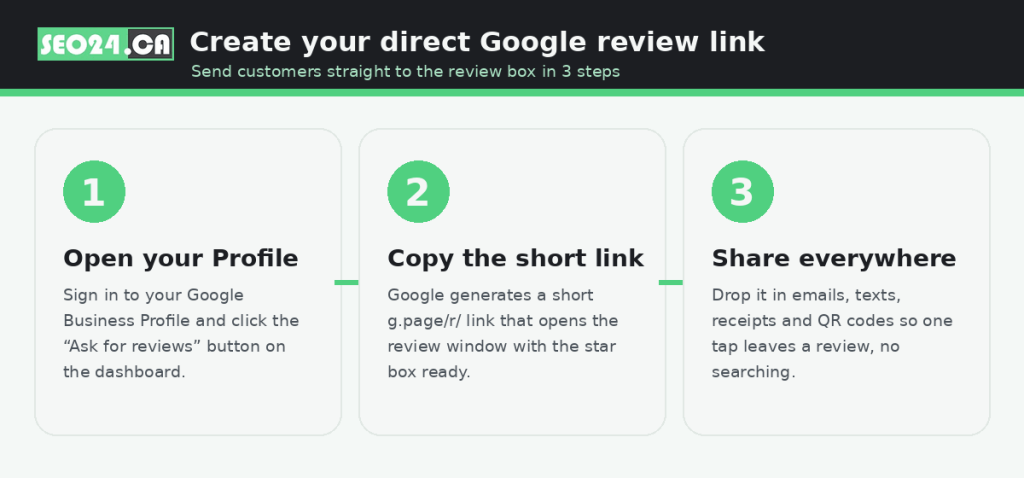
- Open your Google Business Profile and find the “Get more reviews” or “Ask for reviews” button on the dashboard.
- Copy the short link Google creates for you (it looks like g.page/r/…). It opens the review window with the five stars ready to tap.
- Share it everywhere: email signatures, SMS, receipts, thank-you pages and printed QR codes.
Pro tip: Turn the link into a QR code for the counter and the receipt. In-person customers scan, rate and leave, all before they reach the door.
How to Increase Google Reviews: 14 Proven Tactics
These 14 tactics cover the full range of ways to ask, from the digital channels you already own to the few seconds of face-to-face conversation that earn the best reviews. The search data below shows just how much demand sits behind every one of these queries, which is the audience you reach when this page ranks.
1. Share your review link by email and SMS
Personalize the message, address the customer by name, and include a single clear call to action. Send within 24 to 48 hours while the experience is fresh, and set one polite automated follow-up for anyone who has not responded in 3 to 5 days.
2. Add a review link to your website
Put a “Leave us a review” button on your homepage, in your footer, and in your email signature so it shows up wherever a happy visitor lands. A dedicated reviews page that also displays your best feedback works well.
3. Use website pop-ups to request reviews
Trigger a friendly pop-up after a purchase or after meaningful time on the page, keep it mobile-friendly, and A/B test the wording so you keep the version that earns the most reviews.
4. Use feedback surveys as a filter
Ask how the experience went first. Route happy responders to your Google review link, and handle unhappy ones privately so you fix the issue before it becomes a public one-star.
5. Ask the right questions
Prompt specific, thoughtful reviews. Instead of “please review us,” try “What stood out about the service?” Tailor the prompt to your industry so the review reads as genuine and useful.
6. Engage customers on-site
Train staff to spot a delighted customer and ask in the moment. A tablet or kiosk at checkout lets people leave a review before they walk out.
7. Print QR codes that open your review page
Place them on receipts, menus, cards and signage, anywhere a customer has a spare moment, with a short “Scan to review us on Google” instruction beside them.
8. Hand out “Leave us a review” cards
A small, well-designed card after a transaction, ideally with a QR code, gives customers a physical nudge they can act on at home.
9. Ask on social media
Remind your followers, reshare your best testimonials, and use stories or polls to invite reviews from the people who already like your brand.
10. Respond to every review
Thank positive reviewers by name and answer negative ones with a calm, solution-first reply. An active profile signals a real, attentive business to everyone reading.
11. Keep your Business Profile current
Accurate name, address, phone and hours, fresh photos, and regular posts all make customers more confident, and more willing, to leave feedback.
12. Make reviewing the only ask, never the reward
Encourage everyone to share honest feedback, but do not tie any discount, freebie or entry to leaving a review. See the policy section below for why this matters.
13. Use review generation tools
Automation platforms send timed email and SMS requests after each transaction, track responses across platforms, and keep the cadence steady without manual work.
14. Use email marketing
Tap your existing list with personalized, well-timed requests right after a positive interaction, and follow up once if there is no response.
Pro tip: Pick three tactics and run them every week, rather than trying all 14 at once. A consistent SMS-plus-QR routine outperforms a scattered effort every time.
Google’s Review Policies: What You Can and Can’t Do
You can ask anyone for an honest review, but you cannot pay for reviews, reward them, or filter who gets asked based on how happy they are. Google calls rewarded and gated reviews “fake and misleading content,” and the penalty ranges from removed reviews to a suspended profile. This is the rule the older “offer a discount for a review” advice gets wrong, and it is worth getting right.
| Allowed | Prohibited |
| • Asking all customers for honest reviews • Sharing a direct review link or QR code • Reminders by email, SMS and social • Replying to every review • Resolving complaints privately before they post | • Offering discounts, gifts or entries for reviews • Review gating (only asking happy customers) • Buying reviews or using fake accounts • Review swaps with other businesses • Pressuring staff or family to post |
Yes, but: Incentives do raise review volume, which is why the old advice was tempting. The risk is that a single policy strike can wipe out every review you have built, so the short-term lift is not worth the exposure.
Make Reviews a Habit, Not a One-Time Push
More Google reviews are not won in a campaign. They are won in a routine: ask at the peak moment, make the link effortless, reply to everyone, and fix problems before they become public. Do that every week and your count, your rating and your local ranking climb together.
Keep the balance right. Reviews should reflect real experiences, follow Google’s rules, and serve the customer reading them, not just the algorithm. Get that balance right and reviews become the most durable marketing asset a local business can own.
Frequently Asked Questions: How to increase GBP reviews
What is the fastest way to improve my Google rating?
Ask happy customers in person and text them a direct review link the same day. Same-day SMS requests get opened fast and the experience is still fresh, so they convert better than any other channel. Pair that with fixing the issues behind your negative reviews so your average rises instead of stalling.
How can I get more Google reviews for free?
Every core tactic here is free: ask in person, share your direct link by email and SMS, add a review button to your site, print QR codes, and reply to every review. You only pay if you choose an automation tool to handle the requests at scale.
How do I increase positive Google reviews without breaking Google’s rules?
Ask every customer for honest feedback, never reward or gate reviews, and run a private feedback step first so you can fix problems before they go public. That lifts the share of positive reviews legitimately, without risking a policy strike.
Do more Google reviews actually improve my ranking?
Yes. Google has confirmed that review count, star rating and recency feed local rankings. A steady stream of recent, positive reviews helps you appear in the local three-pack and earns more clicks once you are there.
How many Google reviews do I need?
There is no fixed number, but enough to beat the competitors in your local results and stay credible, often a few dozen to start. Recency matters as much as total, so a handful of fresh reviews each month is more valuable than a large but stale pile.
See Where Your Profile Is Losing Reviews
Want to know why customers are not leaving reviews and what is holding your local ranking back? Claim a free SEO audit and we will review your Google Business Profile, your review flow and your local visibility, then show you the three changes that will get you the most reviews fastest. If you would rather we run the whole program, our Google Business Profile optimization services in Toronto handle it end to end.