
GBP optimization is the process of improving your free Google Business Profile so it ranks higher in Google’s local search results and Google Maps, gets seen by more nearby customers, and turns those views into calls, visits, and bookings. It means choosing the right categories, keeping your business details accurate, collecting reviews, and staying active so Google trusts your listing. Done well, it is one of the highest-return things a local business can do, and it costs nothing but attention. Below you will learn exactly what GBP optimization covers, why it matters in 2026, and the step-by-step way to do it right.
Table of Contents
Key takeaways
- GBP optimization improves your Google Business Profile (formerly Google My Business) so it ranks in the local Map Pack and Google Maps.
- Google ranks local results on three signals: relevance, distance, and prominence. You can directly influence two of them.
- Your primary business category is the single strongest relevance lever, according to the 2026 Local Search Ranking Factors survey.
- Nearly 46% of all Google searches have local intent, and a complete profile is roughly 2.7 times more likely to be considered trustworthy.
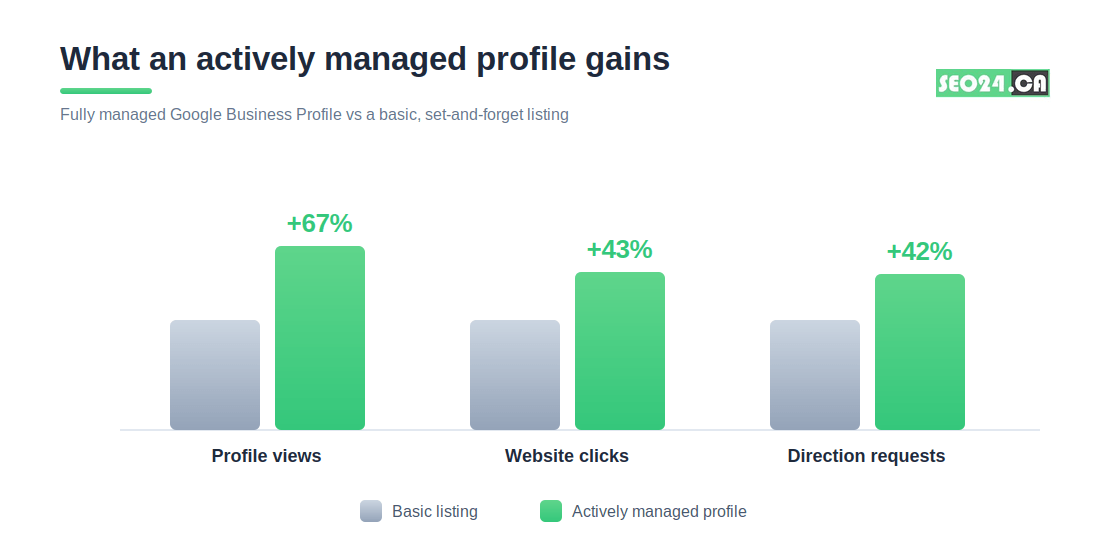
- Actively managed profiles see about 67% more profile views and 43% more website clicks than basic, set-and-forget listings.
- GBP optimization is free, fast to start, and compounds over time when treated as an ongoing habit rather than a one-time setup.
What is GBP optimization?
GBP optimization is the work of setting up, completing, and continuously improving your Google Business Profile so Google understands your business and shows it to the right local searchers. A profile is the box that appears on the right side of Google Search and the pins you see on Google Maps, showing your name, hours, reviews, photos, and a call or directions button.
Optimization goes well past filling in the blanks. It is the difference between a listing that simply exists and one that wins the top three Map Pack spots for searches like “plumber near me” or “dentist in North York.” Google rewards profiles that are accurate, complete, and active, and it quietly demotes the ones that look abandoned.
Think of your profile like a storefront on the busiest street in town. Two shops can sell the same thing, but the one with clear signage, lights on, fresh window displays, and a line of happy customers out front is the one people walk into. GBP optimization is how you become that shop in Google’s eyes.
| Pro Tip Before changing anything, search your main service plus your city in an incognito window. Screenshot where you appear today. That baseline makes every later improvement measurable instead of a guess. |
You might be thinking this sounds like a quick afternoon task. It can start that way, but the businesses that actually rank treat it as a living asset. That distinction becomes obvious the moment you see how Google decides who shows up first.
What is GMB optimization, and is it the same as GBP?
Yes. GMB optimization and GBP optimization are the same thing. In 2021 to 2022 Google renamed Google My Business (GMB) to Google Business Profile (GBP), so any guide, tool, or agency still saying “GMB optimization” or “GMB management” is describing the exact same work under the old name.
The name changed, the goal did not. You are still claiming a listing, completing it, earning reviews, and keeping it active. Google also retired the standalone Google My Business app and moved management directly into Search and Maps, so you now edit your profile by searching your own business name while signed in.
This matters for one practical reason: a lot of advice online still uses “GMB,” and some of it is years out of date. When you read older tutorials, mentally swap “GMB” for “GBP” and double-check any feature that may have moved or disappeared.
“GMB” and “GBP” point to the same product. If a tactic only makes sense inside the old standalone app, it is probably outdated.
With the vocabulary settled, the real question is what Google actually looks at when it decides which businesses to show.
Why is GBP optimization important for local SEO?
GBP optimization is important because your Business Profile, not your website, is what Google shows first for most local searches. Nearly 46% of all Google searches have local intent, and the Map Pack often appears above the regular blue links on both Search and Maps.
That placement is prime real estate. When someone searches with intent to buy nearby, the top three local results capture the large majority of clicks and calls. If you are not in that pack, you are effectively invisible at the exact moment a customer is ready to act.
A well-optimized profile also feeds AI search. Google’s AI Overviews and assistants pull verified details straight from Business Profiles, so businesses with complete, consistent listings appear more often in zero-click answers where the searcher never visits a website at all.
Here is what GBP optimization does for a local business:
- Puts you in the Map Pack, the three-result box most local searchers click first.
- Drives calls, direction requests, and bookings directly from Search and Maps, often without a website visit.
- Builds trust through reviews, photos, and accurate details before a customer ever contacts you.
- Feeds AI Overviews and voice assistants with the verified data they cite.
| Real example A North York dental clinic we audited had a complete website but an unverified profile with the wrong category. After claiming the profile, fixing the category, and gathering 20 fresh reviews over two months, their calls from Maps roughly tripled, with no change to the website itself. |
If the upside is this large, why do so many businesses stay buried? Almost always because they never align their profile with the three things Google measures. Those three things come next.
How does Google rank local results? Relevance, distance, and prominence
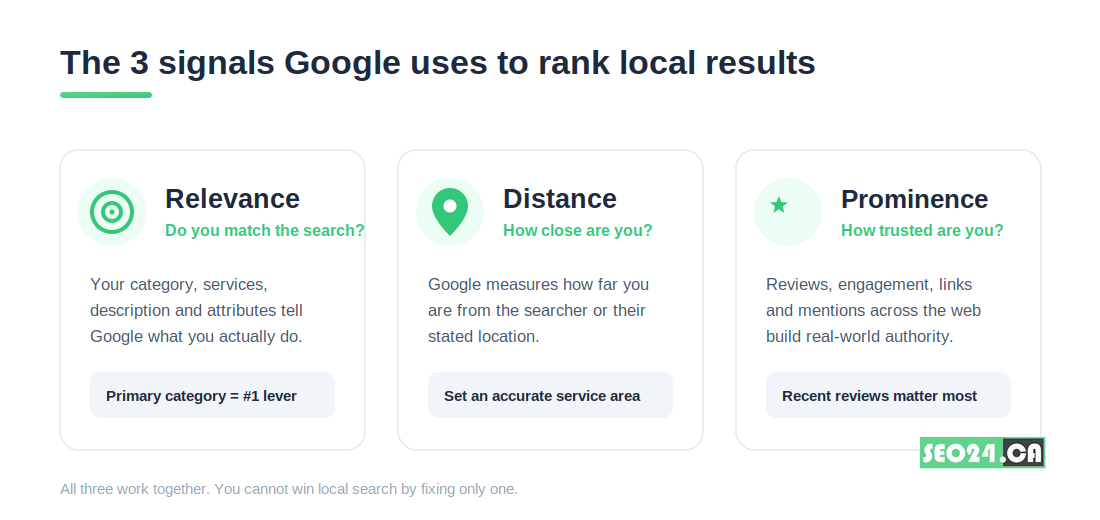
Google ranks local results using three core signals: relevance, distance, and prominence. Every optimization tactic you will ever read about maps back to improving one of these three.
Relevance: do you match the search?
Relevance is how well your profile matches what someone typed. Google reads your primary category, additional categories, services, description, and attributes to decide. According to the 2026 Local Search Ranking Factors survey, the primary category is the single most important factor for ranking in the Map Pack.
| Pro Tip Spy on the top three competitors ranking for your target search. Look at their primary category (tools like PlePer or GMBspy reveal it). If a higher-ranked rival uses a more specific category than you, that mismatch alone can be why you trail them. |
Distance: how close are you to the searcher?
Distance is how far your business is from the person searching, or from the location they named. You cannot move your shop, but you can define an accurate service area and verify your location cleanly so Google places you correctly. For service-area businesses, a precise, honest radius beats a giant fake one.
Prominence: how well-known and trusted are you?
Prominence is Google’s read on how established your business is. It is built from review volume and recency, ratings, quality links to your site, mentions across the web, and how actively you use the profile. Recent reviews carry more weight than old ones, so a steady trickle beats a one-time pile.
In 2026, user engagement signals matter more than ever. Google watches profile views, clicks, calls, messages, photo views, and direction requests, treating strong engagement as proof you are genuinely relevant. For the wider context, see our guide to why local SEO is important for your business, which shows where your profile fits in the full strategy.
Now that you know what Google measures, let us turn it into a profile you can actually build, starting from scratch.
How do you set up and verify a Google Business Profile?
You set up a Google Business Profile by signing in with a Google account, entering accurate business details, and verifying ownership. The whole process is free and usually takes under 30 minutes of active work, plus verification time.
Follow these steps in order:
- Sign in with a dedicated business Google account, not your personal one, so management and access stay clean as your team grows.
- Enter your exact business name, address, phone number, and hours. Write them once, then use that identical format everywhere else online.
- Choose the most accurate primary category. This is the highest-impact decision in the entire setup, so resist anything vague.
- Verify ownership. Verification is by phone, email, video, or postcard depending on your business; phone and email are usually instant, while a postcard can take several days.
- Complete every remaining field: description, services, products, attributes, opening date, and high-quality photos of your real location and work.
| Pro Tip During video verification, have your signage, equipment, and any licensing visible and ready before you start the call. Most failed verifications come from a rushed walkthrough that does not clearly prove the business is real and at that address. |
You might worry that verification is a one-time hurdle and then you are done. It is not. An unverified or incomplete profile simply will not appear in the Map Pack, which is why setup and optimization are really the same project. Once you are verified, the work shifts to the levers that actually move rankings.
How to optimize your Google Business Profile: the checklist
To optimize your Google Business Profile, complete every section, choose precise categories, earn recent reviews, post regularly, and keep your details identical across the web. Work through the checklist below in order, since each item builds on the last.
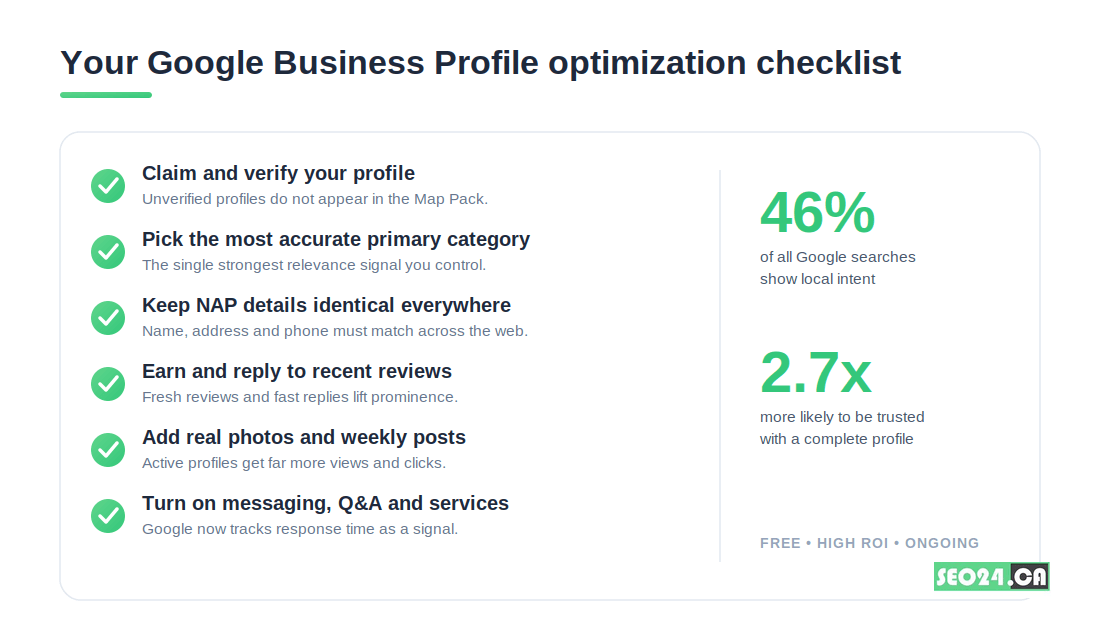
- Claim and verify first. Nothing else counts until the profile is verified and shows as yours.
- Nail the primary category. Pick the most specific match, then add secondary categories for other genuine services.
- Lock in NAP consistency. Name, address, and phone must match exactly across your site, directories, and social profiles.
- Write a real description. Use clear, natural language that describes what you do and where, without keyword stuffing.
- Add genuine photos and weekly posts. Real images of your team, location, and work beat stock photos for engagement.
- Build a review habit. Ask every happy customer, then reply to each review, good or bad.
- Turn on messaging and Q&A. Seed the Q&A with real questions, and reply to messages fast; Google now tracks response time.
What most people miss More categories is not better. Adding services you do not really offer dilutes relevance and can confuse Google about what you are. One precise primary category plus a few honest secondary ones beats a long, padded list every time.
A finished checklist feels like the destination, but reviews are the lever most owners underrate. They deserve their own section.
How important are reviews for GBP optimization?
Reviews are one of the strongest prominence signals in local search, and in 2026 their recency and your replies matter as much as the star rating. A profile with a steady flow of recent, answered reviews outranks an older profile with a higher rating but no recent activity.
Reviews do double duty. They tell Google your business is active and trusted, and they tell human searchers you are the safe choice. A four-point-seven rating with 80 recent reviews and thoughtful owner replies converts far better than a perfect five-star rating from two years ago.
Here is a simple system that works:
- Ask in person right after a good experience, when goodwill is highest.
- Hand over a one-tap review link by text or QR code so leaving a review takes seconds.
- Reply to every review within a day or two, mentioning the service or product by name.
- Never buy fake reviews; Google detects and penalizes them, and they erode the trust you are trying to build.
| Real example A Toronto auto shop we worked with sat at 4.9 stars but had not earned a review in eight months and ranked fifth locally. They added a QR code at the till and asked every customer. Twelve weeks and 30 fresh reviews later, with the owner replying to each one, they moved into the top three for their main search. |
Reviews also need somewhere to point and a reason to trust you. Our guide on how to get more reviews on Google breaks the ask down further, and if a damaging review slips through, here is how to remove a negative Google review the right way.
Reviews build trust, but a profile that goes quiet between them still loses ground. Staying active is the next piece, and it is where GBP management comes in.
What is GBP management?
GBP management is the ongoing work of keeping your Google Business Profile optimized after the initial setup: posting updates, gathering and answering reviews, refreshing photos, answering questions, and monitoring performance. Optimization gets you ranking; management keeps you there.
Google reads inactivity as a signal that a business may no longer be relevant. Profiles that post regularly, answer messages quickly, and collect fresh reviews send the engagement signals that hold and improve rankings. A profile left untouched for six months almost always slides.
Ongoing GBP management typically includes:
- Weekly posts for offers, events, and updates.
- Prompt replies to reviews, questions, and messages.
- Seasonal updates to hours, services, and photos.
- Monthly checks of insights to see what searches and actions are growing.
Many small business owners handle this themselves at first, then hand it off as it grows. If you reach that point, our GBP management service in Toronto covers the full ongoing workload so your profile never goes stale.
Whether you keep it in-house or outsource it, the real decision is how much of this you should do yourself. That trade-off is worth laying out clearly.
GBP optimization services: should you DIY or hire help?
You should handle GBP optimization yourself if you have time and one location; you should hire a GBP optimization or SEO service if you compete in a crowded market, run multiple locations, or simply cannot keep the profile active. Both paths work, so the honest answer depends on your time and your competition.
The table below compares the two so you can decide quickly:
| Factor | Do it yourself | Hire a GBP / SEO service |
| Cost | Free, only your time | Monthly fee, but faster results |
| Best for | Single location, low competition | Multiple locations or tough markets |
| Speed | Slower, learning as you go | Faster, proven playbook |
| Ongoing effort | Falls on you every week | Handled for you |
| Risk | Easy to miss category or NAP errors | Audited and monitored continuously |
Many owners start solo to learn the basics, then bring in help once the profile becomes a real lead source worth protecting. There is no wrong order, only the cost of leaving it neglected.
If competition is your main worry, it helps to understand the bigger local picture first. Our overview of local SEO services shows how your profile, website, and citations work as one system rather than isolated tactics.
Before you decide either way, make sure you are not about to repeat the mistakes that quietly sink most profiles.
Common GBP optimization mistakes to avoid
The most common GBP optimization mistakes are inconsistent business details, the wrong primary category, keyword-stuffed names, fake reviews, and letting the profile go inactive. Each one quietly caps how high you can rank, no matter what else you do right.
Watch for these traps:
- Inconsistent NAP. Different phone numbers or address formats across the web weaken Google’s trust in your listing.
- Vague primary category. A general category when a specific one exists hands the ranking to a more precise competitor.
- Keyword stuffing the business name. Adding “best Toronto plumber” to your name violates Google’s guidelines and risks suspension.
- Fake or incentivized reviews. Google detects them, and a suspension erases the trust you built.
- Set-and-forget. No posts, no replies, no new photos. Inactivity is the slowest, most common way to lose rankings.
| Pro Tip Put a 15-minute GBP check on your calendar for the first Monday of every month: scan for new reviews to answer, questions to reply to, hours to update, and one fresh photo or post. That small habit prevents almost every mistake on this list. |
Avoid these, stay consistent, and your profile keeps climbing. The principles all come together in one closing idea.
Conclusion
GBP optimization is the most direct, lowest-cost way for a local business to get found by customers who are ready to act. It works because it aligns your profile with the three things Google actually measures: relevance, distance, and prominence. Get your category right, keep your details consistent, earn recent reviews, and stay active, and you give Google every reason to show you first.
The businesses that win local search are rarely the biggest. They are the ones that treat their Google Business Profile as a living asset rather than a one-time form. Start with an honest audit of where you rank today, fix the highest-impact items first, and revisit the profile every month. Consistency, not cleverness, is what moves you into the Map Pack and keeps you there.
Frequently asked questions: What is GBP management
What does GMB mean?
GMB stands for Google My Business, the former name of Google’s free local listing tool. Google renamed it to Google Business Profile (GBP) in 2022, so GMB and GBP refer to the same product.
Is GMB optimization the same as GBP optimization?
Yes. GMB optimization and GBP optimization describe identical work: completing and improving your free Google listing so it ranks in local search and Maps. Only the name changed.
Is a Google Business Profile free?
Yes. Creating, verifying, and optimizing a Google Business Profile is completely free. You only pay if you choose a GBP optimization service or run separate Google Ads.
How long does GBP optimization take to work?
Verification can be instant or take several days by postcard. Ranking improvements usually appear within a few weeks to a few months as reviews accumulate and Google sees consistent activity.
Do I need a website to rank in the Map Pack?
No, but it helps. A profile alone can rank, yet a fast, relevant website strengthens your relevance and prominence signals and gives searchers somewhere to convert.
Get a free Google Business Profile audit
Want to know exactly why your profile is not in the top three locally and what to fix first? Submit your business name and city for a free Google Business Profile audit from SEO24. We will check your category, NAP consistency, reviews, and engagement, then send you a prioritized list of the changes most likely to move you up in your local market.
Claim your free audit on the free SEO audit page, or see exactly how we run Google Business Profile optimization in Toronto.
The fastest way to increase Google reviews is to ask every happy customer right after a good experience and hand them a one-tap review link. That one habit, done consistently, beats every clever trick. Reviews decide whether searchers trust you and whether Google shows you in the local pack, so…

Are negative reviews hurting your business’s reputation? Google reviews are essential for building trust, but sometimes, unfair or fake reviews can slip through the cracks. So, what can you do if you find yourself dealing with a damaging review?